
Storage is much more than just hard drive capacity. In any IT infrastructure – from start-up server rooms to enterprise data centers – the storage architecture is decisive for the performance (IOPS, latency) and availability of your applications. Bottlenecks in the storage area slow down even the fastest CPUs.
At the same time, IT managers are faced with the dilemma of the growing flood of data: How do you scale efficiently without breaking the budget or unnecessarily increasing administrative complexity? The answer often lies in choosing the right architecture for the right workload.
In this article, we'll break down the three most common storage concepts into their technical parts: DAS (Direct Attached Storage), NAS (Network Attached Storage), and SAN (Storage Area Network). We analyze functionalities, protocols and use cases so that you can decide which technology – or which combination – fits best into your environment.
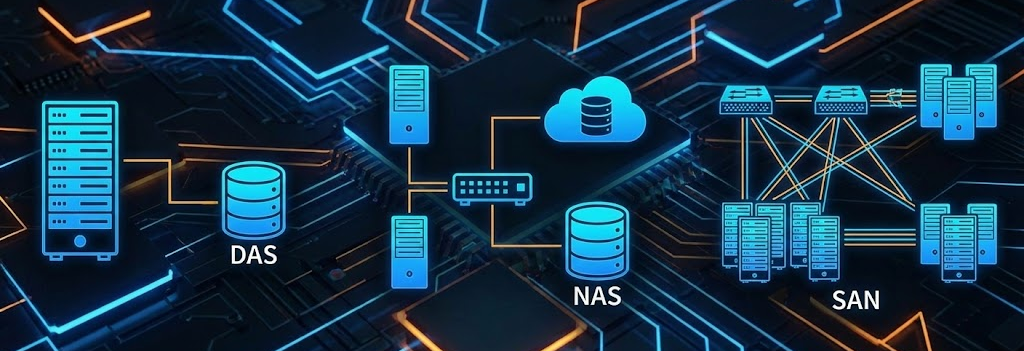
Why Storage Choice Determines Performance
Before we dive into the protocols and topologies, let's get down to the "why": Storage is often the key bottleneck in virtualized environments. While CPU and RAM are constantly getting faster, an incorrectly sized or architecturally unsuitable storage system slows down the entire infrastructure.
It's no longer just a matter of "storing data somewhere". Different data types place completely different demands on the backend:
- Databases and VMs require low latency and high IOPS (block storage).
- File servers and archives need high throughput and cost-effective scalability (file storage).
A wrong decision in the architecture phase takes its revenge in two ways: through poor application performance, violated SLAs or – even worse – through complex, error-prone migration projects if the selected system no longer scales with increasing data load. If you plan storage today, you have to weigh up performance, availability (HA) and future growth (scale-up vs. scale-out).
The three major architectures: DAS, NAS, and SAN
When we talk about storage design, we inevitably end up with the question of connectivity. The topology determines not only the cable you plug in, but more importantly the protocol that is spoken. For administrators, the most important distinction is usually: block level vs. file level.
- Does your server access a "raw" hard drive and format it itself (block)?
- Or does he access a finished folder that is managed by another system (File)?
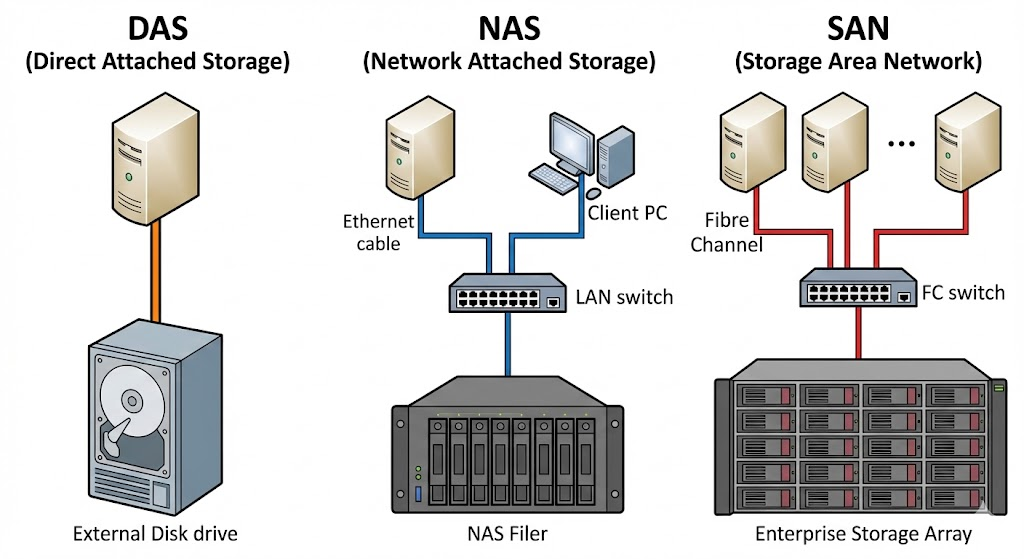
Here's the side-by-side comparison of the three concepts you'll encounter in the wild:
| Feature | DAS(Direct Attached Storage) | NAS(Network Attached Storage) | SAN(Storage Area Network) |
| Concept | 1:1 connection. The memory is directly connected to the server (internal or by cable). | Storage is provided in the LAN (Ethernet). A specialized "filer" shares data. | Dedicated high-performance network (Fibre Channel or iSCSI) for storage traffic. |
| Block-level: The server sees a local disk/volume and manages the file system itself (e.g. NTFS, ext4). | File level: The NAS filer manages the file system. The client only sees folders/shares. | Block level: The server sees a "local" disk (LUN), even though it is physically located away in the rack. | |
| Protocols | SATA, SAS, NVMe, USB | SMB/CIFS (Windows), NFS (Linux/Unix) | Fibre Channel (FC), iSCSI, FCoE, NVMe-oF |
| Performance | Very High: No network latency, direct bus access. | Medium to Good: Depends on LAN bandwidth and protocol overhead (TCP/IP). | Excellent: Optimized for high throughput and low latency at massive IOPS. |
| Pros | • Easy setup (plug and play) • Cheap • No network dependency | • Easy sharing (teamwork) • Central management • Platform-independent (Win/Lin/Mac) | • Highest availability (multipathing) • Live migration of VMs possible • Enterprise-scale scalability |
| Cons | • "Siloing": Data belongs to only one host • Difficult to scale • No high availability in the event of server failure | • Performance suffers under network load • Not ideal for databases (due to latency/protocol) | • High costs (hardware/licenses) • Complex management (LUNs, zoning) • Requires specialized knowledge |
| Typical use-case | boot drives, single servers, local caches, isolated test systems. | File servers, user homes, backups, archives, media streaming. | Virtualization (VMware/Hyper-V cluster), ERP databases, mission-critical apps. |
Note: The boundaries are becoming increasingly blurred. Modern NAS systems (such as those from Synology or QNAP) often also offer iSCSI targets (block level over LAN) and thus act as "mini-SAN" for small clusters. Conversely, enterprise SANs often offer NAS (unified storage) head units. For the architecture decision, however, the key question remains: Do I need shared files (NAS) or shared block storage for performance/cluster (SAN)?
Which storage is right for your workload?
Decision Help: Which Storage Fits Your Workload?
There is no one-size-fits-all answer to the question "DAS, NAS or SAN?" There is no "better" or "worse", only a "suitable" for the respective use case.
- A start-up that shares Word documents will fail (due to cost and know-how) with a complex Fibre Channel SAN.
- An enterprise cluster hosting 500 VMs won't be happy with a simple NAS over Gigabit LAN (due to latency and lack of multipathing).
To choose the right architecture, you should conduct an honest needs analysis. Here are the "crucial questions" for your planning:
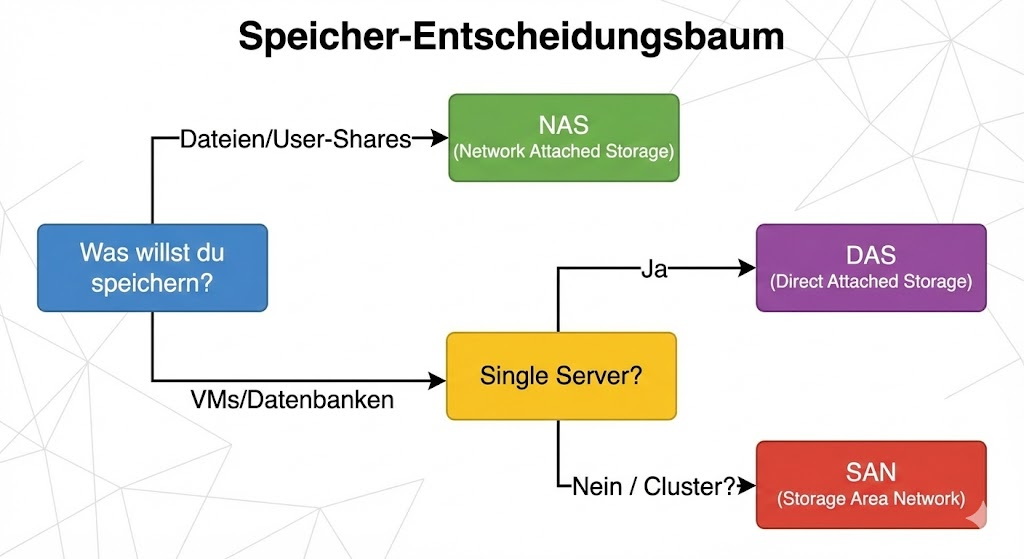
The checklist to choose from
- Data Type & Access: Is it unstructured files (PDFs, images -> NAS) or structured I/O data that expects a block-level file system (SQL databases, VM disks -> SAN/DAS)?
- Performance metrics: What is more critical? High sequential throughput (e.g., video streaming > NAS/DAS) or minimal latency for random I/O (e.g., OLTP databases > SAN/Flash DAS)?
- Scalability & Growth: Is it enough to add a hard drive (scale-up), or does the system have to grow linearly with the load by adding nodes (scale-out)?
- Availability (HA): Can the storage go offline when the server is under maintenance (DAS)? Or does the storage need to survive the failure of a controller or switch without interruption (SAN with multipathing)?
- Budget vs. admin effort: Do you have the budget and staff to maintain a Fibre Channel network? If not, iSCSI (SAN over Ethernet) or high-end NAS are often the better middle ground.
Looking to the Future: Hybrid Cloud and SDS
The classic separation of hardware silos is increasingly softening. Modern IT strategies rely on flexibility and agility. Two trends are currently dominating the market:
Hybrid Architectures & Cloud Tiering
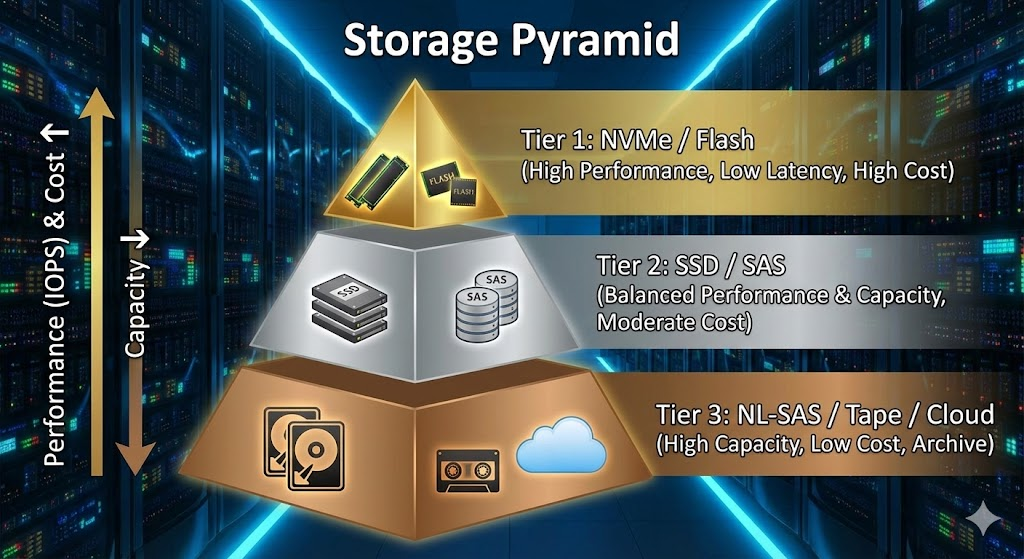
No one wants to waste expensive NVMe storage on ten-year-old archive data. Modern storage systems therefore use tiering: hot data is stored locally on fast flash storage (on-premises), while cold data or backups are automatically outsourced to the cloud (e.g. S3, Azure Blob). This combines on-premise performance with the infinite scalability of the cloud.
2. Software-defined Storage (SDS)
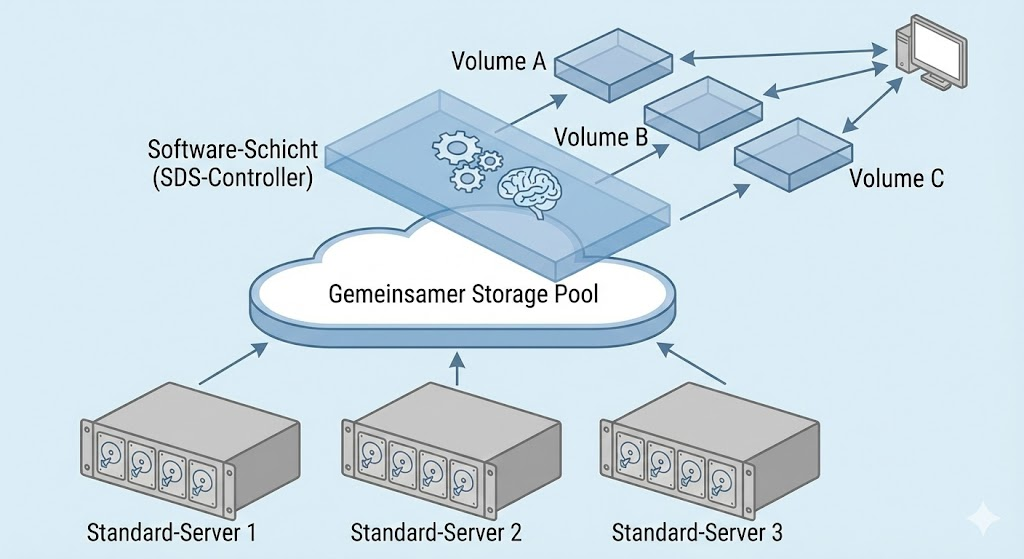
A paradigm shift is taking place here. Instead of buying expensive, proprietary hardware appliances, intelligence shifts completely to software. SDS solutions (such as VMware vSAN, Ceph or Microsoft Storage Spaces Direct) abstract the physical hard drives from standard servers (commodity hardware) and bundle them into a logical storage pool.
- The advantage: You're no longer tied to a manufacturer's hardware cycles and can mix hardware from different generations.
Conclusion: No "one-size-fits-all" solution
DAS, NAS, and SAN aren't competing concepts that replace each other — they're different tools in your admin toolbox. Once you understand the physical and logical differences (block vs. file, latency vs. throughput), you no longer make gut decisions, but architectural decisions.
The reality in modern data centers is often hybrid:
- The SAN fuels the database clusters.
- The NAS takes care of user data and backups.
- The DAS is experiencing a renaissance in hyperconverged infrastructures (HCI) through software-defined storage (vSAN).
The key is that you are not guided by marketing promises ("Our all-flash array solves all problems"), but by your workloads. Because in times of exponential data growth (data gravity), memory becomes the most critical component: When the CPU is waiting, the server is slow. When the storage is in place, the company is in place.
The most important things in a nutshell
For a quick overview, here are the rules of thumb for your next project draft:
- Do you need raw performance and HA for VMs/databases?
👉 SAN (Fibre Channel/iSCSI) is your friend. - Do users want to share files or do you need a backup destination?
👉 NAS is the flexible choice. - Do you have a single server or are you building an SDS cluster (e.g. vSAN)?
👉 THAT is cost-efficient and fast.
Invest time in planning. An on-the-fly storage migration is open-heart surgery—it's better to choose the right architecture right away.
further links
| TITLE & Description | URL |
| BSI IT-Grundschutz: Module SYS.1.2.2 Windows Server BSI recommendations for the secure configuration of servers, including aspects of data storage and file services. | https://www.bsi.bund.de/DE/Themen/Unternehmen-und-Organisationen/Standards-und-Zertifizierung/IT-Grundschutz/IT-Grundschutz-Kompendium/IT-Grundschutz-Bausteine/Bausteine_Download_Edition_node.html |
| Red Hat: What is Software-Defined Storage (SDS)? A technical explanation of the concept of decoupling software and hardware, matching the outlook chapter of the article. | https://www.redhat.com/de/topics/data-storage/software-defined-storage |

💬 Comments
0 KommentareSei der Erste und starte die Diskussion mit einem hilfreichen Beitrag.
Leave a comment
Dein Beitrag wird vor der Veröffentlichung kurz geprüft — fachlich, respektvoll und auf den Punkt ist hier genau richtig.