
Virtualization is the engine of modern IT infrastructures. It enables you to use resources more efficiently, reduce administrative effort and remain flexible.
But at the latest since the changes in the VMware market, many administrators and decision-makers have been looking for alternatives or confirmation of their existing strategy. The three most common candidates in the ring are currently VMware vSphere, Microsoft Hyper-V and the fast-growing challenger Proxmox Virtual Environment (VE).
In this article, we compare these solutions in detail: performance, licensing, administration and for whom which platform is best suited.
Basics: Hypervisor Types and Architecture
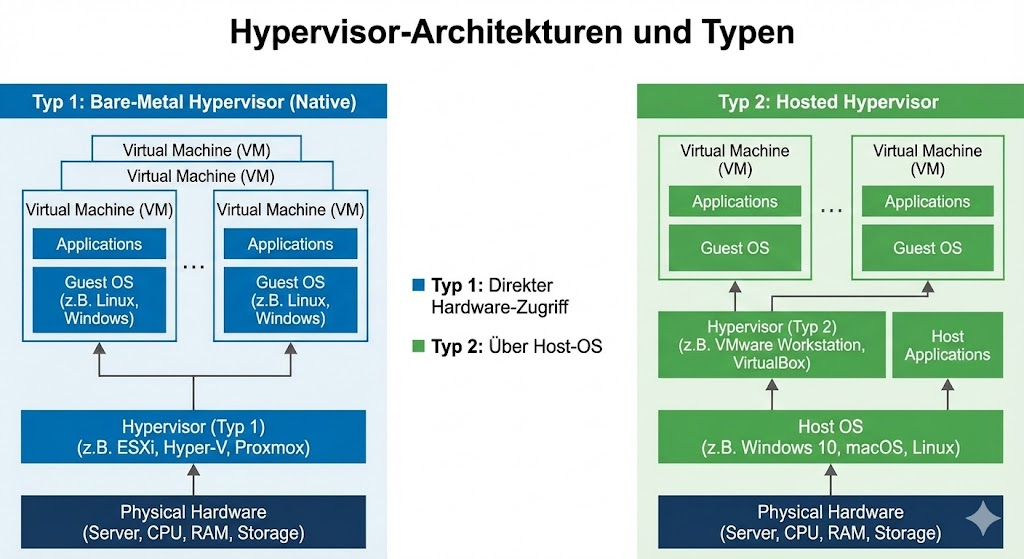
First of all, it's important to understand that VMware, Hyper-V, and KVM are Type 1 hypervisors . All three solutions enable the operation of virtual machines at the bare metal level (type 1 hypervising), but differ greatly in their structure:
- VMware ESXi: A proprietary, extremely slim hypervisor that manages almost without a classic operating system and is fully trimmed for enterprise functions.
- Microsoft Hyper-V: Technically, it is a Type 1 hypervisor, but it is closely interlinked with the Windows Server OS. The management partition (the parent OS) is a Windows Server.
- Proxmox VE: A complete open source platform based on Debian Linux. Proxmox uses KVM for virtual machines and LXC for containers. It combines hypervisor, storage (ZFS/Ceph) and network management in one solution.
Read more in our article | "How virtualization is changing IT"
Licensing: Cost models and budget
This is where the most massive upheavals in the market are currently taking place. For you as an administrator, it is crucial to look not only at the acquisition costs, but also at the "Total Cost of Ownership" (TCO) over 3 to 5 years.
1. VMware (Broadcom): The Paradigm Shift
Since the takeover by Broadcom, hardly a stone has been left unturned at VMware.
- No more purchase licenses: The classic "perpetual licensing" (buy once, pay support annually) has been discontinued. There are only subscriptions (rental models).
- Bundle compulsion: In the past, you could license individual components. Today, you usually have to choose between two major packages: vSphere Foundation (VVF) for medium environments or VMware Cloud Foundation (VCF) for large enterprise clouds.
- Core-based billing: Licensing is per CPU core (usually with a minimum of 16 cores per CPU). If you have servers with a large number of cores, the license costs increase linearly.
- The end of the free hypervisor: The popular, free "ESXi Free Hypervisor" has been officially discontinued.
2. Microsoft Hyper-V: The OS flat rate
At Microsoft, the hypervisor is a means to an end to sell Windows Server.
- Included in the OS: Hyper-V is a role in Windows Server Standard and Datacenter.
- The "VM tax":
- Standard Edition: Allows you to have 2 virtual Windows instances (OSEs) per host license.
- Datacenter Edition: Allows you an unlimited number of Windows VMs on the licensed host.
- Linux is "free": If you only run Linux VMs on Hyper-V, you theoretically only need the license for the host itself (or the free Hyper-V Server 2019, the future of which is uncertain). In practice, most companies use data center licenses to have peace of mind in the license audit.
3. Proxmox VE: Freedom for a service fee
Proxmox turns the tables. The software is completely free, the business model is based on service.
- No vendor lock-in: All features (backup, clustering, firewall, HA) are included in the free version. There are no "Enterprise Plus" features that lie behind a paywall.
- The repository model:
- Without a subscription, you use the
no-subscriptionrepository. This is "bleeding edge" and not recommended for production systems because updates are less tested. - With a subscription (charged per CPU socket, not cores!) you get access to the stable
enterpriserepository and technical support from the developers.
- Without a subscription, you use the
- Cost savings: The subscription costs are often a fraction of what VMware calls for comparable features.
| Feature | VMware vSphere | Microsoft Hyper-V | Proxmox VE |
| License model | Pure Subscription (subscription) | Via Windows Server License (purchase or subscription) | Open source (AGPL), optional support subscription |
| Billing | Per CPU Core (min. 16 Cores/CPU) | Per CPU Core (Host Licensing) | Per CPU Socket (Pautechal Price) |
| Free version | No (discontinued) | Yes (limited), mostly via Windows Server | Yes, fully functional (without enterprise repo) |
| Features behind paywall | Yes (e.g. DRS, vSAN often only in higher bundles) | No (Datacenter Edition only unlocks Windows VMs) | No (All features always included) |
| Cost bias | ⭐⭐⭐ High (Enterprise) | ⭐⭐ Medium (depending on Windows needs) | ⭐ Low (Budget-Friendly) |
Performance: What affects speed?
How do the candidates do in the engine room? It's not just about CPU speed, it's about storage efficiency, flexibility, and workload handling.
1. VMware: The Optimized Specialist
VMware ESXi is an extremely lean kernel that has only one task: virtualization.
- Resource Management: The DRS (Distributed Resource Scheduler) is still the gold standard. It balances VMs fully automatically in the cluster to avoid hotspots.
- Storage: With VMFS (Virtual Machine File System), VMware uses its own, highly optimized file system.
- Disadvantage: VMware is picky about hardware. Driver support is almost only available for enterprise hardware (note HCL!). Consumer hardware or older servers often don't work.
2. Microsoft Hyper-V: The Windows Optimizer
Hyper-V shines especially when Windows is virtualized.
- Dynamic Memory: Hyper-V can take or allocate memory from Windows VMs on the fly, which is extremely efficient for VDI or dense server environments.
- Replication: Hyper-V Replica is an ingenious feature for SMBs. It allows a VM to be replicated to a second server every 30 seconds (or 5/15 minutes) – without expensive shared storage (SAN). Easy disaster recovery out-of-the-box.
- Storage: Leverages VHDX files on NTFS or ReFS. This is solid, but less "magical" than ZFS or vSAN.
3. Proxmox VE: The Swiss Army Knife
Proxmox combines KVM (for VMs) with LXC (for containers) and ZFS (for storage).
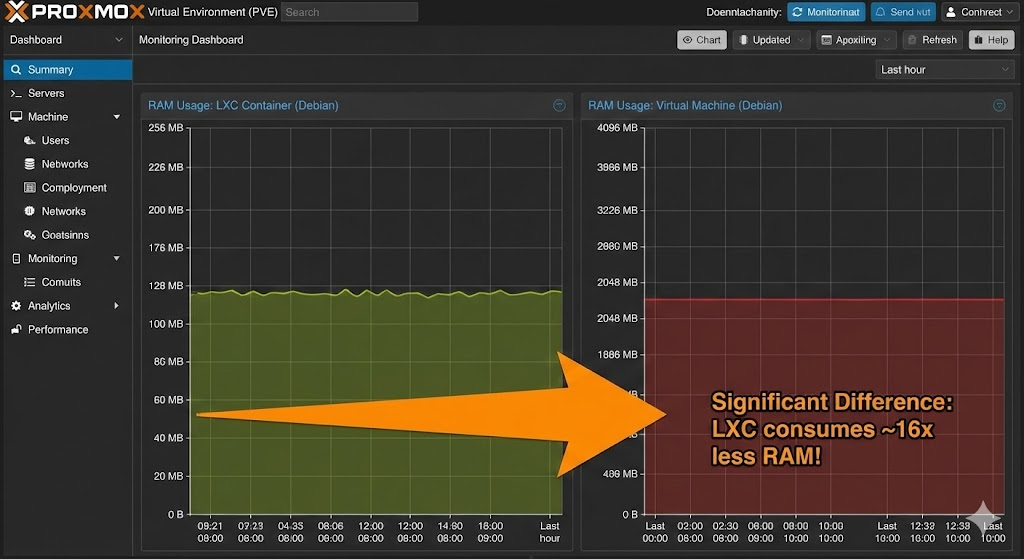
- LXC Container (the "Killer Feature"): Unlike VMware and Hyper-V, Proxmox allows low-level containers. A file server, a pi-hole or a small web server often does not need a full VM with its own kernel. In an LXC container, they run with a few MB of RAM consumption. You can run hundreds of services on hardware that would have long since run out under VMware.
- ZFS & Ceph: Proxmox natively supports ZFS (software RAID with error correction and caching) and Ceph (distributed storage). This allows you to build high-availability (HA) clusters with local SSD storage without having to buy an expensive external SAN.
- Hardware Support: Since a Linux kernel is underneath, Proxmox runs on almost everything – from an old laptop to the latest enterprise server.
| Feature | VMware vSphere | Microsoft Hyper-V | Proxmox VE |
| Hypervisor | Type-1 (Proprietary Kernel) | Type-1 (Microkernel Design) | Type-1 (KVM on Linux Kernel) |
| Container support | Cumbersome (Tanzu / vSphere Pods) | Windows Containers / Docker (via guest) | Native (LXC) – very efficient |
| File System / Storage | VMFS, vSAN (expensive) | NTFS, ReFS, Storage Spaces Direct | ZFS, LVM, Ceph, Btrfs |
| Live Migration | vMotion (Excellent | )Live Migration (Very Good) | Live Migration (Good, via QEMU) |
| Backup solution | 3rd party required (e.g. Veeam) | 3rd party | required Integrated (Proxmox Backup Server) |
| Disaster Recovery | Site Recovery Manager (Additional Cost) | Hyper-V Replica (Included) | Replication via ZFS/Ceph (Included) |
| Hardware compatibility | Limited (HCL strict) | Good (Windows Certified) | Excellent (Everything Linux can do) |
Administration and Management
This is where it is decided whether your working day will be relaxed or end in frustration. The best performance is of no use if the management tools are sluggish, confusing or unnecessarily complex.
1. VMware vSphere: The Gold Standard (with Overhead)
VMware is fully committed to centralization.
- The vCenter: Without vCenter, VMware is hardly fun. It is the central command center for clusters, updates (Lifecycle Manager) and distributed switches. The HTML5 interface is now extremely mature, clear and responsive.
- Granularity: Rights management is unbeaten. You can control down to the smallest detail which admin is allowed to restart which VM or open which console.
- The price of power: The vCenter is itself a resource-hungry appliance (VCSA). In smaller environments (e.g. 2-3 hosts), it often feels wrong to reserve 12-16 GB of RAM just for the management tool. In addition, the vCenter is a "single point of failure" for administration – if it is not running, you cannot perform complex cluster operations.
2. Microsoft Hyper-V: The toolbox
At Microsoft, management is often fragmented. Depending on the size of your environment, you can use different tools:
- The "Tool Zoo":
- Hyper-V Manager: For single hosts. Simple, but not cluster-capable.
- Failover Cluster Manager: Absolutely necessary as soon as you want to use HA (high availability). This is where you manage live migrations and cluster resources.
- Windows Admin Center (WAC): The modern web interface. Looks chic, but often feels a bit slower than native consoles.
- System Center (SCVMM): If you want a "VMware feeling", you need the System Center Virtual Machine Manager. It's powerful, but it's its own, expensive and complex software suite.
- The superpower: PowerShell. For Windows admins, this is the Holy Grail. Nowhere else can virtualization be automated as deeply and seamlessly as here. One one-liner is enough to deploy 50 new VMs and attach them to the AD.
3. Proxmox VE: The "All-in-One" Wonder
Proxmox takes a radically different approach: multi-master management.
- Web GUI everywhere: There is no central management server that you need to install. Each individual node in the cluster delivers the full web interface. Will Node 1 fail? Anyway, you log in to Node 2 and just keep managing the cluster. This massively reduces complexity.
- Integrated Console: You have direct shell access to the host and an HTML5 console for the VMs directly in the browser – without plugins, without waiting time.
- Backup (PBS): The integration of the Proxmox Backup Server is second to none. In the hypervisor interface, you can not only see the backup status, but you can also restore individual files from a backup directly ("Single File Restore") without having to open an external backup software.
Comparison table: Management in check
| Criterion | VMware vSphere | Microsoft Hyper-V | Proxmox VE |
| Main interface | vCenter Server (Web) | Hyper-V Manager / Admin Center | Web GUI (on each node) |
| Architecture | Centralized (vCenter Appliance required) | Decentralized or Central (SCVMM) | Multi-Master (No additional server required) |
| Complexity | High (requires training) | Medium (tool change required) | Low (All in one view) |
| Automation | PowerCLI / API | PowerShell (Excellent) | REST API / CLI (Bash) |
| Cluster Management | Excellent (DRS, vMotion) | Good (via Failover Cluster Mgr.) | Good (Quorum-based) |
| Special feature | : Granular RBAC (rights) | Deep Windows integration | , Integrated backup & firewall |
Conclusion on administration: If you need enterprise granularity, you'll love the vCenter. If you live in the Windows world, you swear by PowerShell. However, if you like it lean, fast and without additional ballast, you will celebrate the Proxmox GUI .
What suits which environment?
Although VMware, Hyper-V, and Proxmox VE are similar in their basic functionalities (HA, live migration, storage abstraction), they often target different business philosophies. There is no one best solution, only the most suitable tool for your strategy.
Here's a detailed breakdown by scenario:
1. The "Microsoft Shop" (pure Windows environment)
If your server room consists of 95% Windows Servers, Exchange and SQL and your admins are fluent in PowerShell.
- Recommendation: Hyper-V
- Why? Integration with Active Directory is seamless. You save yourself complex additional licensing, as the data center licenses are often already available. Tools like the Windows Admin Center make management intuitive for Windows admins.
Enterprise, Corporations & Compliance
Companies that are subject to strict regulations, operate huge SAP/Oracle databases and where downtime costs millions.
- Recommendation: VMware vSphere
- Why? Despite the price increases, VMware is unbeaten in the high-end sector. Many software vendors (ISVs) certify their products for VMware only or first . If you need to guarantee that your Oracle DB is support-compliant, VMware is often the safest way to go. In addition, features such as DRS (automatic load balancing) are the most mature here.
3. SMBs, MSPs, and IT service providers
Medium-sized companies or system houses (managed service providers) that have to pay attention to the margin and need flexible technology.
- Recommendation: Proxmox VE
- Why? Here, the price-performance ratio is fully appreciated. As an MSP, you can build client environments without high licensing fees. The ability to build low-cost, high-availability clusters without expensive SAN via ZFS and replication is a huge competitive advantage. In addition, the multi-client capability and the integrated firewall offer a lot of flexibility.
Homelab, Research & DevOps
Environments in which tests are carried out "quickly" or state-of-the-art CI/CD pipelines are running.
- Recommendation: Proxmox VE
- Why? LXC containers are the game changer here. You can spin up test environments in seconds. The hardware requirements are low, and the API can be easily automated (Terraform, Ansible).
| Criterion | VMware vSphere | Microsoft Hyper-V | Proxmox VE |
| Primary focus: | Enterprise Stability, | Windows Integration | , Flexibility & Efficiency |
| Cost Structure | High (OpEx) | Medium (often included) | Low (Support plan) |
| Learning Curve | Medium (vCenter) | Flat (for Win Admins) | Medium (Linux Base) |
| Hardware hunger | high (note HCL!) | Medium | Low (runs on almost everything) |
| Storage Approach | Hardware SAN or vSAN | S2D (Storage Spaces Direct) | ZFS (On-Premises) or Ceph (HCI) |
| Ideal for... | Corporations, banks, critical infrastructure | SMEs with a focus on Microsoft | SMEs, hosters, Linux shops, homelabs |
Support and ecosystem: The "Veeam factor"
A hypervisor is only as good as the ecosystem around it. Opinions often differ here – especially when it comes to backup.
VMware & Microsoft: The Top Dogs
Both benefit from a huge market. Almost every backup software (Veeam, Commvault, Datto) has supported VMware and Hyper-V natively for decades.
- Hardware: Dell, HP, Lenovo and Co. deliver ready-made images and guarantee driver support down to the last detail.
- 3rd Party Tools: There is a plugin for almost every problem (Monitoring, Security, VDI).
Proxmox VE: The Community & the Backup Change
Proxmox has one of the most active open source communities in the world. Answers in the forum often come faster than with classic enterprise support. But:
- Backup (The Elephant in the Room): For a long time, the lack of native Veeam support was the main argument against Proxmox.
- The solution: With the Proxmox Backup Server (PBS), Proxmox provides its own solution that is perfectly integrated. It offers incremental backups, deduplication, and ransomware protection. Many admins who once used PBS no longer miss Veeam.
- The change: Due to the increasing market power of Proxmox, large providers such as Veeam are now also starting to implement initial support for Proxmox (Veeam support for Proxmox is currently being introduced). So the argument "No backup possible" no longer holds.
- Hardware: Since Proxmox is based on Debian, it runs on almost any x86 hardware. This gives you the freedom to use cheaper "whitebox" servers or refurbished hardware without risking license violations.
Conclusion: The cards are being reshuffled
For a long time, the question in the server room was only: "VMware or Hyper-V?". With the drastic licensing changes by Broadcom at VMware and the technical maturity of Proxmox VE, the playing field has changed fundamentally.
We are currently experiencing one of the largest waves of migration in recent years.
- Stay with VMware if you have complex enterprise needs, your team is perfectly trained to meet them, and the budget for the new subscription pricing is secondary. Never change a running system – if you can afford it.
- Use Hyper-V if you are already deep in the Microsoft cosmos and want to use synergies. It is solid, performant and "simply there".
- Switch to Proxmox VE if you're looking for independence. If you want to free yourself from license corsets and want a modern, integrated platform that brings virtualization, containerization, and backup (via PBS) under one roof. Proxmox has long since outgrown the "hobbyist's corner" and has arrived in the professional medium-sized sector.
Our advice for the next step
Don't make a decision at the green table.
- Analyze your licenses: What would VMware cost under the new model? Do you have unused Windows licenses for Hyper-V?
- Do the practical check: Install Proxmox VE on discarded hardware. The installation takes less than 15 minutes.
- Test the backup: A hypervisor change is often actually a backup strategy change. Take a look at the Proxmox Backup Server – often the enthusiasm about its efficiency is the final trigger for the switch.
No matter which path you choose, it is important that you remain in control of your infrastructure – both technically and financially.
further links
| VMware by Broadcom – Licensing FAQ Transition to the subscription model and the end of perpetual licenses. | https://www.vmware.com/products/vsphere.html |
| Proxmox VE – Features & Documentation Features of Proxmox VE including High Availability and Backup Server. | https://www.proxmox.com/de/proxmox-virtual-environment/funktionen |
| Microsoft Hyper-V on Windows Server Microsoft documentation on the Hyper-V role in Windows Server 2022/2025. | https://learn.microsoft.com/de-de/windows-server/virtualization/hyper-v/hyper-v-on-windows-server |
| Veeam Data Platform – Proxmox Support Support for Proxmox VE by market leader Veeam. | https://www.veeam.com/blog/proxmox-backup-support.html |
| Linux KVM (Kernel-based Virtual Machine) Background information on the Linux kernel module that forms the basis for Proxmox. | https://linux-kvm.org/page/Main_Page |

Sei der Erste und starte die Diskussion mit einem hilfreichen Beitrag.
Leave a comment
Dein Beitrag wird vor der Veröffentlichung kurz geprüft — fachlich, respektvoll und auf den Punkt ist hier genau richtig.