

Hardware RAID controllers have been the standard for redundancy for decades, but they have a fatal weakness: they are blind to the content of the data. A controller simply pushes zeros and ones without knowing whether it is a critical database log or empty space.
ZFS (Zettabyte File System) and its implementation RAID-Z break with this paradigm by merging the Logical Volume Manager and the file system. The result is an architecture that not only compensates for failures, but actively combats silent data corruption.
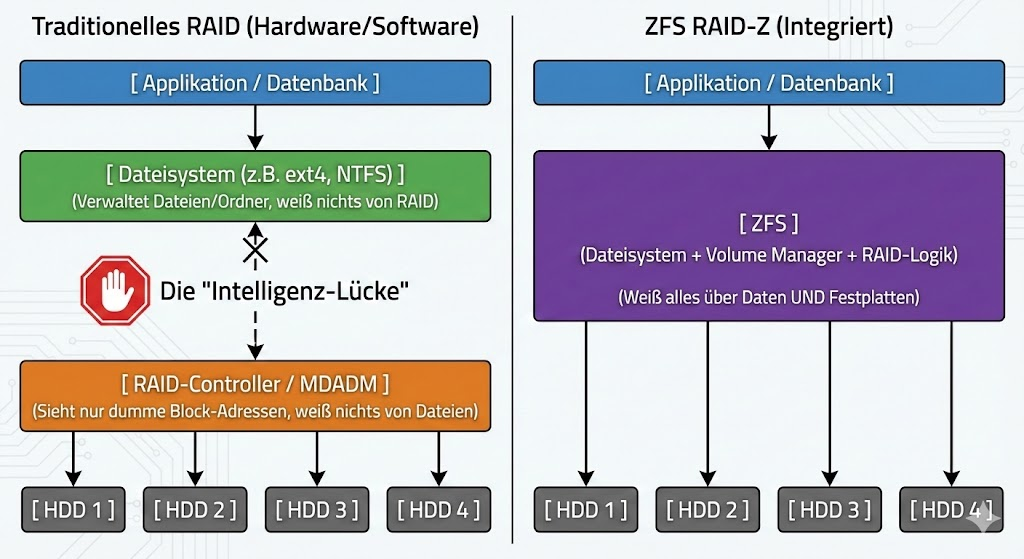
“Write Hole”: Copy-on-Write Explained
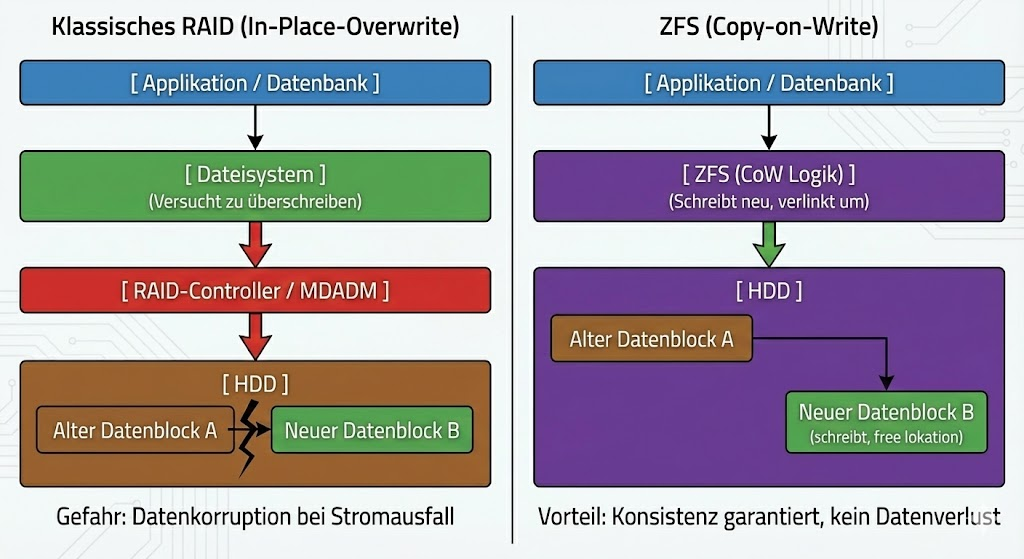
RAID-Z is not a software-level RAID 5, even though the parity logic seems similar. The decisive architectural difference lies in the writing behavior. Classic RAIDs suffer from the “write hole” phenomenon: If the power fails during a write process, the data block and parity block may no longer fit together. The array is inconsistent.
ZFS eliminates this risk through copy-on-write (CoW). When you modify a file, ZFS never overwrites the original data blocks. Instead, the change is written to a new block. Only when this write process (including the new checksum) is successfully completed, the metadata pointer is transferred to the new block. This is an atomic operation. Either the write process is completely successful, or it never logically took place. A corrupt intermediate state is technically impossible.
Dynamic stripes instead of rigid blocks
Another bottleneck of classic controllers is the fixed stripe size. RAID-Z uses a dynamic strip width. Each logical block is written as a separate record. This means that ZFS adjusts the Stripe width on-the-fly to the data to be written. This significantly reduces performance losses due to “read-modify-write” cycles for small random writes, as the system intelligently decides how data and parity are distributed across the physical disks.
Integrity through the Merkle Tree (Self-Healing)
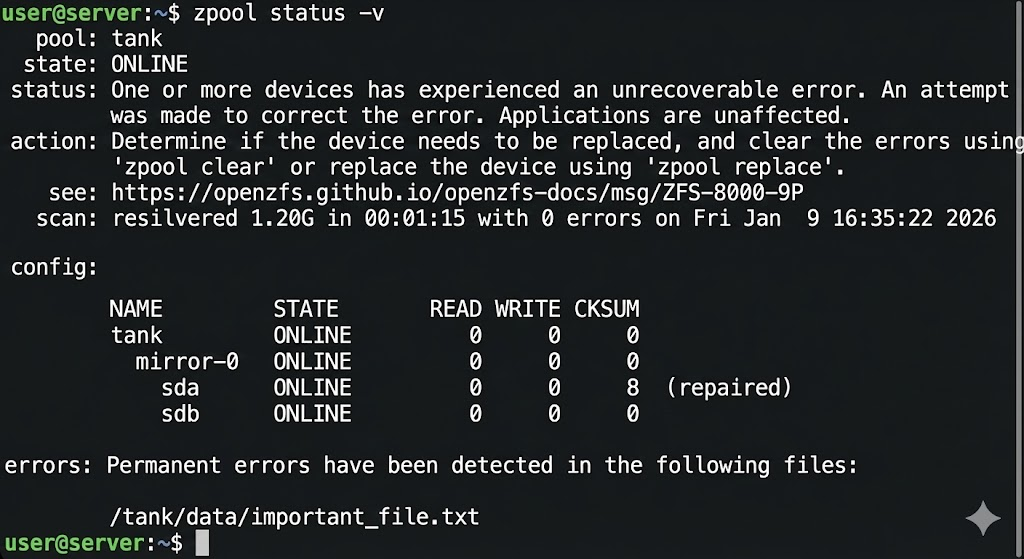
The often quoted “self-healing” is based on a hash tree structure (Merkle Tree). Unlike conventional file systems, ZFS does not store the checksum of a data block in the block itself, but in its parent pointer.
If the system now reads data, it calculates the checksum of the read bits and compares it with the sum stored in the parent block. If these do not match, there is a “silent data corruption” (bit red). Since ZFS knows the topology of the data, it immediately discards the defective block. It accesses the parity information of the other drives in the network (vdev), reconstructs the correct bit stream and overwrites the defective sector on the disk with the valid data. This process is fully automatic in the I/O path.
Decision: RAID-Z vs. RAID-Z2 vs. RAID-Z3
The choice of RAID Z level is a trade-off between gross capacity, performance, and the statistical probability of an URE (Unrecoverable Read Error) during a rebuild. All drives are organized into virtual devices (vdevs).
RAID-Z1 (Single Parity)
Here, one parity block is used per stripe. It allows a single hard drive to fail.
- For modern hard drives (> 4 TB), Z1 is often negligent. If a disk fails, the entire array must be resilvered. If a single read error occurs on another disk during this massive read load, the pool is usually lost. Application: Only small SSD arrays or unimportant data.
RAID-Z2 (Double Parity)
Z2 uses two parity blocks and can cope with the failure of any two discs in the vdev.
- This is the industry standard. Even if one disk fails and a read error occurs on a second disk during the rebuild, the remaining parity data ensures integrity. The ratio of capacity loss to safety is best balanced here.
RAID-Z3 (Triple Parity)
Three parity blocks allow the failure of three drives.
- The computational load for parity calculation increases significantly here, which can reduce performance (especially IOPS). Z3 is designed for extremely large arrays with very large HDDs (e.g. 20TB+), where rebuild times can take days or weeks and the risk of further failures increases statistically significantly.
The direct comparison:
| Feature | RAID-Z (Z1) | RAID-Z2 | RAID-Z3 |
| Analogy | Similar to RAID 5 | Similar to RAID 6 | Unique to ZFS |
| Parity | Single Parity (1 Block) | Double Parity (2 Blocks) | Triple Parity (3 Blocks) |
| Fault tolerance | 1 drive may fail | 2 drives may fail | 3 drives may fail |
| Minimum number of disks | 3 drives | 4 drives | 5 drives |
| Speed and Capacity More Important Than Extreme Security | The “Sweet Spot” for Security and Performance | Maximum Security for Very Large Arrays |
Data Recovery from RAID-Z
Despite the robustness of ZFS, there are scenarios that require manual intervention. We distinguish between physical failure and logical corruption.
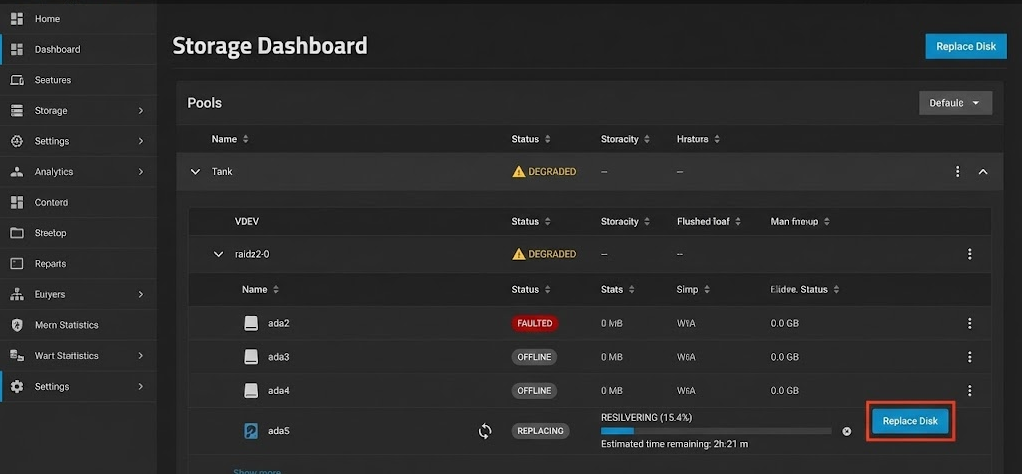
Scenario A: Physical Drive Failure If the system marks a disk as FAULTED , the pool will continue to run in “Degraded” mode. Parity is calculated in real-time to serve read requests. You replace the hardware and initiate the “Resilver” process. ZFS only copies the data actually used , not the empty blocks (a massive time advantage compared to classic RAID rebuilds).
Scenario B: Metadata loss If the file system itself is so badly damaged that the pool can no longer be mounted (e.g. due to controller errors that write garbage), standard on-board tools zpool scrub will no longer help, as is often the case, because the entry point into the Merkle Tree is missing.
In such cases where this zpool import fails, specialized forensic software is necessary that understands the on-disk structure of ZFS and can assemble fragments without intact metadata pointers. Tools like DiskInternals RAID Recovery come in by scanning the raw data of the disks and trying to manually chain the transaction groups (TXGs) to extract files. However, this is the last line of defense before the backup restore.
Result
RAID-Z is more than just disk space aggregation; it’s a life insurance policy for data integrity. The decision against hardware RAID and in favor of ZFS is a decision for data consistency. For production environments, avoid RAID-Z1 and go directly to RAID-Z2 to mitigate the mathematical inevitability of read errors on large hard drives. Software-defined storage requires more RAM and CPU power, but it pays back through mathematically provable data accuracy.
Would you like me to calculate for your specific hardware configuration how the net capacity and the probability of failure behave between RAID-Z2 and Z3?

