

This Microsoft 365 privacy guide will be updated continuously. Since the features and settings within Microsoft 365 change and evolve regularly, it’s a good idea to stay up to date with the latest developments.
In order to stay informed about the latest developments and changes within Microsoft 365, it is essential to regularly consult the official Microsoft documentation. At the end of the respective article sections you will find further and topic-related links that give you a deeper insight into specific issues.
The introduction of Microsoft 365 (MS365) not only brings with it a wide range of tools to promote productivity and collaboration in the enterprise, but also opens up extensive opportunities to streamline data protection measures and ensure the security of sensitive corporate data.
This guide will guide you step by step as you adjust and optimize your organizational, privacy, and compliance settings. The aim is to ensure compliance with the requirements of the General Data Protection Regulation (GDPR) and thus ensure responsible handling of company data.
Organization Settings
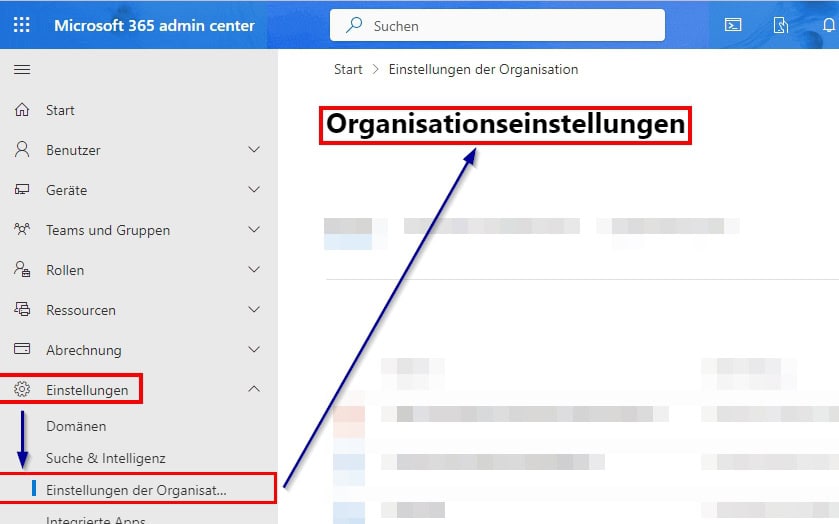
After you set up your Microsoft 365 tenant, you should review your organization settings . They are critical to privacy and security, as well as GDPR compliance.
Carefully setting these settings protects sensitive data and prevents risk. For more information on tenant creation, see the article: How do I create a tenant.

Services
After the basic configuration of the Microsoft 365 tenant, all services must be used in a GDPR-compliant manner. Continuous monitoring, privacy-compliant settings and clear access controls are central to this.
These measures protect sensitive data, ensure compliance with the General Data Protection Regulation and minimise risks.
Privacy-friendly default settings such as short storage periods and pseudonymization make unauthorized access more difficult and prevent data leaks – keeping the Microsoft 365 environment secure.
to the settings
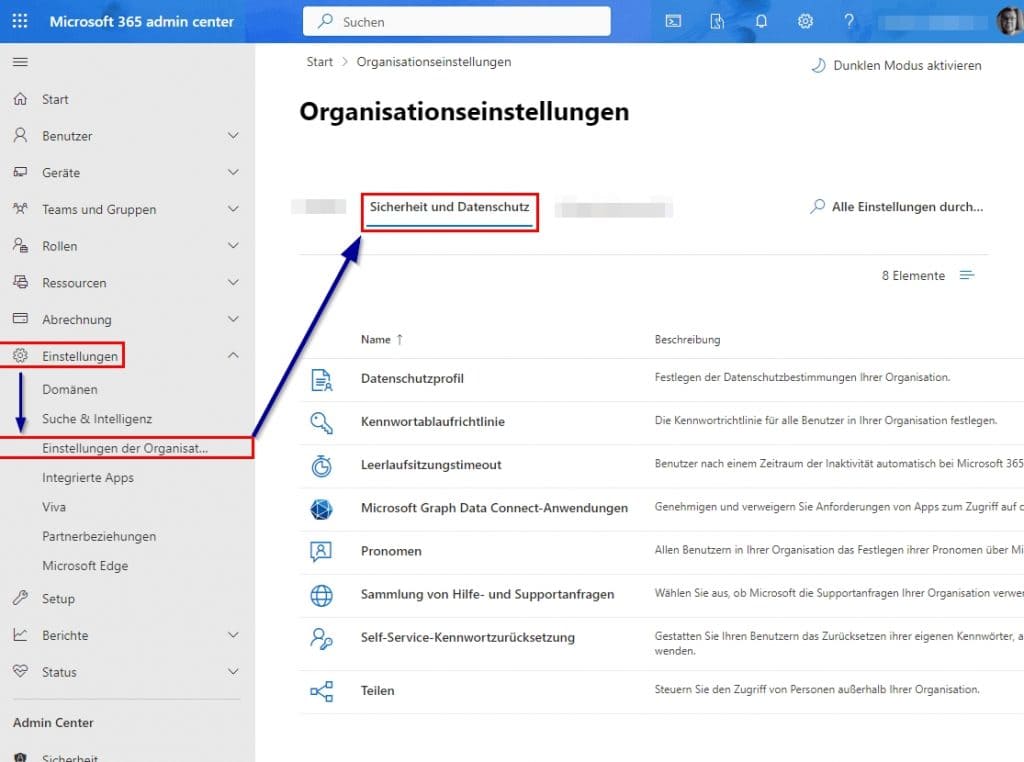
Security and privacy
The security and privacy of corporate data in Microsoft 365 is based on clearly defined access rights.
It must be clearly regulated which employees are allowed to view which information in order to prevent unauthorized access. For further protection, monitoring and logging tools are used to document access activities and thus ensure compliance requirements.
In addition, regular training courses strengthen employees’ awareness of data protection and promote the responsible handling of sensitive information.
to the settings
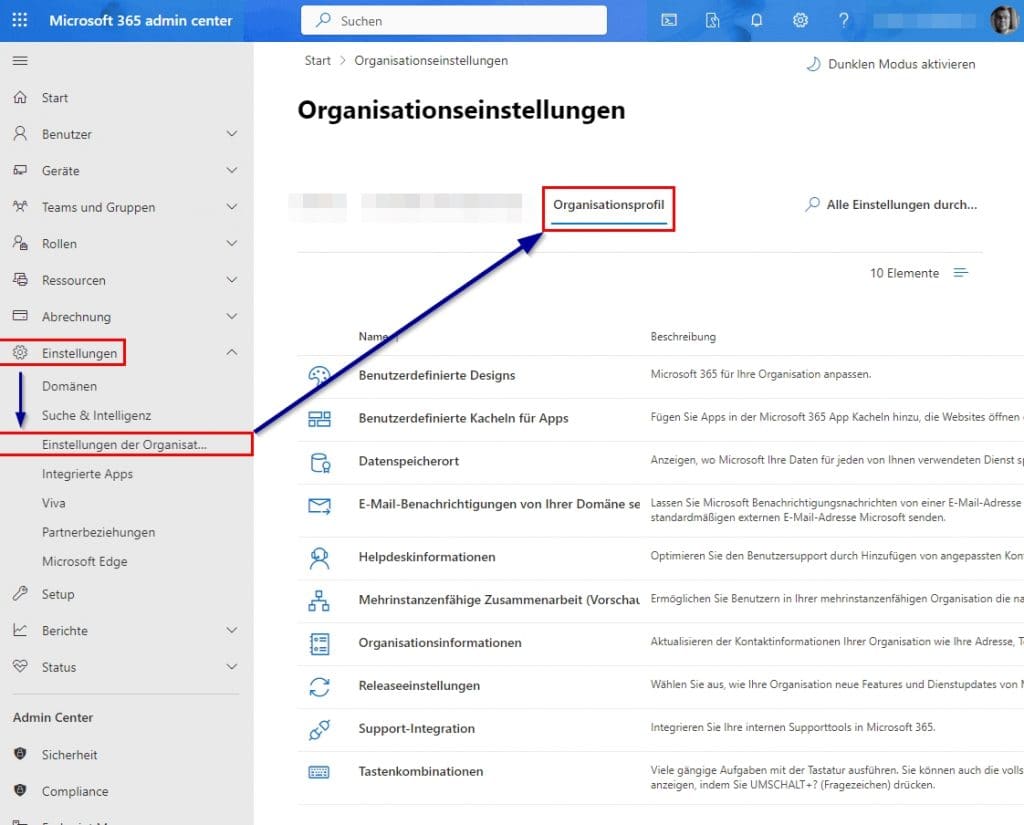
Organization Profile
A well-maintained organizational profile is essential for data protection and compliance with the GDPR.
The organization’s contact information should be updated regularly to ensure accurate information and clear lines of communication. It is also necessary to securely manage all organizational data – this includes adjusting visibility and privacy settings in Microsoft 365 to prevent unauthorized access.
Regular review of the stored data ensures accuracy and verifies compliance requirements, making the organization’s profile a significant contributor to security and privacy.
to the settings
Data protection in Microsoft 365 services

Microsoft ENTRA ID
Microsoft Entra ID forms a central component within the Microsoft 365 environment and supports efficient identity and access management. The use of this solution ensures a structured regulation of access rights and makes a decisive contribution to the protection of sensitive company data.
* Recommended settings
- Cooperation between clients:
Supporting multi-tenant organizations ensures secure, GDPR-compliant B2B collaboration. Clearly defined boundaries protect personal data. learn.microsoft.com - Directory synchronization:
With Microsoft Entra Connect, Active Directory data can be synchronized securely and reliably. In doing so, attention must be paid to GDPR compliance, data minimization and up-to-date and correct information. learn.microsoft.com - Up-to-dateness of organizational information:
Regular monitoring and updating of contact and technical data ensure effective rights management and constant GDPR compliance.

Microsoft Teams
Privacy policies in Microsoft Teams are essential to protect personal data and comply with legal requirements such as the GDPR.
* Recommended settings
- Employee training:
Targeted sensitization of employees to the handling of sensitive information is indispensable. Training measures convey relevant data protection guidelines, clarify potential risks and present best practices in the handling of personal data.
- Manage guest access:
Enabling guest access enables collaboration with external stakeholders. It must be ensured that only authorized guests have access. For this purpose, clear guidelines for access to data and resources by guests must be defined and applied.
- Team and channel management:
Governance in the creation and management of teams and channels ensures that sensitive information is only accessible to authorized users. It should be clearly defined who is allowed to create new teams; in addition, regular reviews of the activities in the channels are necessary.

Microsoft SharePoint
Careful management of data and access rights in SharePoint Online is critical. Control of external approvals and regular checks of authorizations ensure data protection and increase security.
* Recommended settings
- Implement security measures:
Features such as Data Loss Prevention (DLP) can prevent unauthorized access to confidential information. In addition, encryption technologies and secure authentication procedures should be introduced to ensure a high level of protection.
- Control external sharing:
It is important to determine which content may be released externally. Activity related to external sharing should be monitored on an ongoing basis so that only authorized users can share content outside the organization.
- Check permissions regularly:
Periodic review of access rights to document libraries and lists is necessary to ensure that only authorized persons have access. Access to accounts that are no longer needed should be withdrawn consistently.

Microsoft Copilot
Careful management of data and access rights in Microsoft 365 Copilot is crucial. Control of data classification and regular checks of authorizations ensure data protection and increase security.
* Recommended settings
- Implement security measures:
Features such as Data Loss Prevention (DLP) and Sensitivity Labels help prevent unauthorized access to sensitive information in Copilot responses. In addition, secure authentication procedures should be introduced to ensure a high level of protection. - Control data access:
It is necessary to determine which data Copilot is allowed to access. The permission structure must be reviewed before activation so that only authorized users can access sensitive information through Copilot. - Check permissions regularly:
Periodic access rights checks are required to ensure that only authorized individuals have access through Copilot. Access to accounts that are no longer needed should be withdrawn consistently.
The sustained implementation of these measures will create a solid foundation for data protection and compliance within the Microsoft 365 environment.
It’s a good idea to regularly review and continuously optimize all settings to both meet the requirements of the GDPR and realize the full potential of Microsoft 365.
further links
| Microsoft 365 documentation | https://learn.microsoft.com/de-de/microsoft-365/ |
| Microsoft Trust Center | https://www.microsoft.com/de-de/trustcenter |
| Microsoft 365 Compliance Documentation | https://learn.microsoft.com/de-de/microsoft-365/compliance/ |
| General Data Protection Regulation (GDPR) Info | https://gdpr.eu/ |
| Federal Commissioner for Data Protection (BfDI) | https://www.bfdi.bund.de/ |
| Office 365 Data Subject Requests Under the GDPR and CCPA | https://learn.microsoft.com/en-us/compliance/regulatory/gdpr-dsr-office365 |
| GDPR Simplified – A Guide for Your Small Business | https://learn.microsoft.com/de-de/microsoft-365/admin/security-and-compliance/gdpr-compliance?view=o365-worldwide |
| GDPR-compliant Microsoft 365: Encrypt or configure? | https://www.buero-kaizen.de/datenschutz-dsgvo-microsoft-365/ |
| Customize the theme for your organization – Microsoft 365 admin | https://learn.microsoft.com/de-de/microsoft-365/admin/setup/customize-your-organization-theme?view=o365-worldwide |
| Make Microsoft 365 GDPR-friendly | https://haake.com/it-sicherheit/datenschutz/microsoft-365-dsgvo-freundlich-gestalten/ |
| General Data Protection Regulation – Microsoft GDPR | https://learn.microsoft.com/de-de/compliance/regulatory/gdpr |
| Data protection and privacy – Microsoft Trust Center | https://www.microsoft.com/en-us/trust-center/privacy |
| Configure Office 365 / Microsoft 365 GDPR-compliant | https://helpdesk.cloudshift.de/docs/microsoft365/office-365-microsoft-365-dsgvo-konform-konfigurieren/ |
| Data retention, deletion, and destruction in Microsoft 365 | https://learn.microsoft.com/en-us/compliance/assurance/assurance-data-retention-deletion-and-destruction-overview |
| Data protection & Microsoft 365: GDPR-compliant use possible? | https://www.dr-datenschutz.de/datenschutz-microsoft-365-dsgvo-konformer-einsatz-moeglich/ |
| Preset security policies in EOP and Microsoft Defender for Office 365 | https://learn.microsoft.com/en-us/defender-office-365/preset-security-policies |
| Add custom tiles to the app launcher | https://learn.microsoft.com/de-de/microsoft-365/admin/manage/customize-the-app-launcher?view=o365-worldwide |
| Microsoft 365 advanced protection | https://support.microsoft.com/en-us/office/microsoft-365-advanced-protection-82e72640-39be-4dc7-8efd-740fb289123a |
| Data protection and Microsoft Office 365: GDPR-compliant use for companies | https://www.robin-data.io/datenschutz-akademie/wiki/datenschutz-microsoft-365-office-365-dsgvo-konformer-einsatz-im-unternehmen |
| IPD Blog: “Using Microsoft 365 in a GDPR-compliant way” | https://www.ipdynamics.de/blog-artikel/microsoft-365-dsgvo-konform-einsetzen-umsetzbar-oder-wunschdenken |
| Personalize your Microsoft 365 user experience | https://support.microsoft.com/de-de/office/personalisieren-ihrer-microsoft-365-benutzeroberfl%C3%A4che-eb34a21b-52fa-4fbf-a8d5-146132242985 |
This post is also available in:
 English