
In the current IT security landscape, a fundamental erosion of the classic network perimeter has taken place. The web browser is no longer just a tool for retrieving information, but has become the primary operating system for enterprise applications and thus the most critical point of egress for sensitive data.

While traditional endpoint data loss prevention (DLP) solutions often fail due to the technical hurdles of encrypted connections or the performance degradation of outdated proxy technologies, Microsoft Purview provides an architecture that natively integrates security policies into the data flow.
For administrators, this results in a new target image: Complete control over sensitive data streams directly at the point of origin, without compromising user productivity due to infrastructural bottlenecks.
Native browser security architecture
The decisive advantage of Microsoft Purview over classic proxy-based DLP systems lies in its native integration into the browser stack. This eliminates the need to break SSL connections at the network gateway, which often leads to performance issues and compatibility issues with modern web apps.
Native integration with Microsoft Edge for Business
Microsoft Edge for Business acts as the native endpoint of the Purview architecture. Since the DLP engine is integrated directly into the browser, activities that remain invisible to external agents can be monitored. This includes not only uploading files, but also UI-based actions.
Within Edge for Business, admins can enforce the following controls:
- Paste monitoring: The engine analyzes the contents of the clipboard in real time. If a user tries to insert sensitive information (such as credit card numbers) into an unauthorized web form or AI prompt, it can be blocked.
- Screen capture prevention: In the preview version, Edge is able to prevent screenshots or video recordings from being taken when protected content is displayed in the browser window.
- Protected Clipboard: This feature ensures that data from managed applications cannot be copied to unmanaged applications, even if they are installed locally on the device.
Avoid false alarms > context decisively!
Protection is based on granular DLP policies that respond specifically to browser actions such as file uploads, copy-pasting, or web content printing. As soon as a user tries to transmit information classified by sensitive information types (SITs) – such as credit card numbers or internal project IDs – the policy intervenes immediately.
A critical aspect in the administration of the year 2026 is the control of shadow AI. Purview allows you to specifically prevent the upload of corporate data to unmanaged AI applications. This does not block the entire website, but specifically blocks the flow of data, allowing employees to continue experimenting productively with LLMs (Large Language Models) without compromising the company's intellectual property.
How-To: Configuring Browser & Web Protection DLP
Step 1: Onboard the endpoints
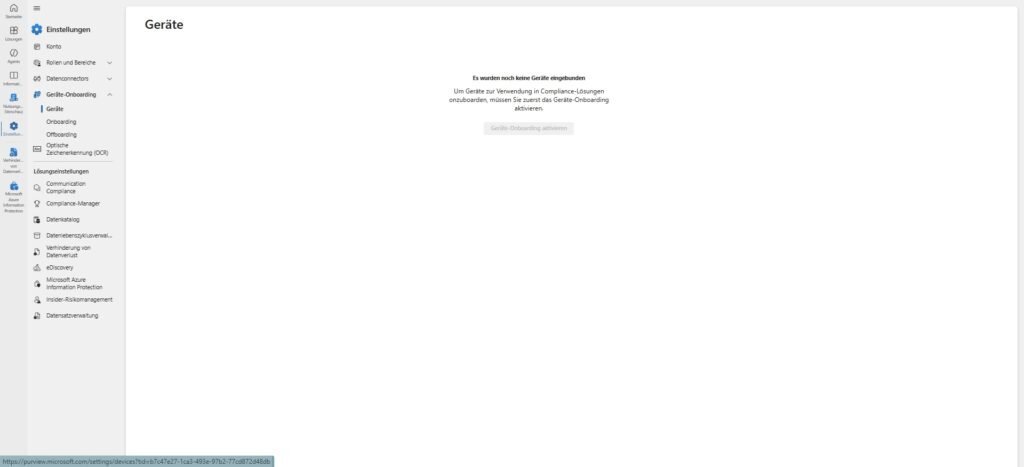
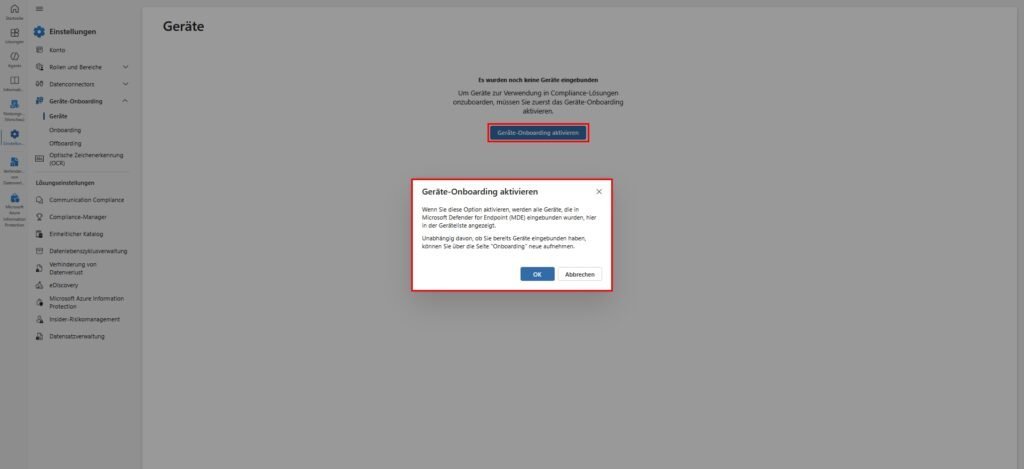
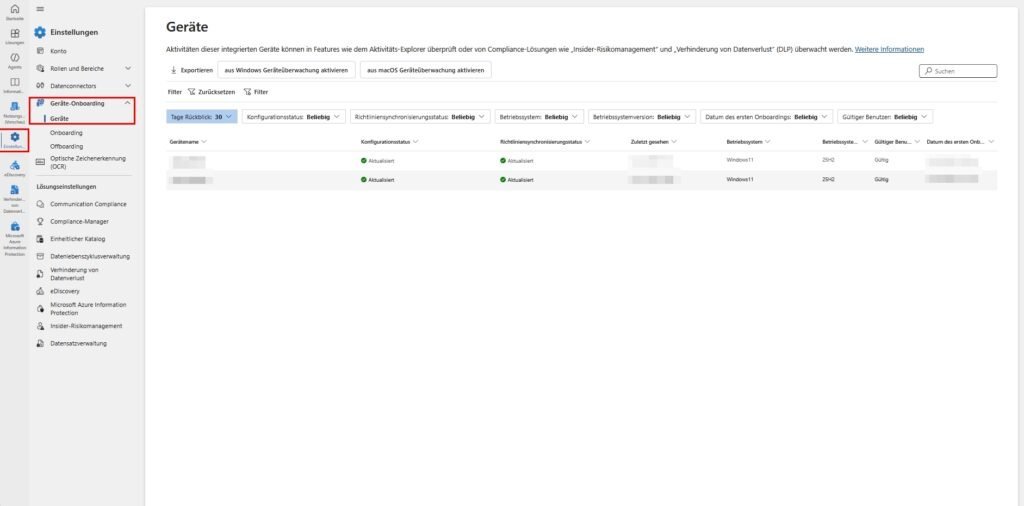
The effectiveness of Endpoint DLP stands and falls with the seamless detection of endpoints. Microsoft uses the SENSE sensor, which is already an integral part of Microsoft Defender for Endpoint (MDE) in Windows 10 and 11.
Windows devices: Deployment via Intune and GPO
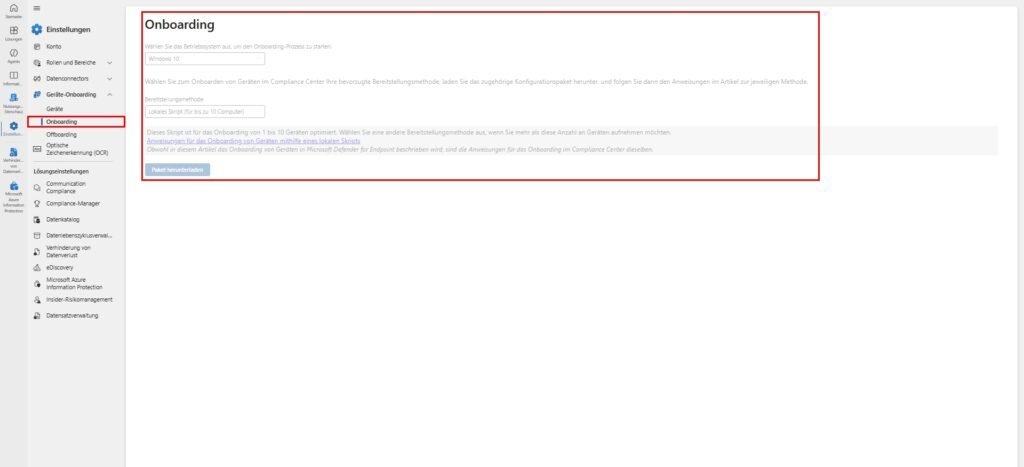
The recommended way to onboard Windows endpoints is Microsoft Intune. The EDR onboarding status in the Defender portal allows a preconfigured package to be delivered directly to Intune. Alternatively, local scripts can be used for test environments, keeping in mind that onboarding and offboarding scripts should never run simultaneously on a device to avoid collisions.
An often overlooked feature is the "Standard Discovery Mode". Onboarded devices can thus identify unmanaged devices in the same network segment. This provides valuable insights into potential shadow IT hardware that has access to corporate resources without being subject to DLP policies.
The macOS Challenge: Configuration Depth Instead of Plug-and-Play
Unlike Windows, macOS requires much more granular configuration to achieve full DLP visibility. It is a common misconception that the mere appearance of a Mac as "Active" in the Purview portal already guarantees security. Without specific configuration profiles, Purview remains "blind" to browser activity in Chrome or Safari on the Mac.
Administrators must deploy multiple .mobileconfigfiles through Intune to grant the necessary permissions:
- System Extensions: Sharing Team Identifiers for Microsoft Components (
UBF8T346G9). - Full Disk Access (FDA): Without this access, the DLP daemon (
com.microsoft.dlp.daemon) cannot scan files on local storage. - Accessibility Permissions: Required to monitor interactions with the user interface.
| macOS Profile Name | Purpose | Risk of Absence |
| Microsoft Purview System MobileConfig | Basic Agent Activation | No Sensor Data in the Portal |
| Accessibility Permission | Monitoring of prints/USB | bypass via UI actions |
| Full Disk Access (FDA) | File Scan for DLP | No Sensitive Content Detection |
| Network Filter | Socket Monitoring | Loss of Browser Exfiltration Control |
Step 2: Definition of sensitive information types
The quality of DLP detection is determined by the precision of the Sensitive Information Types (SITs). Purview offers over 400 built-in SITs, but it also allows for the creation of highly specialized custom types.
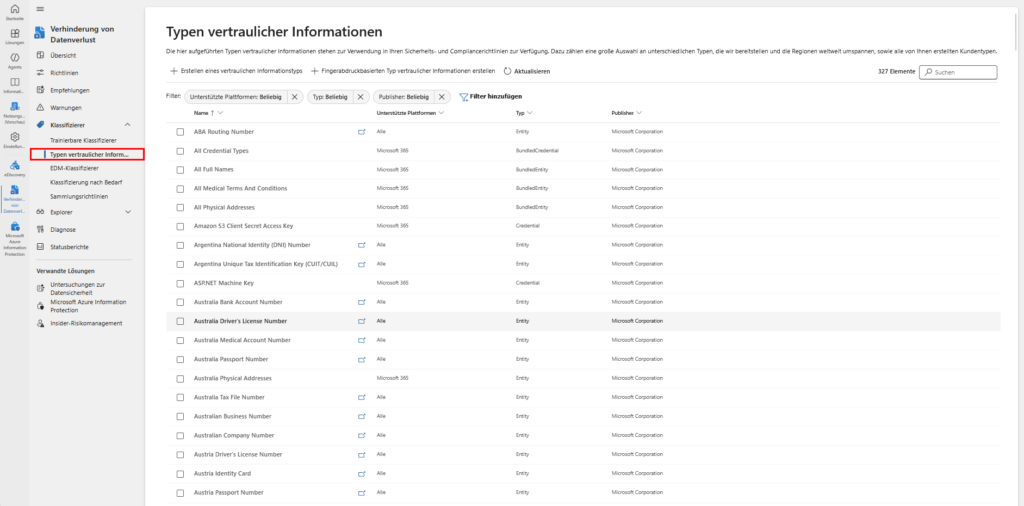
Regex Logic and the Boost Engine
Purview uses the Boost.RegEx engine. This requires administrators to have a deep understanding of regex syntax, as inefficient expressions can affect system performance. A critical mistake is the use of position anchors such as ^ (start) or $ (end). Because Purview scans text in blocks, there is no guarantee that a scanned section will match the actual beginning or end of a file, resulting in false negatives.
Another technical detail concerns lookbehind assertions. These must have a fixed length. An expression like (?<=^|\s|_) is invalid because the anchor ^ is zero in length, while spaces and underscores are in one length. A valid alternative would be (?:^|(?<=\s|_))to pass the validation check of the Purview console.
Confidence levels and supporting elements
A SIT typically consists of a primary element (such as a 10-digit ID) and supporting elements (keywords such as "employee number" or "human resources").
- High confidence (76-100): Requires the match of the pattern plus a checksum validator or very specific keywords in close proximity (default: 300 characters).
- Medium confidence (65-75): Often used when the pattern is detected, but only general keywords are present.
For organizations operating in Asian markets, support for Double-Byte Character Sets (DBCS) for Chinese, Japanese, and Korean is essential. Since these languages do not use traditional word separators, the Purview engine automatically inserts spaces during scanning to enable pattern recognition.
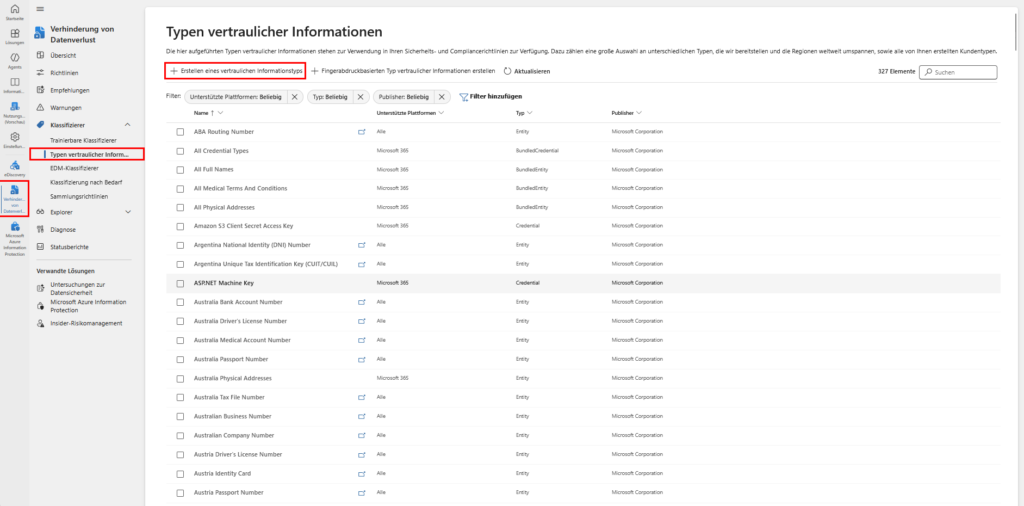
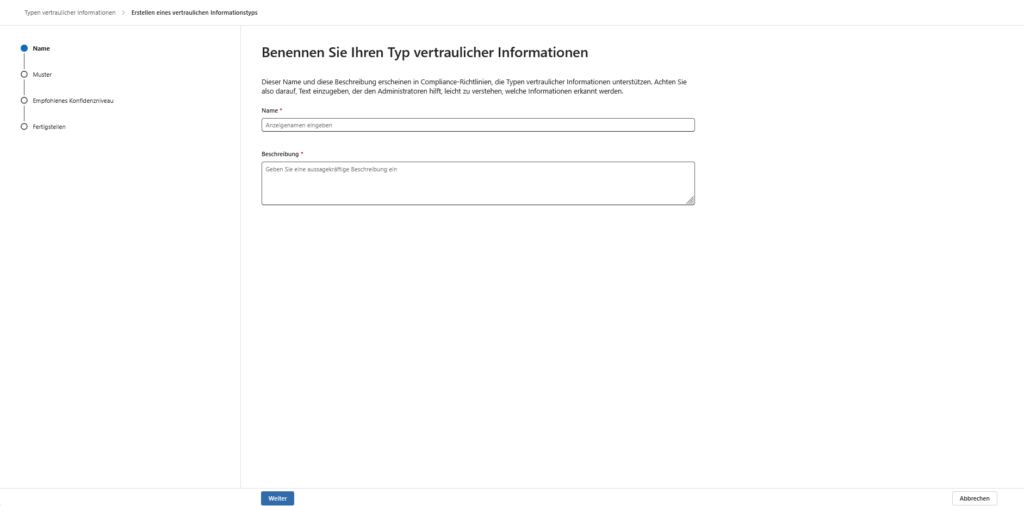
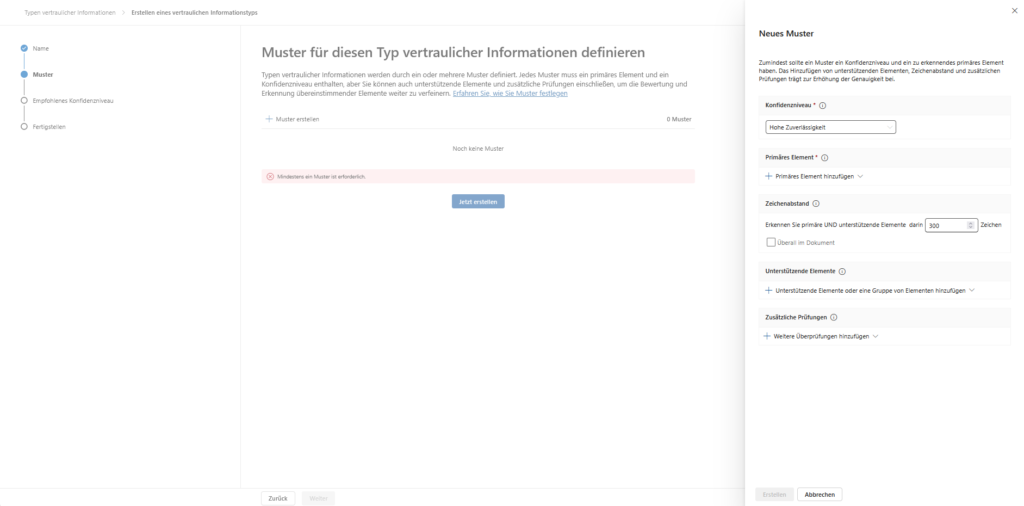
Let's say your project IDs follow this logical structure: An abbreviation for the department (e.g., PRJ, DEV, SEC), a hyphen, the year (four digits), another hyphen, and an alphanumeric code (e.g., two letters and two to four numbers).
The regular expression for this is: \b(PRJ|DEV|SEC)-\d{4}-[A-Z]{2}\d{2,4}\b. The use of \b (Word Boundary) prevents the ID from being incorrectly recognized within longer strings, while the group (PRJ|DEV|SEC) restricts the prefixes, which massively increases the hit rate.
Step 3: Create the DLP policy for browsers
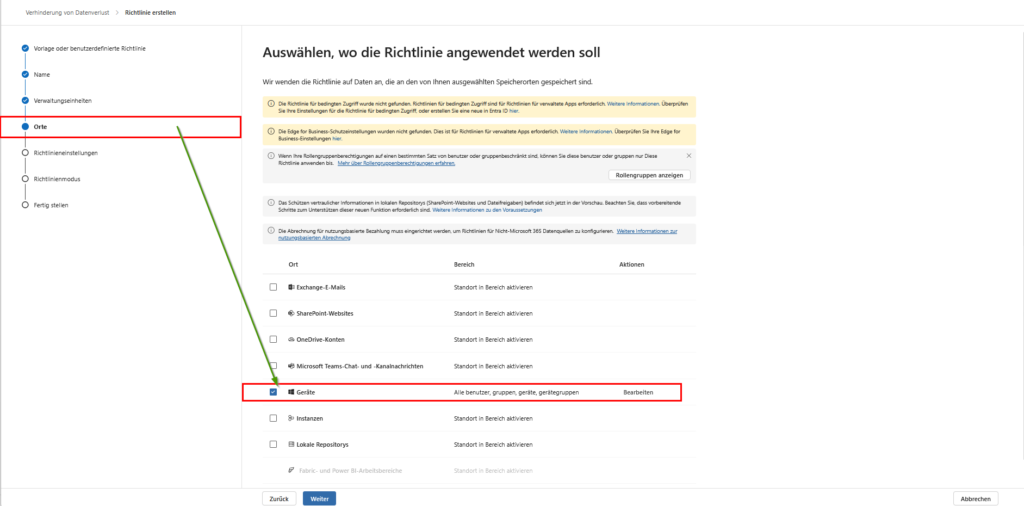
After the identifiers (SITs) are in place, the set of rules must be defined. To do this, create a new DLP policy in the Microsoft Purview Portal. The crucial point for web protection is the selection of locations: You must set the switch for Devices to "On".
This is the basic technical prerequisite for bringing the DLP engine to the endpoint and thus to the browser. Only through this assignment are the policies distributed to the Purview client on the Windows or macOS devices, which makes it possible to monitor file uploads, copy-paste actions, and cloud shares within Edge and Chrome in the first place. Without enabling this location, all browser activity will remain invisible to Purview, even if the hardware onboarding was successful.
Step 4: Configure Web Restrictions
In this step, you define within the DLP rule under Actions how the system should react operationally in the event of a hit. This is at the heart of your web governance. Here you link the sensitive data defined in step 2 with hard access controls for the browser.
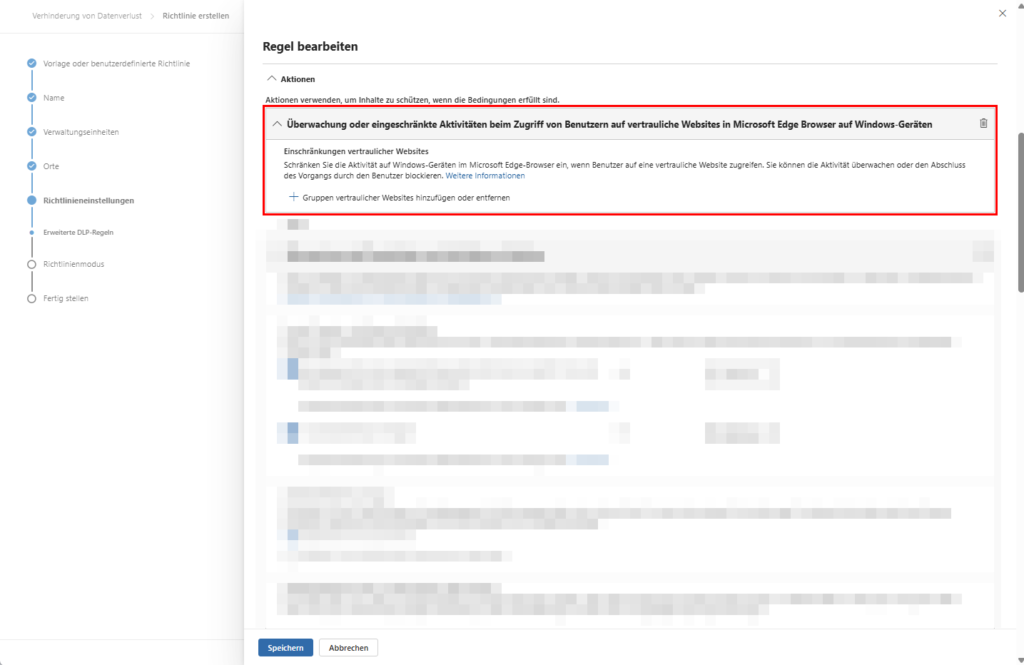
A. Protection of confidential websites (proactive control)
This is a feature specific to Microsoft Edge on Windows devices. It allows you to apply protection directly at the source. Once a user visits a URL classified as "confidential", you can restrict the following activities:
- Copying content: Prevents data from being extracted to the clipboard.
- Paste: Blocks the flow of sensitive information into web forms.
- Print & Save: Prevents web content from leaving the system physically printed or as a local file ("Save As").
B. Service Domain and Browser Activity
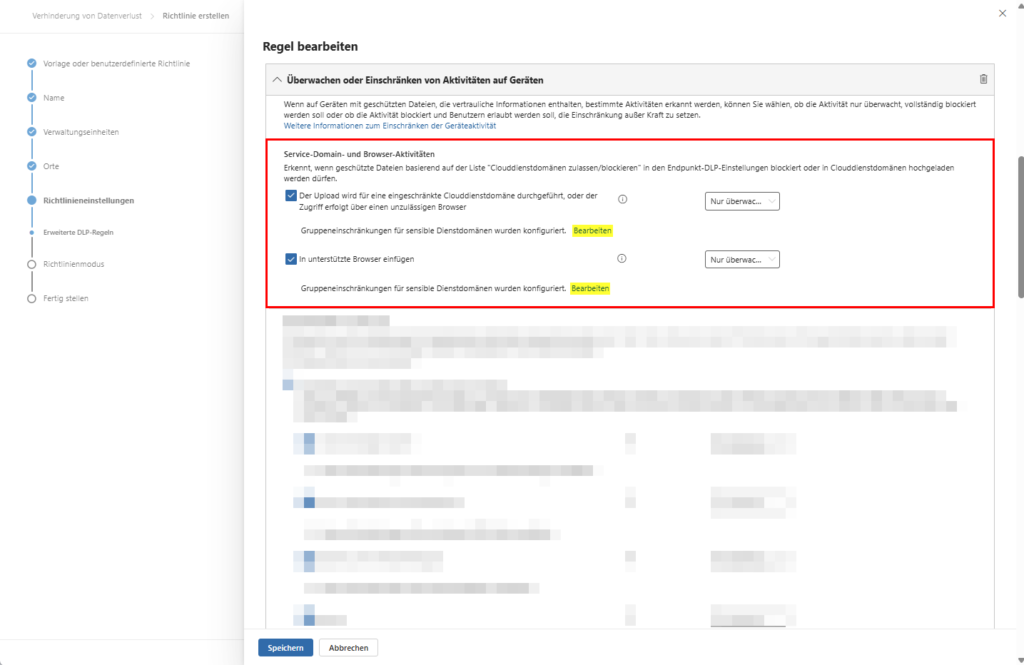
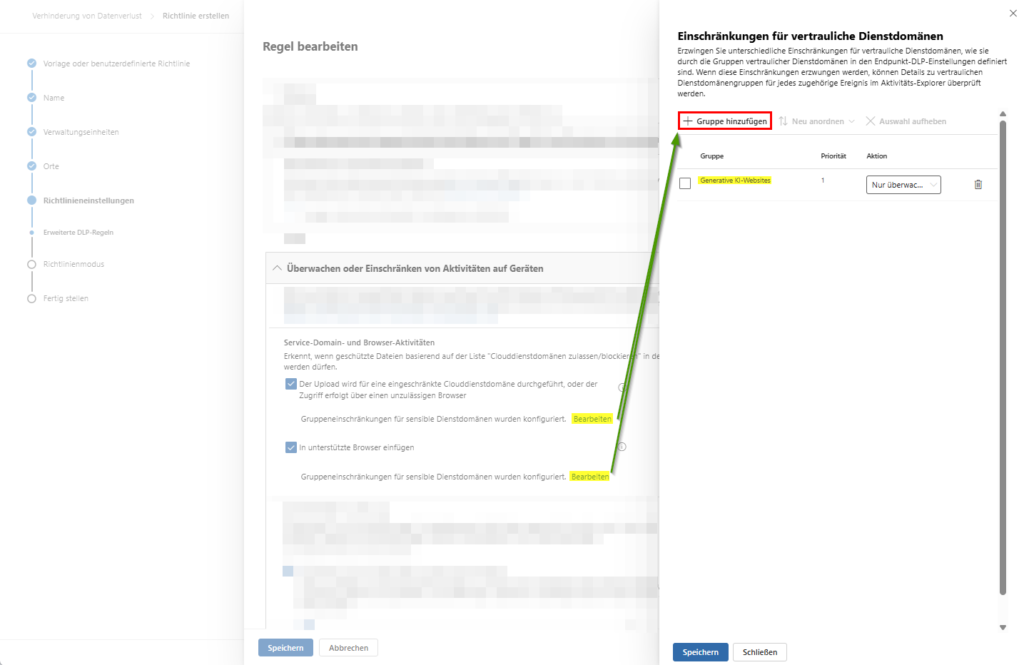
This feature uses the global list of your "Allowed/Blocked Cloud Service Domains". If a user attempts to upload files containing sensitive content to untrusted destinations (such as private web storage or unmanaged AI tools), one of the following escalation levels will apply:
- Audit: The process is logged for compliance purposes only.
- Warn: The user receives a notification, but can continue the process.
- Block: Data transfer is strictly prohibited.
- Blocking with override: The user can bypass the blockade by entering a business justification . This preserves flexibility in everyday work and still remains audit-proof.
Overview: Shadow AI Services for DLP Control
| Category | URLs / Services | Focus for monitoring |
| Popular LLMs & Chatbots | chatgpt.com, openai.com, claude.ai, , gemini.google.com, , perplexity.ai mistral.ai | Protection against unauthorized insertion (paste) of company data into general AI prompts. |
| AI Developer Tools (Code Exfiltration) | v0.dev, replit.com, cursor.com, , windsurf.com... | Preventing code uploads or the review of proprietary algorithms by external AI engines. |
| AI Content Generators (Marketing/Design) | canva.com (Magic Studio), midjourney.com, runwayml.com, pika.art | Protect internal imagery, brand assets, or unpublished marketing strategies. |
| AI Productivity & Analytics | otter.ai, fireflies.ai, ( deepl.com AI translation) | Protect meeting transcripts or confidential documents uploaded for analysis. |
When you enter these URLs into the Microsoft Purview portal, you can define them as "Unallowed Cloud Service Domains."
- Setting: Settings > Device Management > Browser and domain restrictions to sensitive data.
- Action in the policy: In your DLP rule, under "Browser and domain activity restrictions," select "Block upload to an unauthorized cloud service domain name."
This ensures that the web browser (Edge native or Chrome with extension) stops the flow of data as soon as one of these URLs is the destination.
C. User Interaction & Incident Reporting
To increase the acceptance of the security measures and minimize the amount of training required, you should automate communication:
- Policy Tips: Enable context-sensitive banners directly in the Edge browser. The user immediately learns in real time why an action has been restricted.
- Admin Warnings: Set the Severity. In the event of critical incidents – such as mass data leaks – your SOC team is alerted immediately to minimize response time (MTTR).
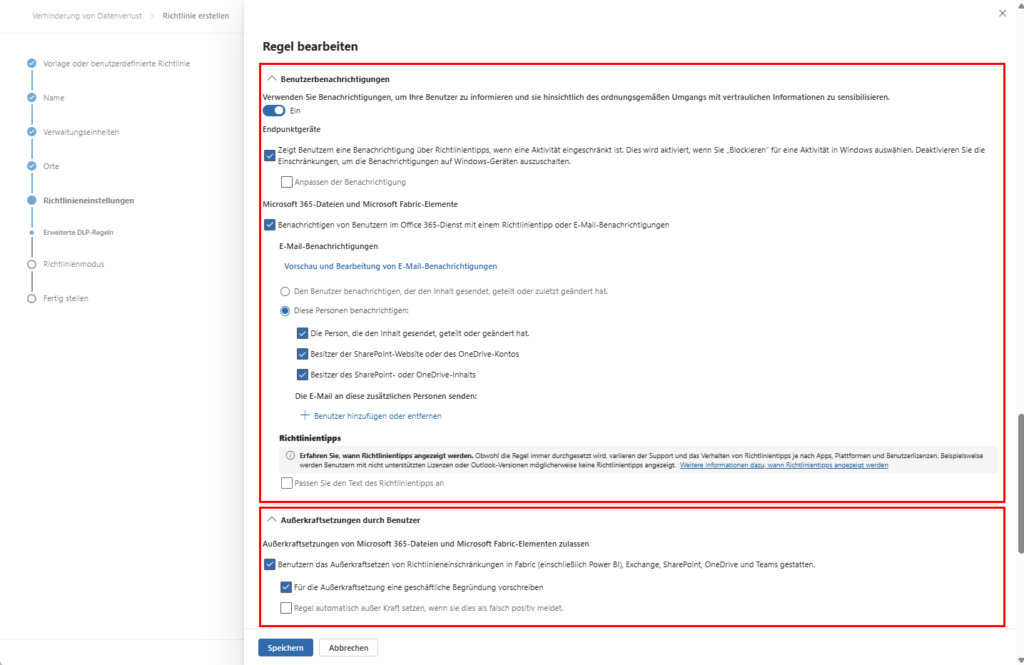
Step 5: App control and location-specific protection
After the browser protection, the configuration for the operating system and Microsoft 365 services follows. Here you determine how deeply the DLP engine intervenes in local workflows.
A. File Activity & App Governance
- Safety Baseline: Under File activities for all apps , you define the default behavior for all applications that are not explicitly grouped.
- Restricted App Groups: Here you can define exceptions. For example, a "developer group" is allowed to export data to specific testing tools, while this remains blocked for standard apps (such as private messengers). These granular rules override the global baseline.
B. Protection against ransomware & shadow IT
A powerful tool is the access restriction for apps. You can prevent unauthorized or unknown applications (that aren't on your whitelist) from opening sensitive files read-only in the first place. This is an effective bar against ransomware that tries to encrypt or exfiltrate data.
C. Dealing with proprietary formats
For files that Purview cannot index natively (e.g. CAD drawings or special containers), use the option: "Apply restrictions only to unsupported file extensions".
- Advantage: Protection here is based on file type rather than content analysis. This ensures that even "blind spots" of the engine are controlled.
D. Microsoft 365 Locations (Teams & SharePoint)
At the same time, you control the data flow within the cloud workloads:
- Teams chat: Stop sending sensitive information in real time.
- Encryption: With the action "Restrict access or encrypt content" you secure the data in such a way that it can only be opened by authorized persons, even after a download (data-at-rest).
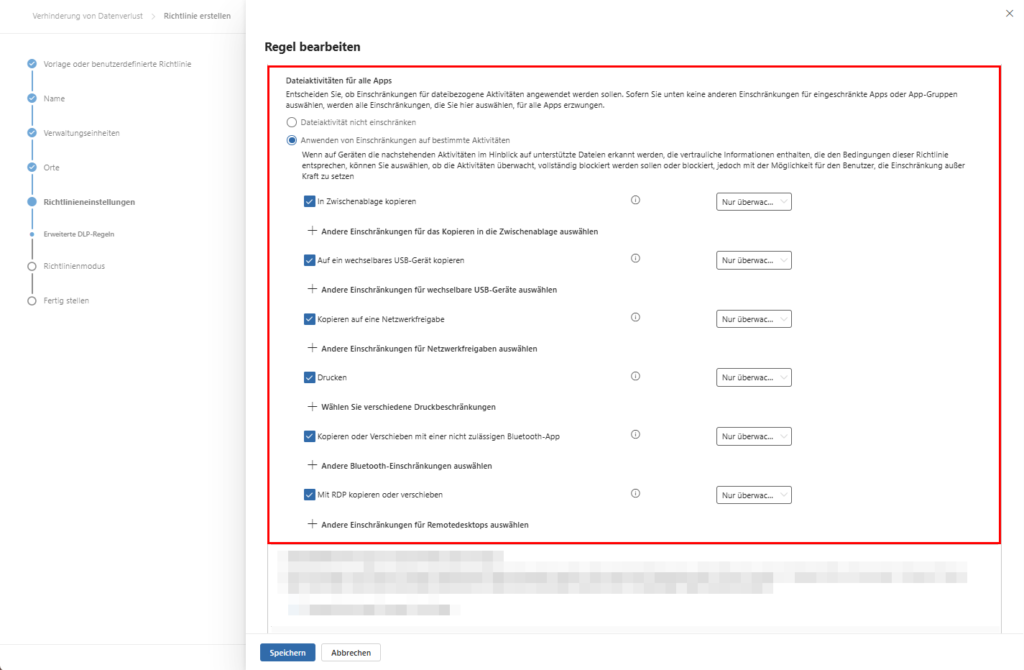
Step 6: User Engagement, Overrides, and Incident Management
A DLP strategy is only as good as its adoption. Transparency is the key to avoiding frustration for the end user.
A. Acceptance through Policy Tips
Make it mandatory to enable user notifications. Policy tips show the user in real time why an action was blocked. This acts like a "just-in-time" training and massively reduces the burden on your IT support.
B. The "Safety Valve": Overrides
Allow overrides by users in non-critical areas.
- Causality: The user must enter a business justification.
- Compliance: This justification is stored directly in the audit logs . This way, the employee remains able to work in urgent cases, while you keep complete documentation for audits.
C. Incident Reporting & Prioritization
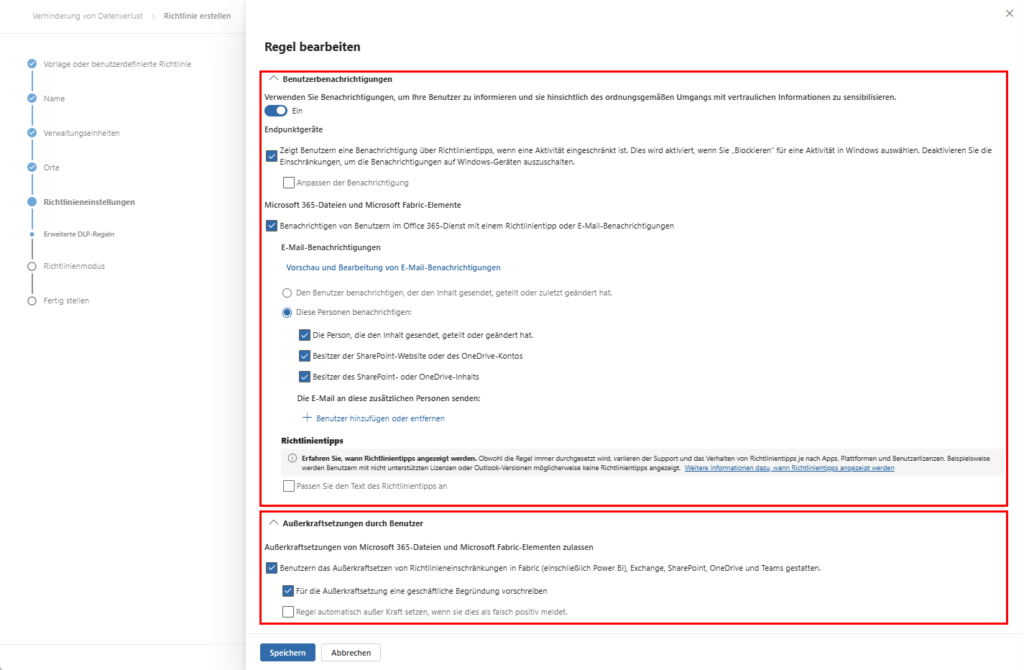
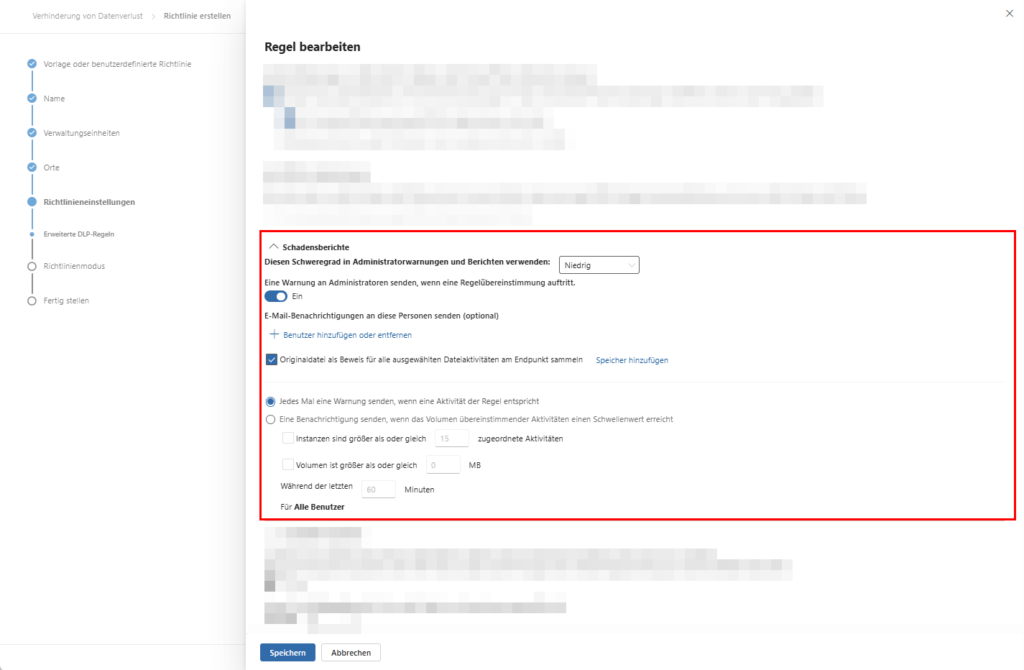
Under Damage Reports , you define the alert chain:
- Severity: Prioritize incidents (e.g., exporting >100 credit card numbers).
- Admin Warnings: In the event of highly critical hits, the SOC team receives an email immediately. This significantly reduces the mean response time (MTTR) in the event of data breaches.
- Rule Priority: Make sure that if more than one rule applies, the most restrictive set of rules is always evaluated first.
Recommendation: Simulation rollout
A DLP project often fails not because of the technology, but because of a lack of user acceptance due to overly restrictive guidelines. A structured rollout is therefore unavoidable.
Experts recommend a three-step approach:
- Simulation mode (Audit Only): Policies are activated, but do not generate blockages or warnings for the user. The Activity Explorer is used to analyze the hit rate and to identify "noisy rules" that would produce too many false positives.
- Notification mode (Block with Override): The user receives a "toast" notice for a policy violation. However, he can continue the action if he gives a business justification. These justifications are valuable feedback for IT to identify legitimate business processes that have not been considered so far.
- Enforcement Mode (Block): In this phase, highly critical activities are blocked without exception. This should be limited to scenarios where the risk of data leakage far exceeds the productive benefits.
Analysis and Tuning in the Activity Explorer
The Activity Explorer is the central instrument for monitoring. It stores events from audit logs, label changes, and DLP hits for 30 days. Administrators should regularly export reports on label downgrades to detect risky user behavior at an early stage.
To reduce false positives, Purview offers the possibility to configure file path exclusions. This is especially relevant for Windows devices to prevent temporary files in directories from triggering unnecessary scans that %SystemDrive%\Users\*\AppData\Local\Temp could affect system performance.
Browser Protection & Defender for Cloud Apps Integration
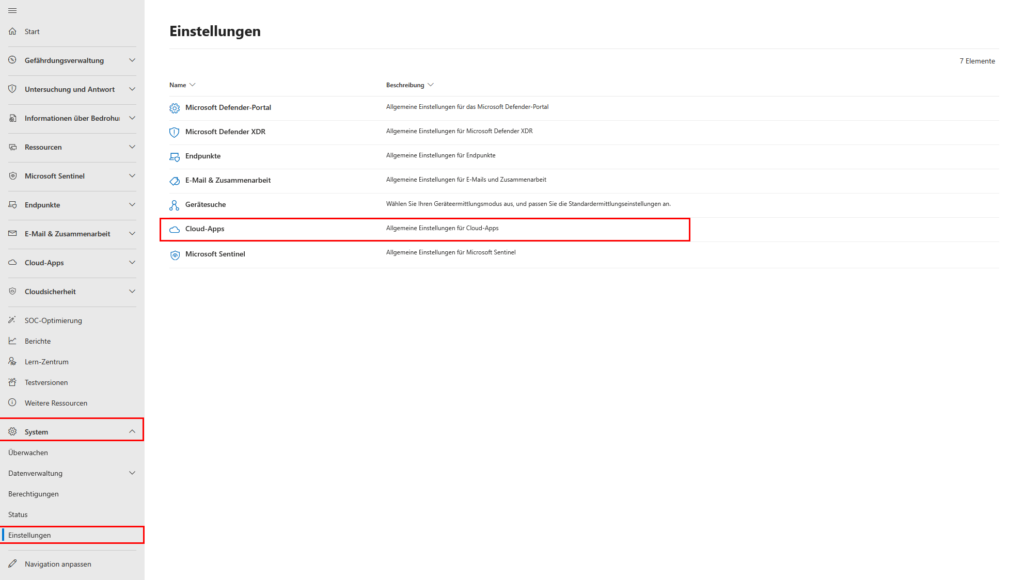
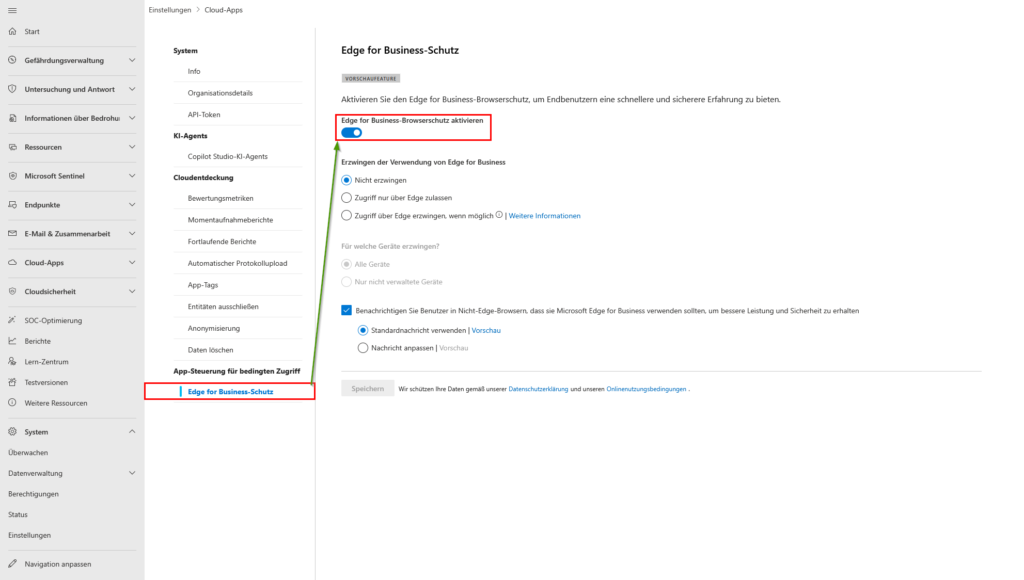
The 'game changer' for 2026: The fusion of endpoint DLP and cloud app security (MDA) directly in the browser process. In-Browser Protection uses Microsoft Edge for Business as a native security agent, eliminating the need for classic reverse proxy architectures. This deep integration provides higher compatibility and lower latency because policy enforcement happens directly in the local browser process.
In order for In-Browser Protection to take effect, the user must be logged in to their Microsoft Edge Work Profile. This ensures the separation of private and business data. In the settings, you can control the enforcement of the use of Edge for Business. You have the choice to completely block access to business apps in other browsers, which massively reduces the attack surface. In addition, Microsoft deactivates the developer tools in the browser when In-Browser Protection is active to prevent manipulation by experienced users.
Comparison: Native Edge Integration vs. Chrome Extension
| Feature | Microsoft Edge (Native) | Google Chrome (with Extension) |
| Installation | None (native in browser core) | Required (Purview Extension) |
| Agent / Footprint | Minimal (no extra process) | Additional process for extension |
| Provisioning | : Automatically via OS onboarding | , Forced-Install via GPO/Intune required |
| In-Browser Protection | Fully Supported (DLP + MDA) | Restricted (Primary File Uploads) |
| Tamper Protection | : Very High (System Level)High | (if Extension is locked) |
| Performance | Real-time with no noticeable latency | Low latency through API calls |
| Maintenance | Automatic via browser updates | Monitoring of the extension version required |
Critical Assessment & Conclusion
Browser protection via Purview marks the farewell from blunt content filters to a context-sensitive security instance. A key advantage over classic web proxies is the ability to inspect encrypted HTTPS traffic directly at the endpoint without having to break tedious SSL inspection chains. This conserves resources and preserves privacy for private use.
From a security perspective, native integration with Edge for Business is the gold standard, as it prevents manipulation by the user on the system side. In environments where Chrome is indispensable, the extension must be configured as "forced-install" via Group Policy or Intune in order not to lose its protective effect. The real-time check is done locally on the device; for extremely complex policies with hundreds of SITs, this can lead to minimal latencies. Therefore, the administrative principle applies: configure as specifically as possible, as broadly as necessary.
In the long term, the combination of browser DLP and the Semantic Index offers a powerful synergy. Purview increasingly understands not only patterns but the context of data, dramatically reducing false positives. For you as an administrator, this means less "noise" in the alerts and a higher acceptance of the security measures throughout the company.

Sei der Erste und starte die Diskussion mit einem hilfreichen Beitrag.
Leave a comment
Dein Beitrag wird vor der Veröffentlichung kurz geprüft — fachlich, respektvoll und auf den Punkt ist hier genau richtig.