
... Check OwaMailboxPolicy!
Microsoft is hardening Outlook on the web and the new Outlook for Windows. To achieve this, the file types .msix and .msixbundle are being added to the list of blocked file types in every OwaMailboxPolicy—both in the default policy and in all custom policies created within the tenant. After the rollout, users will no longer be able to open or download such attachments in OWA or the new Outlook.
Most environments won’t notice this because .msix packages are rarely sent via email. However, for software distribution and development, this file type may be in circulation. You should be aware of these scenarios before rollout—otherwise, a blocked attachment will end up as a helpdesk ticket without anyone knowing the cause.
Capture the entire policy inventory
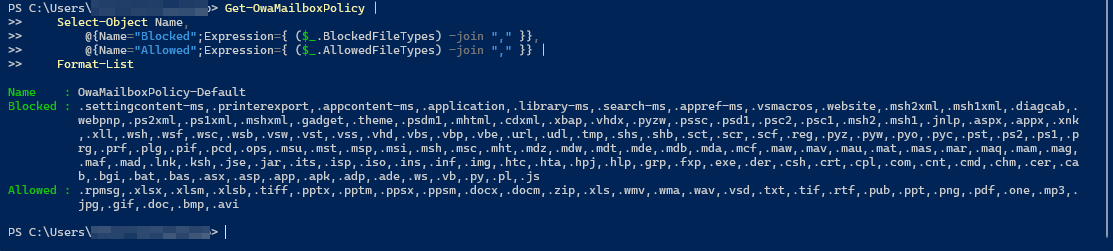
Many tenants have one or more custom OwaMailboxPolicies in addition to the default policy, which have been created over the years. The block applies everywhere, so you first document the status of all policies.
Connect-ExchangeOnline

Get-OwaMailboxPolicy |
    Select-Object Name,
        @{Name="Blocked";Expression={ ($_.BlockedFileTypes) -join "," }},
        @{Name="Allowed";Expression={ ($_.AllowedFileTypes) -join "," }} |
    Format-List
This way, you can see for each policy which types are already blocked and which are allowed. It's also a good opportunity to consciously review the lists in the first place.
2: Allow .msix if needed
If you don’t need .msix and .msixbundle files, no action is required. The file type will automatically be added to the blocklist during the rollout. If you do need them, add them to the allowed file types before the rollout. This can be done directly for an individual policy.
Set-OwaMailboxPolicy -Identity "OwaMailboxPolicy-Default" `
    -AllowedFileTypes @{Add=".msix",".msixbundle"}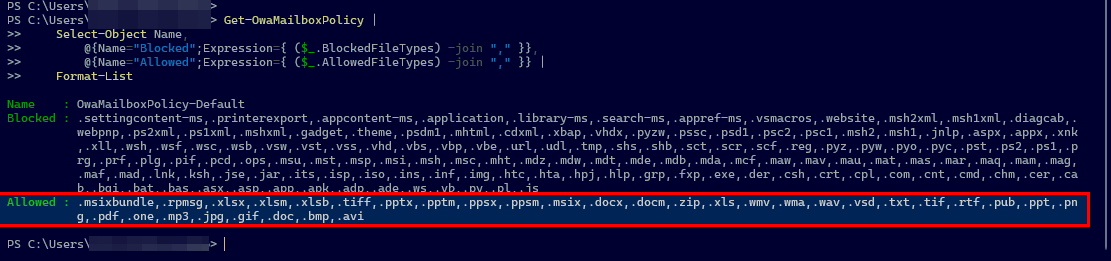
If you have multiple policies and want to allow the type everywhere, you simply iterate through all of them. The hashtable syntax with Add appends to the list instead of overwriting it, so existing entries are not lost.
Get-OwaMailboxPolicy | ForEach-Object {
    Set-OwaMailboxPolicy -Identity $_.Name `
        -AllowedFileTypes @{Add=".msix",".msixbundle"}
}3: Verify the results
After making the change, you verify that the type is actually permitted in each desired policy. A concise overview gives you an immediate picture.
Get-OwaMailboxPolicy |
    Select-Object Name,
        @{Name="msix erlaubt";Expression={ $_.AllowedFileTypes -contains ".msix" }},
        @{Name="msixbundle erlaubt";Expression={ $_.AllowedFileTypes -contains ".msixbundle" }}
Classification
The change is small, but the benefit for visibility is greater. Once you’ve properly documented the OwaMailboxPolicy, you’ll also know the lever for other file types in the future.
The allowlist and blocklist work against each other, and an entry in AllowedFileTypes overrides the block for that specific file type. For .msix, this means making a deliberate decision, documenting it, and simply relying on the default behavior if the file type is not needed.

💬 Comments
0 KommentareSei der Erste und starte die Diskussion mit einem hilfreichen Beitrag.
Leave a comment
Dein Beitrag wird vor der Veröffentlichung kurz geprüft — fachlich, respektvoll und auf den Punkt ist hier genau richtig.