
... Migrate Apps to Entra Tokens!
Microsoft is removing pre-authenticated URLs, known as tempauth URLs, from SharePoint Online and OneDrive. Starting April 1, 2027, selected Graph file APIs will no longer return URLs containing embedded authentication information and will no longer issue HTTP 302 redirects to such URLs. Affected are the API families for download and content, createUploadSession, copy operations including monitoring, preview, thumbnail, version, and format conversion.
The reason is security. A URL with an embedded token is an access credential that can be copied, cached, and redeemed. Going forward, SharePoint Online will require a valid Entra ID token for the resource. Applications that store, inspect, or follow such URLs via a 302 redirect will stop working if they are not migrated by the deadline. This includes custom line-of-business apps, automations, and some third-party integrations. Requests made directly against the SharePoint APIs rather than via Graph are not affected.
Step by step
1: Discover candidates among your apps
There is no single query that will show you the exact usage of tempauth. Therefore, you approach it through two signals: which apps have Graph file permissions at all, and which of those actively access SharePoint or OneDrive. First, obtain the list of enterprise apps and their service principals.
Connect-MgGraph -Scopes "Application.Read.All","AuditLog.Read.All","Directory.Read.All"

Get-MgServicePrincipal -All -Property DisplayName,AppId,Id |
    Select-Object DisplayName,AppId |
    Sort-Object DisplayName |
    Export-Csv -Path .\enterprise-apps.csv -NoTypeInformation -Encoding UTF8
Next, for each suspicious app, you check the granted Graph permissions (such as Files.ReadWrite.All, Sites.ReadWrite.All) and the app's sign-in activity in the Entra sign-in logs. Apps that regularly interact with Graph file endpoints and retrieve download, upload session, preview, or copy URLs are on your review list.
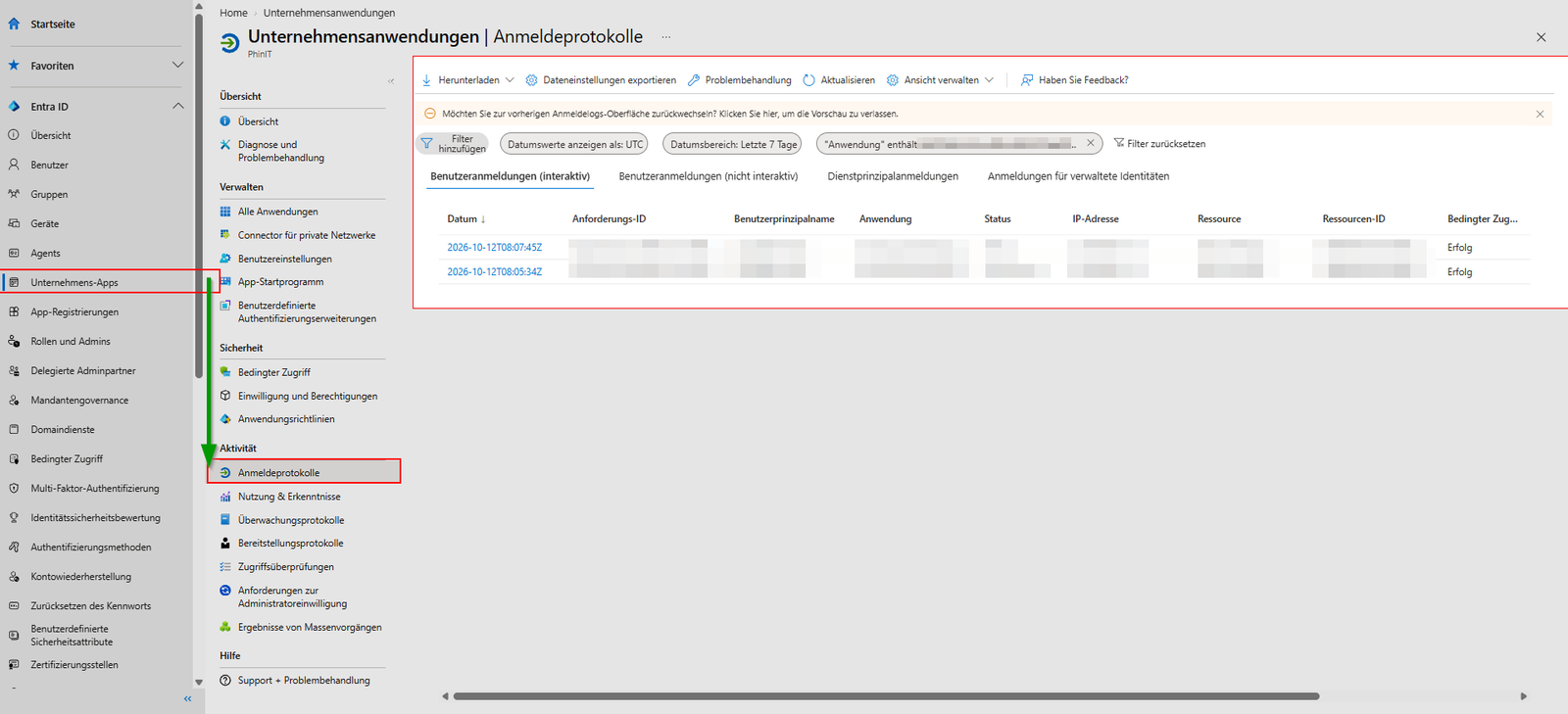
2: Validate each app’s behavior
For each app on the list, you address three questions: Does the app store, inspect, or resolve a URL with an embedded token? Does it rely on a 302 redirect, or can it handle a direct content response? Can it obtain and include a valid Entra ID token for Graph or the SharePoint Online resource?
For custom-developed apps, the development team provides the answer; for third-party applications, it’s the vendor. Get these commitments in writing, because the fix lies in the code, not in a setting.
3: Testing the new tenant controls
In preparation, you'll receive new SharePoint Online controls that will be included with an upcoming version of the SharePoint Online Management Shell. These allow you to enable the new URL behavior per application ID and test it before the deadline kicks in. The change isn't enabled by default—you select the app IDs yourself.
Connect-SPOService -Url https://<tenant>-admin.sharepoint.com

# Aktuellen Stand der Pre-Auth-Einstellungen ansehen
Get-SPOTenantPreAuthSettings
When you enable the new behavior for a small set of app IDs, closely monitor the app's sign-in and error logs. If the app runs smoothly with direct content responses and Entra ID tokens, extend the configuration to additional applications. Document the test status for each app to ensure no application remains unchecked by the deadline.
Why April 2027 is closer than it sounds
Eighteen months of lead time may seem generous. For a custom-developed app with an approval process, testing cycle, and maintenance windows, the timeframe is tight. With third-party vendors, you are dependent on the vendor’s release schedule.
Identifying the candidates early and reaching out to vendors now means having a validated list by the deadline instead of dealing with an outage. This is an operational responsibility, not an end-user concern, which is exactly why it can easily get overlooked in day-to-day operations.

💬 Comments
0 KommentareSei der Erste und starte die Diskussion mit einem hilfreichen Beitrag.
Leave a comment
Dein Beitrag wird vor der Veröffentlichung kurz geprüft — fachlich, respektvoll und auf den Punkt ist hier genau richtig.