

Classic DLP rules often fail in the face of reality: rigid blockades are frustrating, generic warnings are clicked away. The goal is context-sensitive user guidance that actively takes the user into compliance responsibility instead of just patronizing him. While the “Classic Outlook” scored here, the new Outlook client (Monarch) was a functional dead end for a long time.
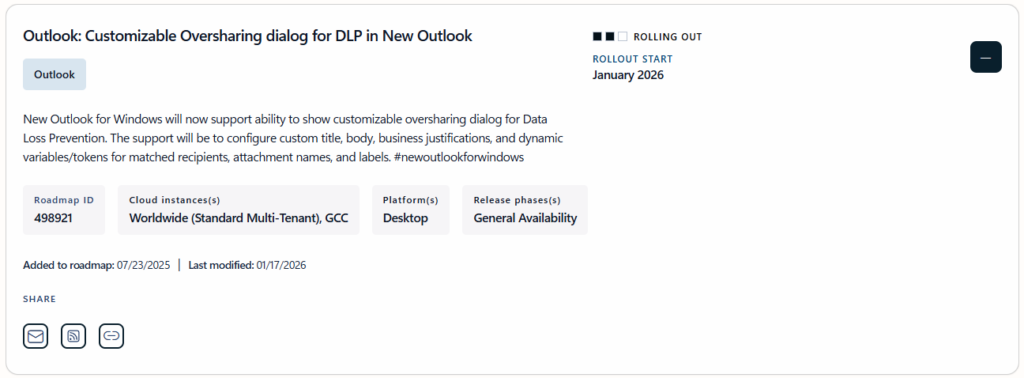
With the rollout of the roadmap item 498921 (MC1202974), Microsoft is now following suit: Custom oversharing dialogs based on JSON are now the standard for granular data control in the modern client as well.
The Architecture of the Custom Oversharing Dialog
An oversharing dialogue is technically an interception event. When a user clicks Send in the Outlook client, the on-premises DLP engine (or the service in the background on delayed sending) evaluates the content against the active policies. If a violation is detected – such as sending documents with the label “Strictly Confidential” to external recipients – the system triggers a pop-up.
The decisive difference with the “Custom” variant is the controllability of the content. Instead of a standard Microsoft message, the system uses a JSON structure defined by you. This makes it possible to display organization-specific instructions, legal notices or tailor-made justification options (business justifications). This increases acceptance among end users, as the warning does not act like a system error, but like an internal policy.
Implementation via JSON and PowerShell
The configuration is not done directly via sliders in the Purview Portal, but by importing a structured file. This file must be UTF-8 encoded and must not contain any comments.
The JSON structure is modular:
- LocalizationData: One array for up to 10 languages.
- Title: Maximum 75 characters for the headline.
- Body: Up to 800 characters for the actual explanation. Here you can use dynamic tokens such as
%%MatchedRecipientsList%%,%%MatchedLabelName%%or%%MatchedAttachmentName%%. - Options: Up to three predefined justification texts (100 characters each).
To enable this configuration, you need to bind it to an existing DLP rule.
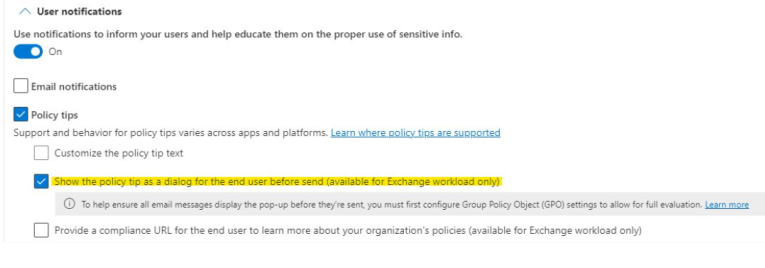
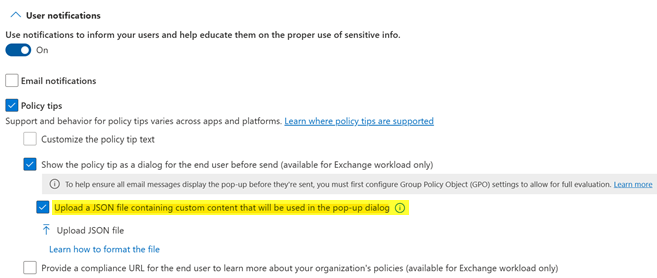
In the Purview Portal, activate the checkbox for uploading a JSON file. However, since we as administrators prefer automation, the way through PowerShell is often more efficient. First, connect to the compliance endpoint:
Connect-IPPSSessionThen read the prepared JSON file and update the rule:
$JSONContent = Get-Content "C:\Scripts\DLP\OversharingTemplate.json" -Encoding UTF8 | Out-String

Set-DlpComplianceRule -Identity "Rule-External-Confidential" `
    -NotifyPolicyTipCustomDialog $JSONContent `
    -NotifyPolicyTipDisplayOption Dialog
Important: The parameter -NotifyPolicyTipDisplayOption Dialog ensures that the pop-up is actually presented to the user and not just a discreet policy tip at the top of the email.
The process in the client: What happens when you send?
Once the policy is synchronized (which can take a few hours in the tenant), the new Outlook client responds proactively. If you compose an email that violates the rule, the following happens:
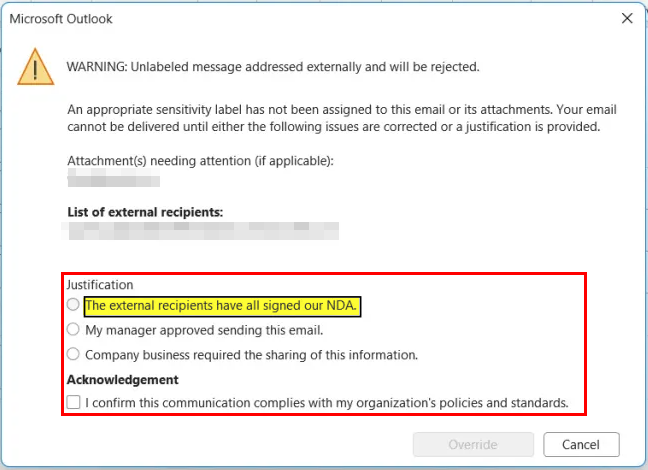
- Evaluation: When you click Send, Outlook checks the recipient domains and the metadata of the attachments.
- Triggers: The JSON data is loaded and the dialog box is rendered.
- Interaction: As the sender, you must now either select one of the predefined reasons or (if configured) enter a free text.
- Audit: The chosen justification is stored in the Purview audit logs together with the send event, which allows the compliance department to understand why an alert was ignored afterwards.
Appreciation and Administration
The introduction of custom oversharing dialogs for the new Outlook closes a critical gap in feature parity to the classic client. From a security perspective, this feature is a powerful tool for raising user awareness. It shifts the responsibility for data protection back to the originator of the information to a certain extent without completely interrupting the workflow.
However, there are pitfalls: Evaluation in the client is not absolutely secure. If a user clicks extremely fast or the network connection is unstable, the mail may pass the local check before the dialog appears. In this case, the DLP check in the Exchange Online transport pipeline takes effect. Here, the mail is then hard blocked or encrypted, but the fancy dialog no longer appears for the user – he only receives an undelivery report (NDR).
For a clean implementation, you should therefore make sure that the JSON validation is error-free. A missing comma or an incorrect case sensitivity in the keys (e.g language . instead of Language) will cause the system to revert to the standard dialog without comment. Use VS Code with a JSON schema validation to catch this.
Overall, the Custom Oversharing dialog in the new Outlook is a mandatory feature for environments with high compliance requirements (E5/G5 licenses). It transforms DLP from a “prevention tool” to a “consulting tool”.





Be the first to comment