

A lack of transparency regarding assignment criteria is the primary cause of skyrocketing license costs in Microsoft 365 environments. The PhinIT License Analysis addresses this head-on: it is not a passive scanner that merely reads your tenant’s current state, but a technical architecture configurator.
Instead of looking at licenses for users in isolation, you define functional guardrails. The tool then performs a precise needs assessment based on your actual technical requirements, showing you what you truly need from a licensing perspective.
Step 1: The Requirement Matrix (Input)
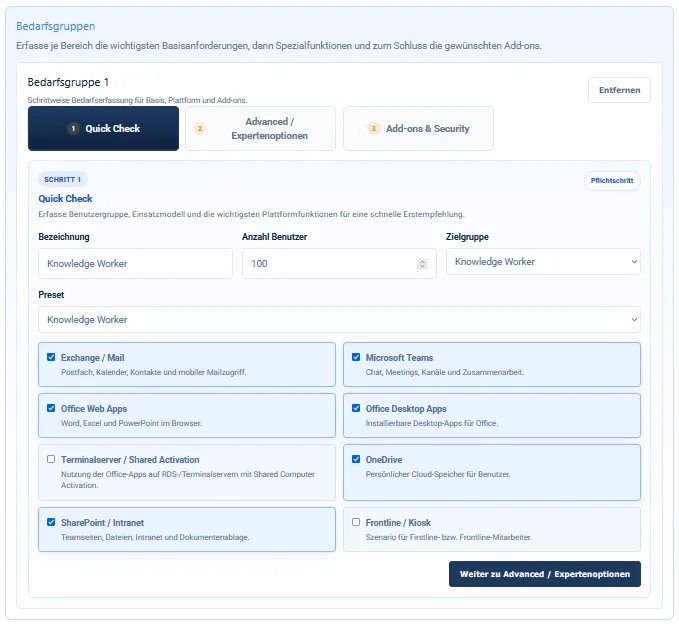
The process begins by segmenting your user profiles. Here, you define your technical needs, not your current inventory. You divide your organization into logical segments, such as stationary office workers, mobile "frontline workers," or specialized roles.
A Senior Admin knows that this is where the greatest leverage lies: if shift schedules are only read on a tablet, an F-plan is sufficient. If complex security policies are required, Business Premium or E5 becomes the target. A critical factor is the infrastructure operation: Do you use Office on terminal servers (VDI/Shared Desktop)? If so, the tool enforces the selection of licenses with "Shared Computer Activation" support to ensure you remain legally compliant.
Step 2: Feature-Based Filtering
In addition to standard suites, you can define specific Advanced Features and dedicated add-ons. Whether you need Microsoft Bookings for scheduling, Defender for Office 365 for enhanced email protection, or Exchange Online Archiving for legal compliance—the algorithm instantly checks which SKU already contains these functions natively and where an add-on is the more economical choice.
The tool allows for granular control, especially in the Security sector: you can specify requirements for Entra ID P2 (Identity Protection), Enterprise Information Protection, or standalone Intune licenses. It determines precisely whether an expensive E5 license is necessary or if a combination of Business Premium and a specific add-on provides the same functionality at a lower cost.
Step 3: The Target State Evaluation
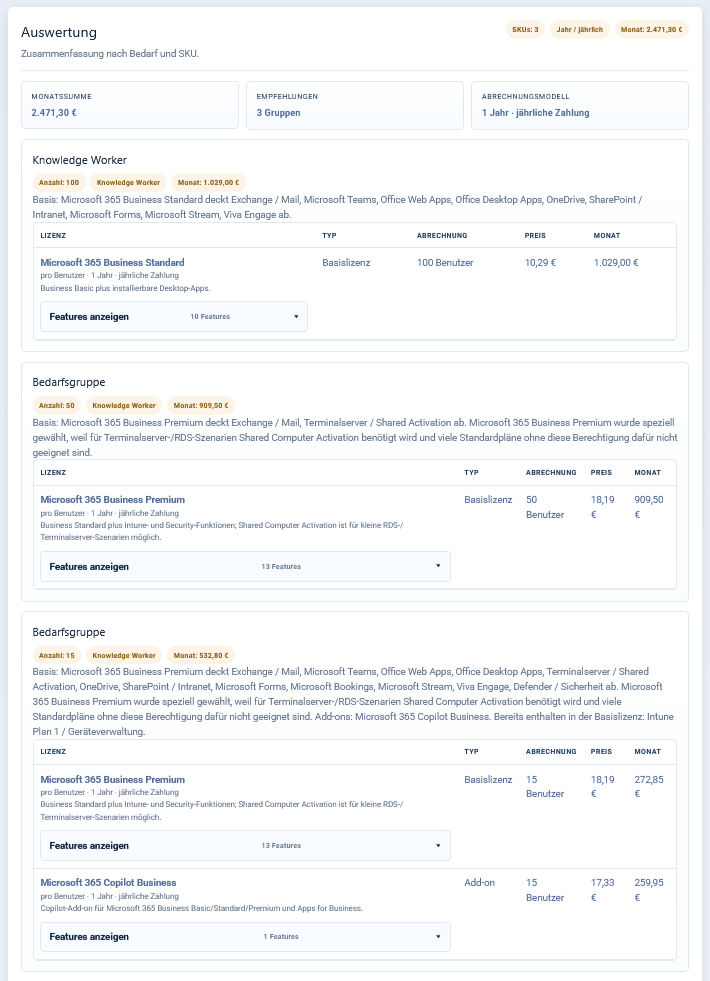
The result is a detailed feature list and a SKU recommendation. The evaluation shows the ideal distribution (e.g., 40x Business Premium + P2 Add-on, 60x F3). This is where the actual administrative value is created: you compare this evaluation against your current Microsoft invoice.
The delta between the tool's result (what you need) and your tenant inventory (what you pay for) immediately reveals over-licensing. The monetary valuation shows you in black and white exactly how much monthly budget you can save by aligning with the ideal target state, while simultaneously ensuring all required advanced features are covered.
Step 4: EU Alternatives vs. M365
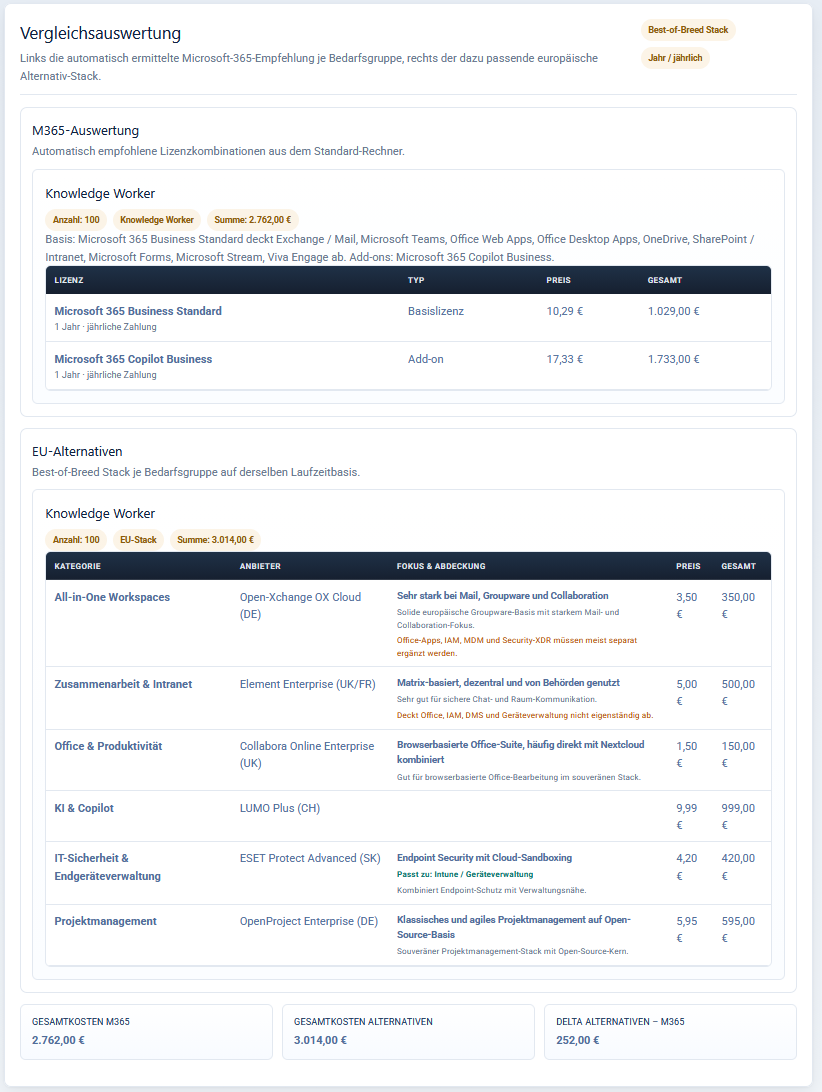
A decisive highlight of the evaluation is the direct comparison between Microsoft suites and EU alternatives from other providers. Additionally, the analysis integrates a comparison with AI options.
The system compares standard suites (including Teams) against desired AI functionalities. This allows you to see down to the cent whether the potential savings from switching to alternative third-party solutions cover the costs for modern AI features like Copilot. You receive a clear basis for deciding whether an "All-in-Microsoft" strategy or an approach using European alternatives is more economically viable.
License Management as a Strategic Tool
True cost optimization is not achieved through discount negotiations, but through technical discipline in feature selection and the courage to compare the market. The PhinIT Advisor provides you with an audit-proof PDF protocol that serves as a definitive decision template for procurement and management.
You will no longer over-purchase licenses out of uncertainty. Instead, you create an architecture that costs exactly as much as the required functionality demands—taking into account third-party advantages and AI needs. For you as an administrator, this means: full budget control and a solid chain of command for every licensing decision.
👉 TO THE TOOL => https://phinit.de/m365-lizenzberater
Sei der Erste und starte die Diskussion mit einem hilfreichen Beitrag.
Kommentar hinterlassen
Dein Beitrag wird vor der Veröffentlichung kurz geprüft — fachlich, respektvoll und auf den Punkt ist hier genau richtig.