On October 14, 2025, support for Windows 10 will end. But with a Microsoft account, you can get another year of free security updates.
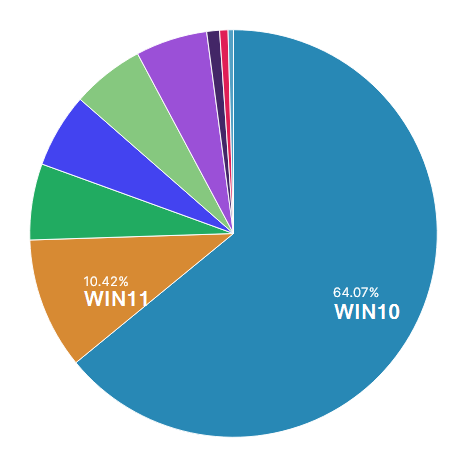
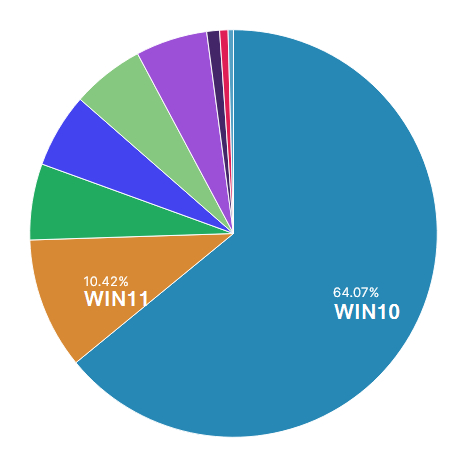
Theclock is ticking: In a few weeks, Windows 10 support will come to an end. A look at my blog statistics shows the problem clearly: 64% of my visitors are still using Windows 10!
- Worldwide, over 60% of all Windows PCs are affected.
As of October 14, there will be no more security updates, bug fixes, or technical support. Your PC will continue to run, but it will become increasingly vulnerable to cyberattacks -> like a car without a MOT -> Gross negligence.
How do I activate the free updates?
For the first time, Microsoft is offering a Consumer ESU (Extended Security Updates) program for private users. You have three ways to register:
Microsoft account
Simplified conditions apply in Germany and the entire EU
- You need a Microsoft account (create for free on microsoft.com)
- Stay logged in with this account
- Log in at least once every 60 days (otherwise you will lose access)
- No hidden costs, no subscription trap
ONLY Outside the EU: In addition, you need to enable Windows Backup, which syncs your PC settings with OneDrive. The 5 GB of free OneDrive storage is sufficient for this.
Microsoft Rewards
Have you already earned 1,000 Microsoft Rewards points? Then you can redeem them for one year of ESU. The 1,000 points are reached relatively quickly if you use these services anyway.
- To earn Rewards Points:
- Search with Bing (if you're signed in with a Microsoft account)
- Use Microsoft Edge as a browser
- Buy apps from the Microsoft Store
- Take part in surveys and promotions
- Complete small tasks on a daily basis (e.g. quizzes, surveys)
Pay once
- 31.49 EUR (30 USD) one-time payment
- Covers up to 10 devices (via the same Microsoft account)
- No recurring costs
- Valid for one year, until October 13, 2026
Meet the requirements!
Windows 10 version 22H2, all updates installed (important: KB5063709), Microsoft account.
What to do if the link is not yet visible?
Don't panic! Microsoft is rolling out the ESU feature gradually. If you don't see the "Register Now" link yet:
- Install all updates , especially KB5063709
- Sign in with Microsoft account (not a local account!)
- Waiting – the function comes in waves
- It will be available to everyone by 14 October 2025 at the latest
Microsoft guarantees that all eligible users will be able to log in until the end of support.
Why act now?
ESU is only a bridge, not a permanent solution. The year gives you time to check Windows 11 compatibility (free upgrade with PC Health Check Tool) or plan budget for new hardware. Without updates, your PC is a real treat for cybercriminals, an antivirus program alone is not enough.
Attention companies: There is a separate ESU program here, starting at $61 per device.
But beware! The price doubles annually and the upgrade is possible for up to 3 years .
Alternatives for old hardware

Your PC can't manage Windows 11 and you don't want to pay or create a Microsoft account? Linux is a free, secure alternative, especially for older hardware!
Linux for beginners
- Linux Mint | Looks similar to Windows, easy to use, large community
- Ubuntu | Most popular distribution, many guides available
- Zorin OS | Specially designed for Windows switchers, familiar interface
Linux for old PCs
- Lubuntu | Very resource-saving, runs even on 10+ years old hardware
- Linux Lite | Name says it all, perfect for weak computers
- MX Linux | Fast, stable, runs smoothly even on older systems
Advanced Linux
- Fedora | Modern features, fast updates, for tech-savvy users
All can be tested from the USB stick (live environment) before replacing Windows. Most Office tasks (LibreOffice), browsers and standard software work without any problems.

Sei der Erste und starte die Diskussion mit einem hilfreichen Beitrag.
Leave a comment
Dein Beitrag wird vor der Veröffentlichung kurz geprüft — fachlich, respektvoll und auf den Punkt ist hier genau richtig.