
Change Cross-Tenant Free/Busy!
When employees in tenant A need to check the availability of colleagues in tenant B, this has so far been handled via EWS. This interface is being deprecated, and the deadline is approaching: Message Center MC1446796 was updated on October 20, 2026.
The final EWS shutdown is April 1, 2027, even for tenants that have continued to use EWS via the EWSEnabled exception. The replacement is the Cross-Tenant Access Policy. This guide shows how to check if you are affected and what the migration entails.
Why this issue affects Outlook users immediately
Set Free/Busy, MailTips, and calendar sharing between tenants to use EWS. If the interface fails, Outlook Desktop will no longer display availability for partner companies in the scheduler, MailTips from the other side will be missing, and shared calendars will remain empty. The outage isn’t noticed in the configuration—it’s the sales team that realizes it when customer appointments are affected.
The rollout of the replacement feature has been ongoing globally since August 2026. According to the Message Center, Free/Busy and MailTips are expected to be rolled out by September 15, 2026, and calendar sharing by October 30, 2026. For GCC, GCC High, and DoD, the rollout is currently paused; Microsoft will announce the resumption date in the Message Center.
Hybrid deployments and pure on-premises scenarios are not affected. For hybrid environments, Microsoft recommends the Dedicated Hybrid App.
Check applicability
Connect-ExchangeOnline

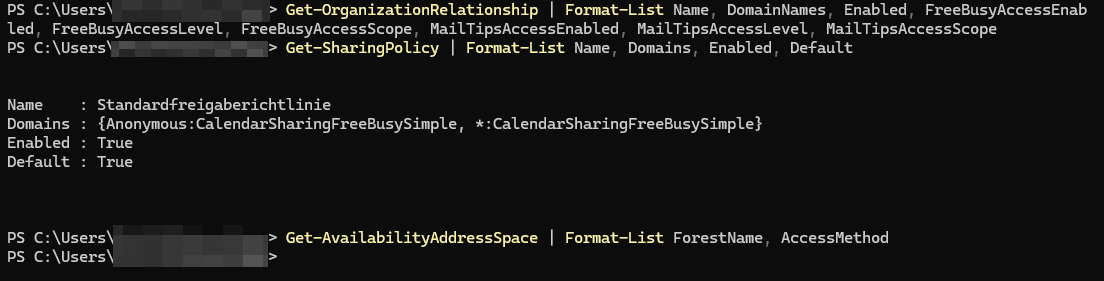
Get-OrganizationRelationship | Format-List Name, DomainNames, Enabled, FreeBusyAccessEnabled, FreeBusyAccessLevel, FreeBusyAccessScope, MailTipsAccessEnabled, MailTipsAccessLevel, MailTipsAccessScope
A relationship is affected if Enabled is set to True, FreeBusyAccessEnabled or MailTipsAccessEnabled is active, and the partner uses Microsoft 365. Sharing Policies control external calendar sharing:
Get-SharingPolicy | Format-List Name, Domains, Enabled, DefaultWhat matters here is whether the policy is active, contains a domain rule with CalendarSharingFreeBusy access, is assigned to a mailbox, and the counterpart is in Microsoft 365. This also includes anonymous calendar publishing via URL (rules with the Anonymous: prefix).
A technical blog also mentions the Availability Address Spaces with AccessMethod OrgWideFBToken:
Get-AvailabilityAddressSpace | Format-List ForestName, AccessMethodThis third check point is not explicitly stated in the Message Center version I read. It comes from a secondary source. Still, perform it – the query is purely a read-rights task.
2: Document inventory
Export the results before making any changes:
Get-OrganizationRelationship | Export-Csv .\orgrel.csv -NoTypeInformation
Get-SharingPolicy | Export-Csv .\sharingpolicy.csv -NoTypeInformation
Exports are your way back. Without them, after the migration, you won’t know which partner domain had which sharing level.
3: Classify partners
Only partners using Microsoft 365 are affected. Handle counterparts with on-premises Exchange separately: the Message Center promises further details in upcoming posts. Therefore, split the list into three groups: Microsoft 365 partners, hybrid partners, and on-premises partners.
4: Set up Cross-Tenant Access Policy
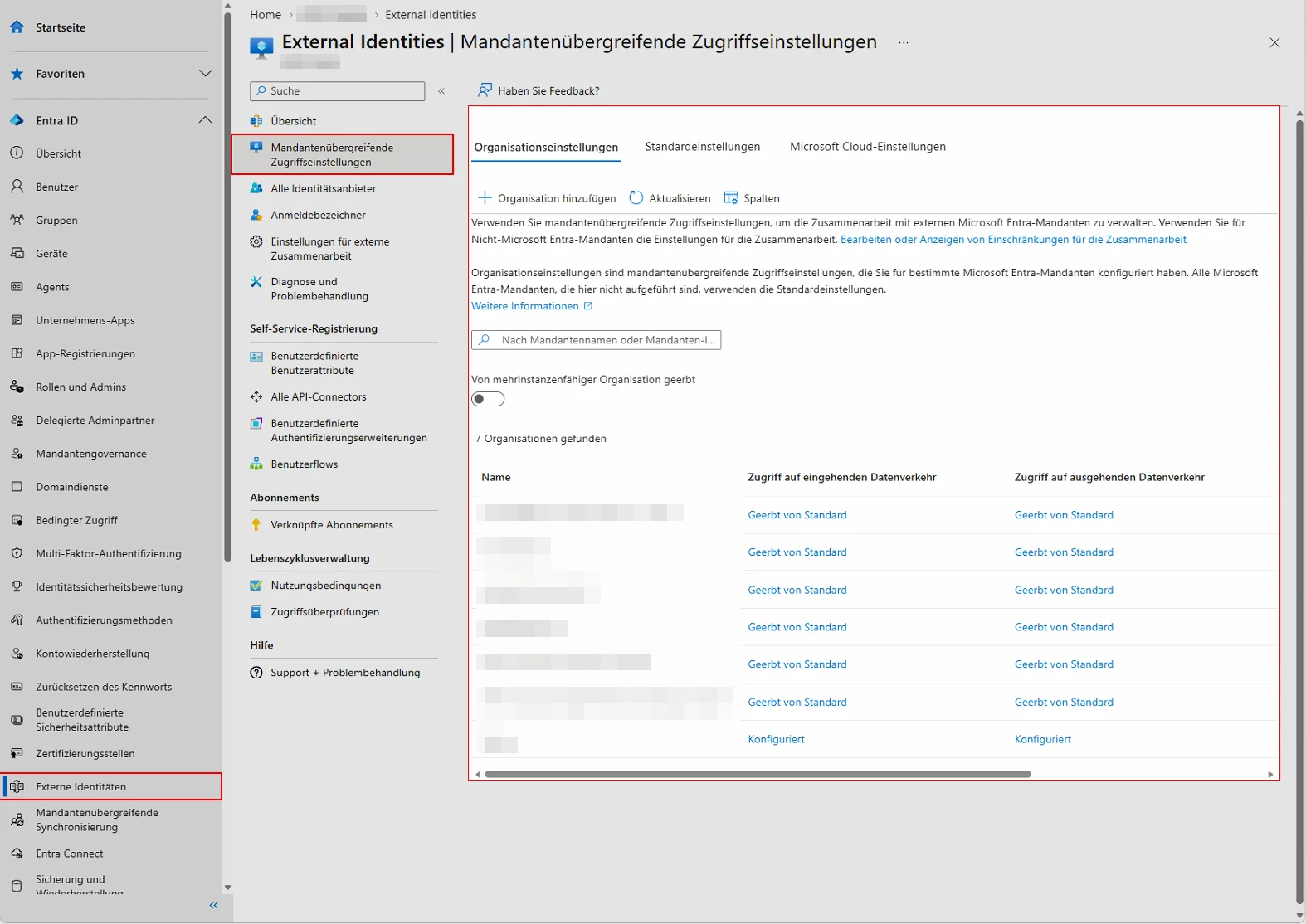
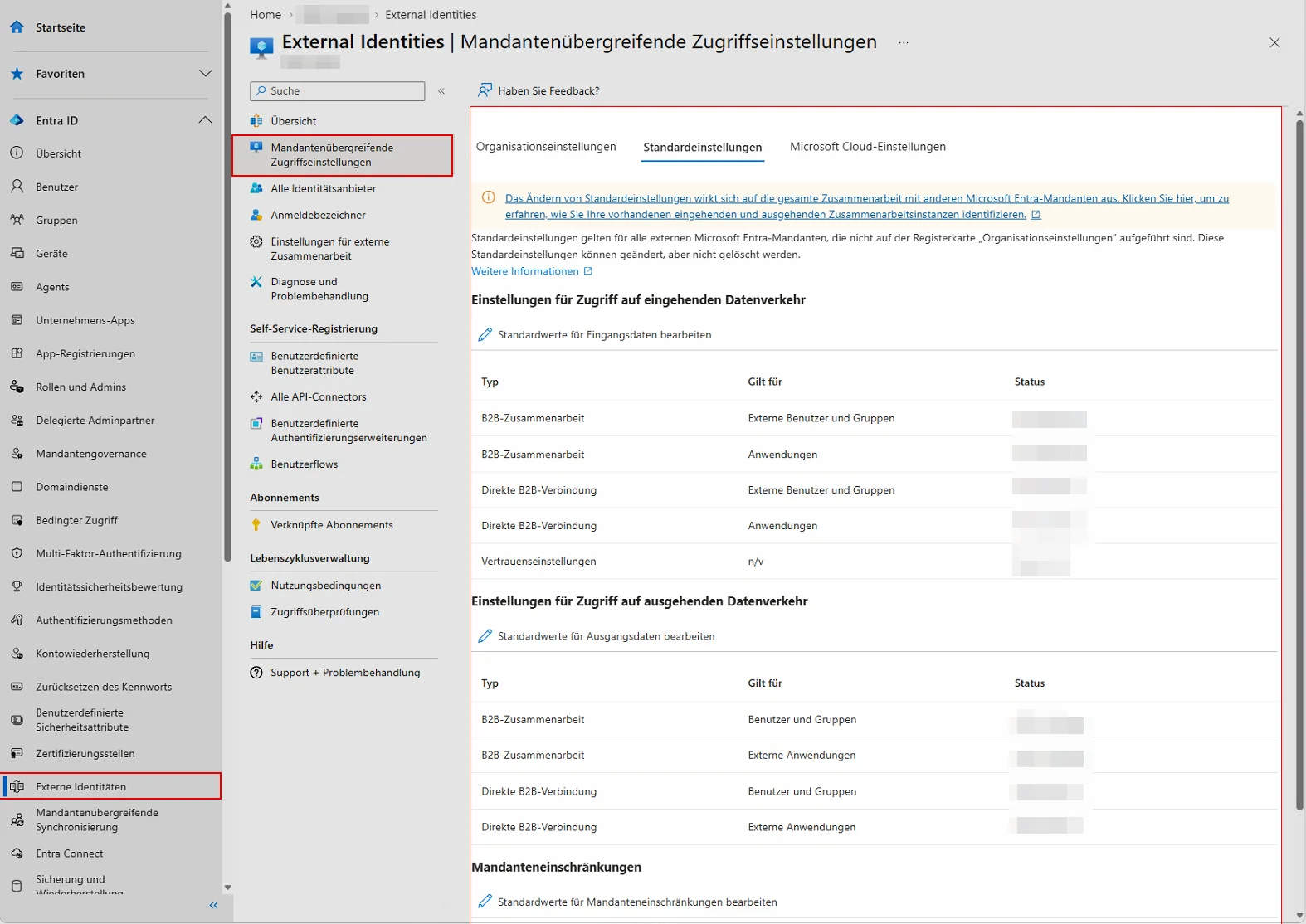
Microsoft’s migration guide outlines four steps: capture current configuration, set up new policy, validate, and remove old configurations. I haven’t verified the exact click path for the sharing settings because I haven’t read the guide.
Cross-tenant access operates on the principle of mutual trust: the target tenant must explicitly allow incoming access, and the home tenant must explicitly allow outgoing access. Whether the same applies to calendar sharing is not specified in the message. Check the migration guide for clarification and proactively plan for the partner to participate.
5: Validate, then clean up
Test with a pilot user and a partner: availability in the scheduler, MailTip for the recipient, sharing of a test calendar. Only then remove the old Organization Relationship and the associated Sharing Policy rule. Anyone who cleans up first risks a partner contact suddenly no longer seeing any availability.
Conclusion
The migration isn’t a major project, but it depends on coordination with third parties—which makes it prone to delays. The timeline helps you here: the rollout of the replacement feature for calendar sharing ends on October 30, while the shutdown isn’t until April 2027. That leaves you roughly five months for review, alignment, and testing.
Start with the inventory, not the configuration. Anyone who runs the three queries today and saves the CSVs will know how many partners are affected. If there are zero hits, you're done. If there are five partners, plan five coordination meetings. The EWSEnabled exception is a delay, not a substitute: it applies at most until the final shutdown and only lets you fix the error later.
The exact configuration path remains unclear. Read Microsoft’s migration guide before creating your first policy. And keep in mind the difference from the other EWS topics: the block for F1/F3 licenses and the migration properties are separate issues.
additional links
| Message Center MC1446796 | EWS deprecation, timeline, admin action | https://mc.merill.net/message/MC1446796 |
| Handsontek M365 Admin | Affected scenarios, Availability Address Space (secondary source) | https://m365admin.handsontek.net/?p=22981 |

💬 Comments
2 KommentareHallo Herr Hepp,ich hätte eine Frage zu einem ähnlichen Problem innerhalb unseres Tenants.Wir verwenden Exchange Online und Outlook Classic. Wenn ich EWS deaktiviere, zeigt Outlook Classic „Keine Verbindung“ bei fremden Kalendern (innerhalb desselben Tenants) auf.Sobald ich auf demselben Kalender explizit Reviewer-Rechte erhalte, funktioniert der Kalender trotz deaktiviertem EWS wieder problemlos.Mit `EwsEnabled = True` funktionieren auch die Kalender mit reinen Default-/Free-Busy-Rechten wieder.Es handelt sich dabei nicht um Cross-Tenant Free/Busy, sondern ausschließlich um Benutzer innerhalb desselben Microsoft-365-Tenants.Gibt es auch für dieses Intra-Tenant-Free/Busy-Szenario auch einen Workaround bzw. eine Konfiguration, mit der man EWS deaktivieren kann, ohne dass dieser Fehler auftritt?Vielen Dank vorab für Ihre Einschätzung und auch für den hilfreichen Artikel.Freundliche Grüße
Hallo | ich muss gestehen, dass ich bei diesem Thema auch leicht „genervt“ bin. Microsoft-seitig ist das seit Jahren bekannt, ein Update oder eine Anpassung gibt es bisher trotzdem nicht.
Tatsächlich läuft reines Frei/Gebucht in Outlook Classic über EWS, höhere Rechte gehen über die MAPI/HTTPS-Schnittstelle.Einen sauberen Workaround mit deaktiviertem EWS kenne ich aktuell nicht. Was bleibt:
1. EWS vorerst aktiv lassen: Set-OrganizationConfig -EwsEnabled $null stellt das alte Verhalten wieder her. Das geht noch bis zur finalen Abschaltung am 1. April 2027.
2. Reviewer-Rechte vergeben: Funktioniert, gibt aber Termindetails frei. Das sollte vorher mit Datenschutz bzw. Betriebsrat abgestimmt sein.
3. Outlook im Web oder neues Outlook nutzen: Beide fragen Frei/Gebucht über REST/Graph ab und sind nicht betroffen. Je nach benötigten AddIns kann das allerdings problematisch sein (Beispiel: ältere Navision AddIns).
EWS bis Ende März aktiv lassen, Termin setzten und Outlook aktuell halten. Zusätzlich den Fall als Ticket an Microsoft melden (im M365 Admincenter unter Support). Je mehr Kunden das melden, desto eher kommt eine Änderung vor April (meine stille Hoffnung).
Danke für das Feedback zum Artikel! LG Andreas
Leave a comment
Dein Beitrag wird vor der Veröffentlichung kurz geprüft — fachlich, respektvoll und auf den Punkt ist hier genau richtig.