
federatedTokenValidationPolicy mandatory from August 2026!
Federated authentication is one of the oldest trust anchors in Microsoft environments and at the same time one of the most dangerous. Whoever binds AD FS or a third-party IdP to Entra ID tells the tenant: Trust every token that this identity provider signs. Exactly this trust Microsoft now limits.
Federated authentication is one of the oldest trust anchors in Microsoft environments and at the same time one of the most dangerous. Whoever binds AD FS or a third-party IdP to Entra ID tells the tenant: Trust every token that this identity provider signs.

Exactly this trust Microsoft now limits. From mid-August 2026 the default behavior of the federatedTokenValidationPolicy changes: Entra ID will then block federated logins where the internalDomainFederation does not match the UPN domain of the signing user.
Until now you had to actively configure this behavior. In the future it will be the default for all tenants, announced via Message Center MC1303719 and roadmap ID 566869 (GA August CY2026, simultaneously for Worldwide, GCC, GCC High and DoD).
Why Microsoft tightens the default
The background is a well-known attack pattern. If an attacker compromises the token-signing certificate of an AD FS or another federated IdP, they can issue valid tokens for arbitrary users (Golden SAML class). As long as Entra ID accepts tokens from a Federation-Trust also for users whose UPN domain does not belong to that trust at all, a single compromised or misconfigured trust expands the damage across the entire tenant.
Validation against the UPN domain limits the blast radius: A trust can now speak only for the domains it was set up for. Security researchers have recommended this hardening for years, among other things via setting validatingDomains = all. Microsoft is now applying them by default as part of the Secure Future Initiative, similar to how App Instance Lock and admin-consent defaults for Exchange Graph permissions were earlier.
How Entra ID technically checks federated logins
To understand where the new default hits, look at token matching. After logging in to the IdP, when the client returns with the signed SAML token to login.microsoftonline.com, Entra ID looks for the matching user object based on three criteria.
The object must be matched via directory sync or manually assigned a SourceAnchor, because cloud-only accounts without OnPremisesImmutableId cannot log in via federation. The NameID field in the token must contain the Base64-encoded ImmutableID of the user, because this is how Entra ID finds the object in the tenant. And the UPN of the found object must belong to a federated domain.
Exactly at the third criterion the tightening occurs. If Entra ID finds the object via the ImmutableID but the UPN domain does not match the Federation-Trust that issued the token, the login ends with error 5000820 (“Sign-in blocked by Federated Token Validation policy”, spelled out AADSTS5000820).
Frank Carius has documented this matching chain in detail on the MSXFAQ, including the consequence: The fastest correction at the object level is a UPN that matches the federated domain.
The practice shows: For some the block already applies today
The August rollout is formally the transition for existing domains. In reality strict validation has been working longer. For domains that were newly federated since December 2025, the behavior is already active. And in the Microsoft Q&A Community, IdP providers and customers have reported since end of 2024 that cross-domain constructs were blocked by backend changes, at that time still without Message Center announcement. The case of Circle Security provider is instructive: Their FIDO2 login federated their own domain in the customer tenant and mapped users via OnPremisesImmutableId, even though their UPN was on another managed domain. Exactly this pattern has delivered 5000820 since then.
From the thread you can derive three points for your planning. First: Proxy addresses, subdomain variants or a correct ImmutableId mapping across domain boundaries do not solve the error, only the matching UPN or a clean federation per domain. Second: A UPN change is in grown tenants not a click but a change project, because the UPN as identifier is used in Exchange Online, Teams, SharePoint, Intune and SaaS apps connected via Entra-SSO. Third: Federating the primary domain afterwards is a workaround that is risky, because Entra ID immediately stops accepting passwords for this domain when activated.
A pilot operation for a subset of users is not planned in the domain federation model. Those who need third-party IdPs only for MFA should therefore check External Authentication Methods (EAM) as a more modern integration path instead of federating a domain.
Who now needs to check
It becomes critical everywhere where users of one domain authenticate over the Federation-Trust of another domain. Typical candidates: Multi-domain forests with a central AD FS, whose IssuerUri points only to one of the domains. Acquisition scenarios where users of the purchased company still run through the old trust of the parent company. Third-party IdPs like Ping, Okta or Shibboleth, where multiple UPN suffixes were mapped onto a single Federation configuration. And orphaned trusts that were never cleanly removed after migrations to Managed Authentication.
The policy is at the beta endpoint under GET /policies/federatedTokenValidationPolicy; read permission Policy.Read.All suffices, write requires Policy.ReadWrite.FedTokenValidation. As roles Microsoft supports Security Administrator, Hybrid Identity Administrator and External Identity Provider Administrator:
Connect-MgGraph -Scopes "Policy.Read.All","Domain.Read.All"

# Alle federierten Domains im Tenant auflisten
Get-MgBetaDomain | Where-Object { $_.AuthenticationType -eq "Federated" } |
    Select-Object Id, AuthenticationType

# Federation-Konfiguration je Domain einsehen (IssuerUri, PassiveSignInUri)
Get-MgBetaDomainFederationConfiguration -DomainId "contoso.com"

# Aktuelle federatedTokenValidationPolicy mit validatingDomains abrufen
Get-MgBetaPolicyFederatedTokenValidationPolicy
The key property of the policy is called validatingDomains: It determines for which verified domains Entra ID forces the match between a federated account and the root domain of the mapped Entra account. Compare the IssuerUri values of Federation configurations with the UPN suffixes of your users. Where a suffix points to a trust that formally belongs to another domain, you have a hit. Note that each IssuerUri must be globally unique; attempting to use the same value for a second domain fails with “Request_MultipleObjectsWithSameKeyValue”.
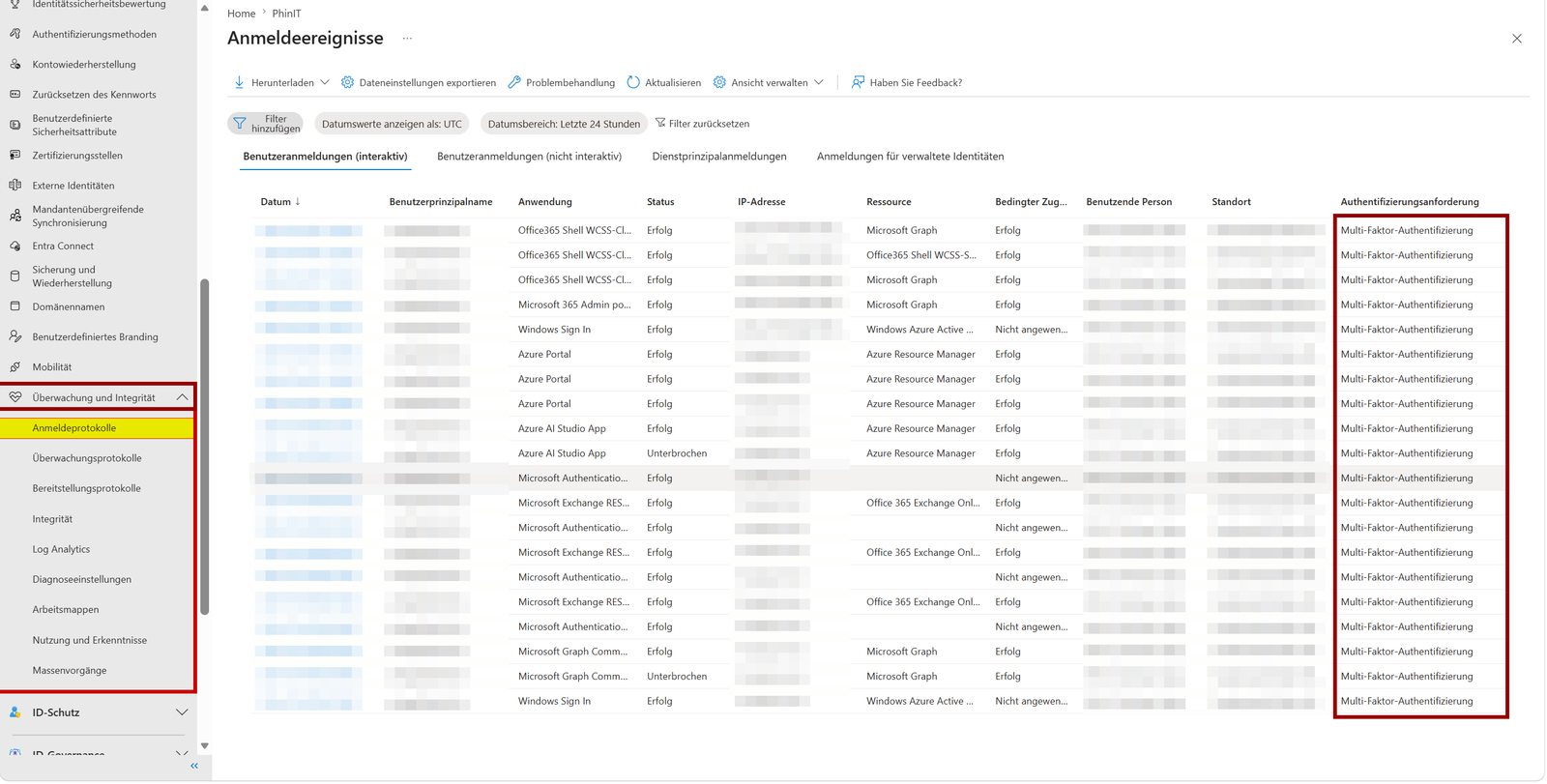
Additionally, it's worth looking into Entra sign-in logs: Filter on federated logins and check if the authenticating domain deviates from the UPN suffix.
A practical note that applies to every work on federation configurations: Keep a cloud-only admin account with a UPN on the onmicrosoft.com domain ready. If a federated domain gets stuck, that's your only guaranteed way back into the tenant.
Your two options before the deadline
Option one, and that is the right one: Correct the Federation configuration. Each federated domain gets a clean, own trust with matching IssuerUri and correct UPNs, or affected users move directly to Managed Authentication with Password Hash Sync or phishing-resistant cloud methods. Those who run AD FS out of habit have here the right occasion for exit.
Option two exists, but Microsoft explicitly advises against it: By updating /policies/federatedTokenValidationPolicy you can create a custom policy with rootDomains = none that continues to allow cross-domain logins. This is an emergency switch for business continuity, not a permanent state, because you thereby deactivate exactly the protection effect the new default should provide. If you take this path, document it as conscious risk acceptance with expiration date.
Boundary: Workload Identity Federation is not affected
The term Federation appears in Entra ID at two very different places, and only one of them is relevant here. The federatedTokenValidationPolicy concerns exclusively domain federation for user logins via AD FS or third-party IdPs.
Federated Identity Credentials (FICs) for App Registrations and Managed Identities, i.e., what your GitHub Actions pipelines, Kubernetes workloads or Terraform deployments bind to Entra without secrets, work with a different trust model: There Entra validates the combination of issuer and subject of the external OIDC token against the stored credential definition (max 20 FICs per app, audience api://AzureADTokenExchange, RS256-signed tokens). These workload scenarios continue unchanged after the August rollout.
If your monitoring reports AADSTS70021, that's a Federated Identity Credential (FIC) problem and has nothing to do with this policy.
Obstacles
Two side effects you should plan for. Conditional Access evaluates federated logins under changed conditions after the transition, blocked sign-ins can also appear as unexpected access denials there.
And helpdesk needs briefing: AADSTS5000820 will be the error code after mid-August, behind which forgotten cross-domain constructs report. Those who start analysis only after rollout debug under time pressure with users in line.
Conclusion
The shift of the federatedTokenValidationPolicy is the kind of breaking change an admin actually desires: Microsoft closes a flaw documented for years in the federation model, and nothing happens for cleanly configured environments. The risk lies exclusively in grown setups where Federation-Trusts are used across domain boundaries, and these constructs have always been a security problem, not a feature. Hence the hardening hits the right ones.
The communication history is worth criticizing. Q&A threads show that parts of the enforcement were already sharply switched on in backend without deprecation notice at end 2024 and providers like customers debugged for months without official documentation. The announcement now via Message Center and roadmap is the right step, but arrives retroactively for some affected. Additionally the tight rollout window in August has no transition phase for existing domains, and the check runs over a beta endpoint of Graph API, adding extra effort to production automations.
My advice: Do the inventory now, not in summer. Inventory federated domains, compare IssuerUri with UPN suffixes, check sign-in logs for cross-domain patterns, verify cloud-only break-glass account. If nothing found, you’re done within an hour and can tick the Message Center entry off. If something, you have until mid-August to solve cleanly (UPN correction, own trust per domain or switch to EAM or Managed Authentication) instead of the explicitly unwanted opt-out. And strategically the core message remains the same as with every SFI change in recent months: Domain Federation is a sunset model. Every hour you now spend on analyzing old trusts is another argument to shut them down entirely.
PowerShell Script
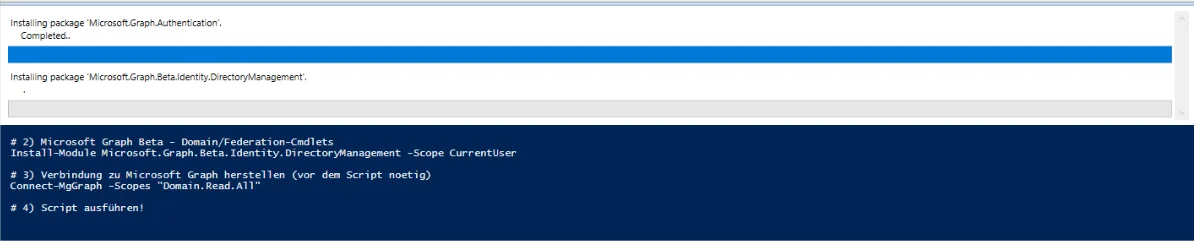
Before you run the script, install the required modules once. Copy the following commands one by one into PowerShell and execute them sequentially.
# 1) Microsoft Graph Authentication (fuer Connect-MgGraph)
Install-Module Microsoft.Graph.Authentication -Scope CurrentUser

# 2) Microsoft Graph Beta - Domain/Federation-Cmdlets
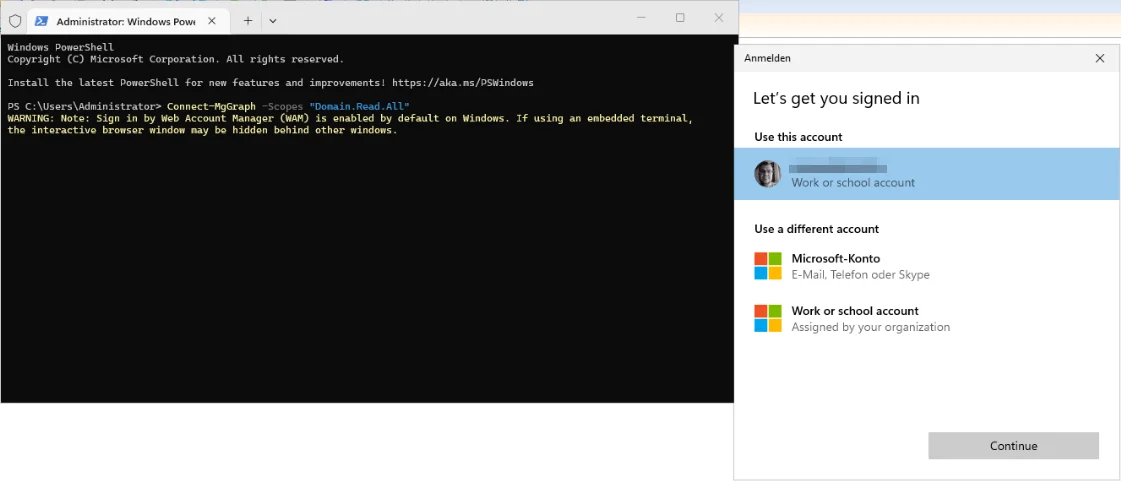
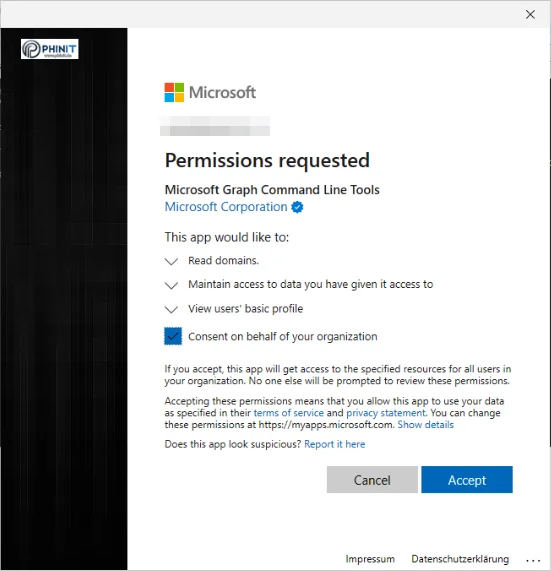
Install-Module Microsoft.Graph.Beta.Identity.DirectoryManagement -Scope CurrentUserTo allow the script to access your tenant's federation configuration, connect once to Microsoft Graph. Execute the following command before the script and disconnect after completion.
# 3) Verbindung zu Microsoft Graph herstellen (vor dem Script noetig)
Connect-MgGraph -Scopes "Domain.Read.All"

# 4) Script ausführen!

# 5) Verbindung nach Abschluss wieder trennen
Disconnect-MgGraph
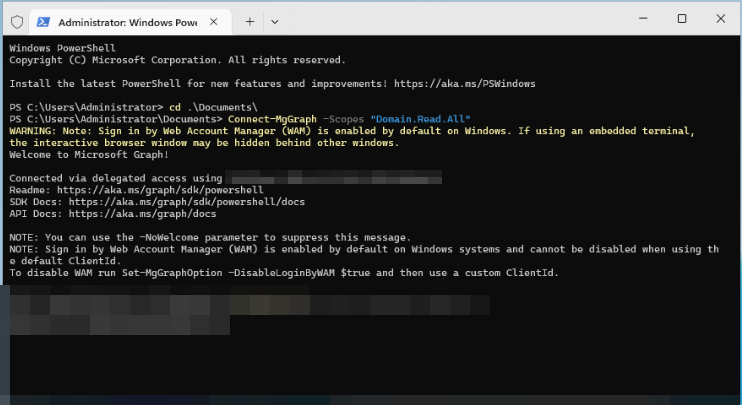
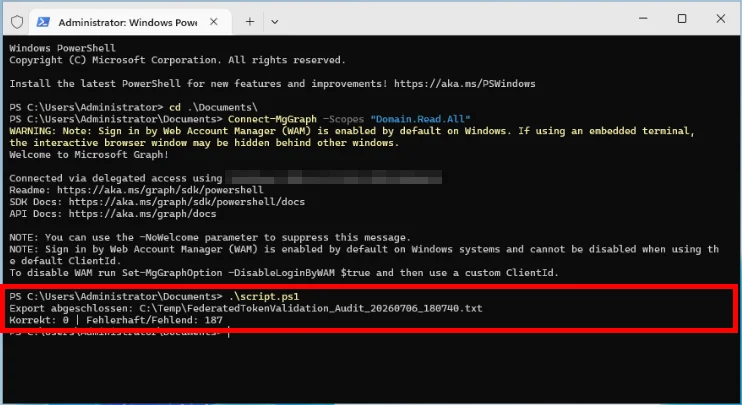
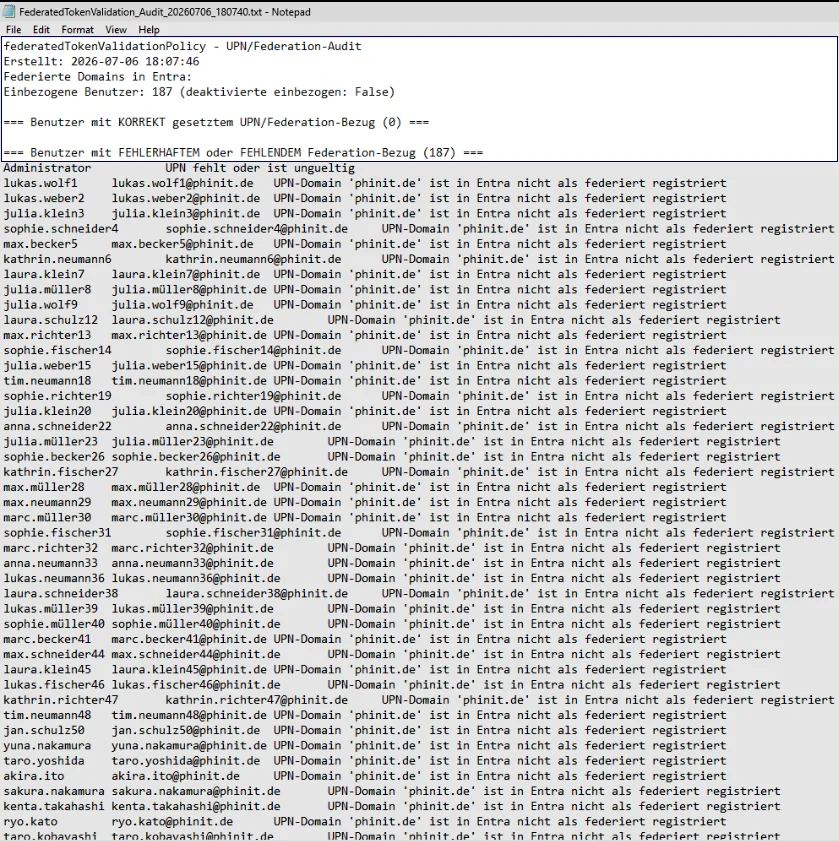
With the following script you compare all users of your local Active Directory against the actual federation configuration of your Entra ID tenant and see at a glance which accounts have the token correctly set and which do not or are missing.
Copy the script into an editor and save it as .ps1 file. Run it with the PowerShell session you connected to!
# ============================================================
# federatedTokenValidationPolicy - Abgleich lokales AD <-> Entra Federation-Konfiguration
#
# Prueft nicht nur, ob die UPN-Domain eines Benutzers ueberhaupt federiert ist,
# sondern gleicht sie gegen die tatsaechliche Federation-Konfiguration
# (IssuerUri je Domain) aus Entra ID ab - das ist der Wert, den Entra beim
# Sign-in mit dem Issuer des SAML-Tokens vergleicht (AADSTS5000820 bei Mismatch).
# Zusaetzlich werden Domains erkannt, deren IssuerUri von mehr als einer
# Domain genutzt wird (Cross-Domain-Risiko, siehe Circle-Security-Beispiel
# im Artikel).
#
# Voraussetzung: VOR diesem Script bereits ausgefuehrt:
#   Connect-MgGraph -Scopes "Domain.Read.All"
#
# Grenze dieses Scripts: Welcher Issuer bei der Anmeldung eines konkreten
# Benutzers tatsaechlich verwendet wird, entscheidet die AD-FS-seitige
# Relying-Party-Konfiguration zur Laufzeit und ist aus AD/Graph allein nicht
# auslesbar. Dieses Script bildet den bestmoeglichen statischen Proxy nach.
#
# Fuer die endgueltige Bestaetigung zusaetzlich die Entra Sign-in-Logs
# pruefen (federierte Anmeldungen: authentifizierende Domain vs. UPN-Suffix).
# ============================================================

$ExportPath = "C:\Temp\FederatedTokenValidation_Audit_$(Get-Date -Format 'yyyyMMdd_HHmmss').txt"
$IncludeDisabledUsers = $false

Import-Module ActiveDirectory
Import-Module Microsoft.Graph.Beta.Identity.DirectoryManagement

if (-not (Get-MgContext)) {
    throw "Keine aktive Microsoft-Graph-Verbindung. Vorher ausfuehren: Connect-MgGraph -Scopes 'Domain.Read.All'"
}

# --- Schritt 1: Alle Domains + Federation-Konfiguration aus Entra lesen ---
$allDomains = Get-MgBetaDomain -All
$federatedDomains = $allDomains | Where-Object { $_.AuthenticationType -eq 'Federated' }

$domainIssuerMap = @{}   # Domain -> IssuerUri
$issuerDomainMap = @{}   # IssuerUri -> Liste von Domains (fuer Kollisionserkennung)

foreach ($fd in $federatedDomains) {
    $issuerUri = $null
    try {
        $fedConfig = Get-MgBetaDomainFederationConfiguration -DomainId $fd.Id -ErrorAction Stop
        if ($fedConfig -and $fedConfig.Count -gt 0) {
            $issuerUri = $fedConfig[0].IssuerUri
        }
    } catch {
        $issuerUri = $null
    }

    $domainIssuerMap[$fd.Id] = $issuerUri

    if ($issuerUri) {
        if (-not $issuerDomainMap.ContainsKey($issuerUri)) {
            $issuerDomainMap[$issuerUri] = @()
        }
        $issuerDomainMap[$issuerUri] += $fd.Id
    }
}

# Domains, deren IssuerUri von mehr als einer Domain genutzt wird -> Cross-Domain-Risiko
$collidingDomains = @()
foreach ($issuer in $issuerDomainMap.Keys) {
    if ($issuerDomainMap[$issuer].Count -gt 1) {
        $collidingDomains += $issuerDomainMap[$issuer]
    }
}

# --- Schritt 2: Lokale AD-Benutzer einlesen ---
$users = Get-ADUser -Filter * -Properties UserPrincipalName, Enabled

if (-not $IncludeDisabledUsers) {
    $users = $users | Where-Object { $_.Enabled -eq $true }
}

# --- Schritt 3: Klassifizieren ---
$correct = @()
$incorrect = @()

foreach ($u in $users) {
    $upn = $u.UserPrincipalName

    if ([string]::IsNullOrWhiteSpace($upn) -or -not $upn.Contains('@')) {
        $incorrect += [pscustomobject]@{
            SamAccountName    = $u.SamAccountName
            UserPrincipalName = $upn
            Grund             = "UPN fehlt oder ist ungueltig"
        }
        continue
    }

    $domain = $upn.Substring($upn.IndexOf('@') + 1)

    if ($domain -notin $federatedDomains.Id) {
        $incorrect += [pscustomobject]@{
            SamAccountName    = $u.SamAccountName
            UserPrincipalName = $upn
            Grund             = "UPN-Domain '$domain' ist in Entra nicht als federiert registriert"
        }
        continue
    }

    if (-not $domainIssuerMap[$domain]) {
        $incorrect += [pscustomobject]@{
            SamAccountName    = $u.SamAccountName
            UserPrincipalName = $upn
            Grund             = "Federation-Konfiguration fuer '$domain' hat keine IssuerUri (fehlkonfiguriert)"
        }
        continue
    }

    if ($domain -in $collidingDomains) {
        $incorrect += [pscustomobject]@{
            SamAccountName    = $u.SamAccountName
            UserPrincipalName = $upn
            Grund             = "IssuerUri von '$domain' wird auch von einer anderen Domain verwendet (Cross-Domain-Risiko, AADSTS5000820)"
        }
        continue
    }

    $correct += [pscustomobject]@{
        SamAccountName    = $u.SamAccountName
        UserPrincipalName = $upn
        Domain            = $domain
        IssuerUri         = $domainIssuerMap[$domain]
    }
}

# --- Schritt 4: Export ---
$lines = @()
$lines += "federatedTokenValidationPolicy - UPN/Federation-Audit"
$lines += "Erstellt: $(Get-Date -Format 'yyyy-MM-dd HH:mm:ss')"
$lines += "Federierte Domains in Entra: $($federatedDomains.Id -join ', ')"
if ($collidingDomains.Count -gt 0) {
    $lines += "ACHTUNG - Domains mit kollidierender IssuerUri: $($collidingDomains -join ', ')"
}
$lines += "Einbezogene Benutzer: $($users.Count) (deaktivierte einbezogen: $IncludeDisabledUsers)"
$lines += ""
$lines += "=== Benutzer mit KORREKT gesetztem UPN/Federation-Bezug ($($correct.Count)) ==="
foreach ($c in $correct) {
    $lines += "$($c.SamAccountName)`t$($c.UserPrincipalName)`t$($c.IssuerUri)"
}
$lines += ""
$lines += "=== Benutzer mit FEHLERHAFTEM oder FEHLENDEM Federation-Bezug ($($incorrect.Count)) ==="
foreach ($i in $incorrect) {
    $lines += "$($i.SamAccountName)`t$($i.UserPrincipalName)`t$($i.Grund)"
}

$lines | Out-File -FilePath $ExportPath -Encoding UTF8

Write-Host "Export abgeschlossen: $ExportPath"
Write-Host "Korrekt: $($correct.Count) | Fehlerhaft/Fehlend: $($incorrect.Count)"
if ($collidingDomains.Count -gt 0) {
    Write-Host "WARNUNG: Kollidierende IssuerUri gefunden bei: $($collidingDomains -join ', ')" -ForegroundColor Yellow
}

💬 Comments
0 KommentareSei der Erste und starte die Diskussion mit einem hilfreichen Beitrag.
Leave a comment
Dein Beitrag wird vor der Veröffentlichung kurz geprüft — fachlich, respektvoll und auf den Punkt ist hier genau richtig.