
Until now, contracts that have been released via eSignature usually end up in SharePoint as unstructured PDF files. To automatically track their legal validity or conduct compliance audits, you previously had to connect external Power Automate workflows to the APIs of signature providers (such as DocuSign or Adobe).
Starting in December 2026 , Microsoft will pull this recognition directly into SharePoint Online’s ingestion pipeline (Roadmap ID 500873), which will natively identify signed documents as such upon upload.
Architecture: Discovery & Index
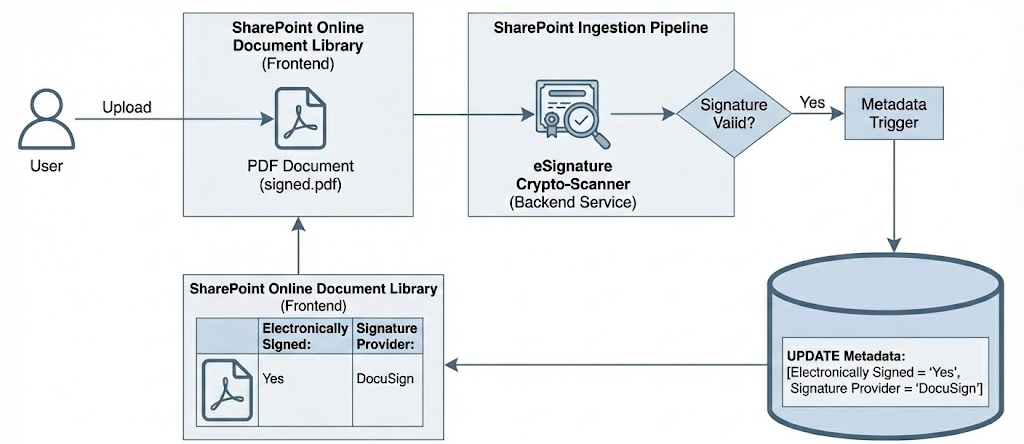
In order to map the visibility and control of contract documents architecturally cleanly, Microsoft is implementing so-called eSignature Smart Tagging. As soon as a file is uploaded to a SharePoint document library, the service analyzes the PDF for cryptographic signatures in the background. If a valid signature is detected, SharePoint automatically tags the document. The user does not have to intervene and no external event triggers are necessary.
The new system metadata
For the technical implementation, the system injects two new, optional metadata columns at the library level:
- Electronically Signed: A Boolean (Yes/No) value that indicates the cryptographic status of the file.
- Signature Provider: A text field that identifies the issuing service (for example, DocuSign, Adobe Acrobat Sign, or the native SharePoint eSignature).
This mechanism does not only apply to new uploads. The SharePoint indexer also loops through existing files in the libraries retroactively, eliminating the need to write elaborate PowerShell migration scripts to manually classify legacy assets.
Purview Retention & DLP
The prerequisite for this automation is that the “SharePoint eSignature” feature is activated at the tenant level. If this is the case, new architectural possibilities for compliance management arise. You can now bind Microsoft Purview Retention Policies or Data Loss Prevention (DLP) rules directly to the metadata tag “Electronically Signed = true”. Contracts are thus protected from accidental deletion on the system side or automatically destroyed after the expiry of the legal retention period, which completely eliminates the human source of error in metadata maintenance.
Conclusion: Governance & Interfaces
Smart tagging closes a significant gap in the document lifecycle. Because discovery now takes place natively in the SharePoint indexer, you reduce your reliance on complex and maintenance-prone Power Automate third-party interfaces. This not only makes the architecture of compliance audits much easier, but also ensures a clean, systemically controlled database in your contract archives.
The rollout will start globally in December 2026.
| Microsoft 365 Roadmap | eSignature Smart Tagging for Electronically Signed Documents | https://www.microsoft.com/en-us/microsoft-365/roadmap?id=500873 |





Be the first to comment