
Microsoft is deprecating the .agent file format for agents in SharePoint and OneDrive. According to MC1511052 dated October 16, 2026, existing agents in this format will continue to work in SharePoint, Teams, and the Copilot app until the end of March 2027.
Starting in early April 2027, Microsoft will begin phasing them out, with the process expected to be completed by mid-April. Those who have not migrated by then will lose their agents, including their integration in Teams chats and channels.
What's changing
Microsoft is migrating the agents in SharePoint and OneDrive to the Microsoft Copilot extension ecosystem so that they land in the same catalog as the other Copilot extensions. Starting mid-November 2026, selecting “Create an agent” or “New agent” in SharePoint and OneDrive will open the Microsoft Copilot Agent Builder, and newly created agents will appear in the plugin store. Creation and upgrade will roll out through early December 2026, in the worldwide cloud and in the Government clouds.
There is a limitation for government clouds: According to the announcement, Copilot in SharePoint is only listed as 'coming soon' there. Two of the three upgrade paths rely on it. As of the current announcement, tenants in government clouds therefore only have the option of using a declarative agent or a custom engine agent for the time being.
Microsoft has announced an Agent Chat web part for SharePoint pages, allowing page authors to embed any agents from the plugin store on a page. The announcement does not specify a release date, with the web part currently listed as 'coming soon' on the roadmap.
The two dates in the message do not contradict each other. Support ends at the end of March 2027, after which Microsoft will roll out the shutdown from early to mid-April. The message does not reveal when your tenant will be affected within this window. Therefore, plan with the end of March as the last safe operating day.
Available upgrade paths
Microsoft distinguishes three approaches depending on the agent's intended use. If it only answers questions about a single site, Copilot in SharePoint handles this without a dedicated agent. If it supports a clearly defined task, you convert the .agent file into a Copilot in SharePoint skill using the "convert-agent-file-to-skill" skill.
If the agent requires content-based conversations across Microsoft 365, the path leads to a declarative agent or to updating a custom engine agent published in the SharePoint channel.
In the SharePoint Builder, the "Upgrade to M365 Agent" button is available for upgrading to the Microsoft 365 Agent. However, the upgraded agent loses its integration with Teams. You must then re-add it to each chat and channel where it was previously active.
Which chats these are is usually only known to the agent's owner, which is why this list should be included in the query to the owners.
What you should do now
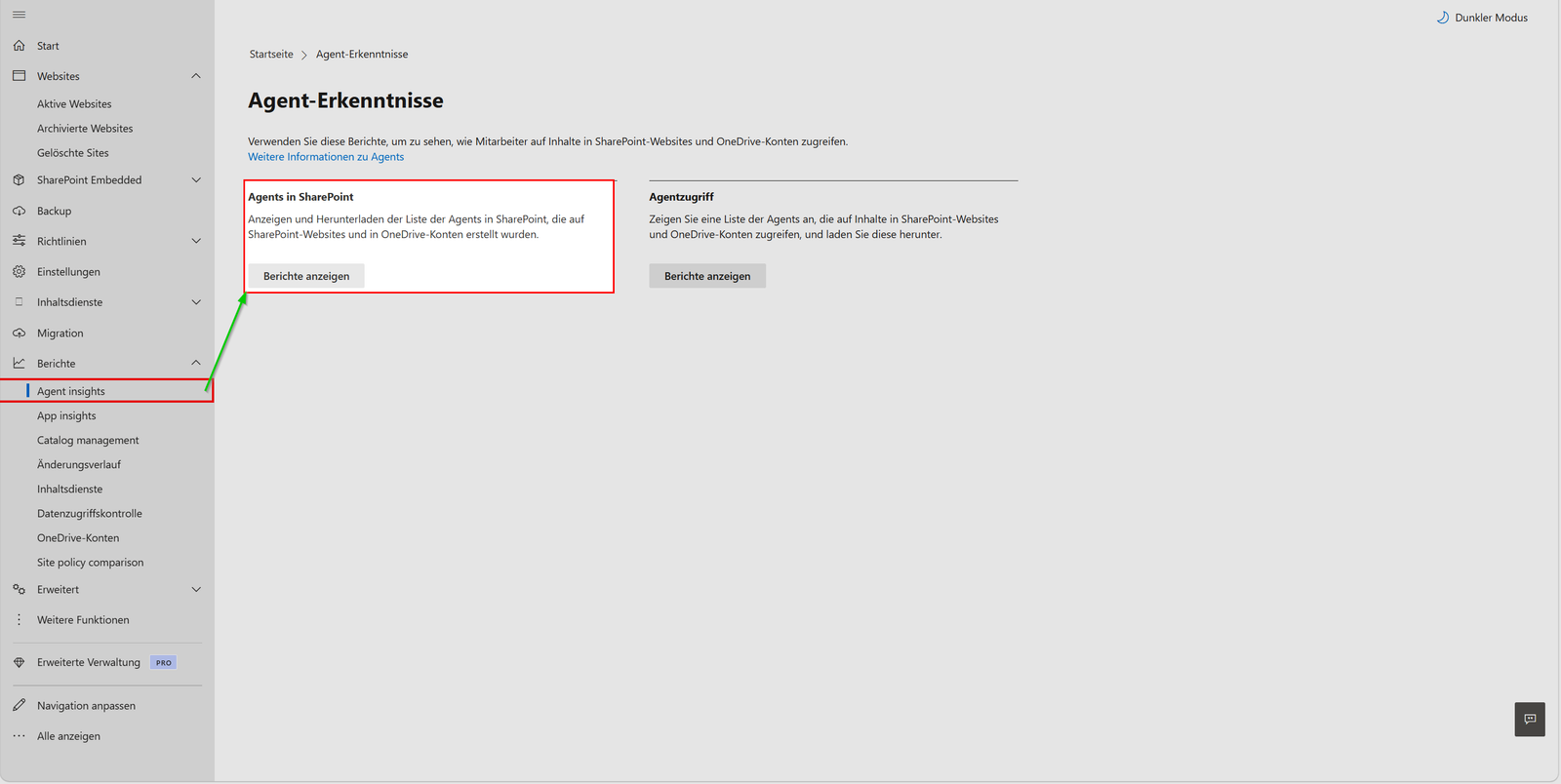
Start with the inventory, because without an overview, neither deadlines can be communicated nor upgrade paths assigned. In the SharePoint Admin Center, under Reports, Agent Insights, you will find two reports. 'Agents in SharePoint' evaluates the audit events FileCreated and FileRenamed for a period of 1, 7, 14, or 28 days, thereby primarily displaying recently created agents.
The CopilotAgentsOnSites detailed report is therefore essential for inventory purposes because it lists all Agents currently available on Sites, with downloads supporting up to one million records. The second report, 'Agent access,' shows which Agents access which Sites and OneDrive accounts, and—beyond SharePoint Agents—also captures declarative and custom Agents.
Both reports require a license for SharePoint Advanced Management or Microsoft 365 Copilot. Without SharePoint Advanced Management, you must first start data collection separately for each report.
# Datenerfassung für den Bericht "Agents in SharePoint"
Start-SPOAuditDataCollectionForActivityInsights

# Datenerfassung für den Bericht "Agent access"
Start-SPOAuditDataCollectionForActivityInsights -ReportEntity M365AgentInsights

# Status prüfen, Berichte lassen sich erst bei "InProgress" erzeugen
Get-SPOAuditDataCollectionStatusForActivityInsights
Get-SPOAuditDataCollectionStatusForActivityInsights -ReportEntity M365AgentInsights
You can generate the first report 24 hours after starting, and in large tenants, it may take up to 48 hours. If no report is generated for three months, data collection pauses again. In the Admin Center, you’ll see the top 100 entries. To retrieve the full report, use PowerShell—for 'Agents in SharePoint,' run Get-SPOCopilotAgentInsightsReport -ReportId <ID> -Action Download.
Afterwards, inform the owners about the deadline and assign each agent to one of the three paths. Schedule the re-onboarding in Teams as a separate step with a deadline, otherwise it will only be noticed after the upgrade that the agent is missing from the channel. For central management of the new agents, Microsoft mentions Agent Builder, the Microsoft 365 Admin Center, and Agent 365, as administration and usage analytics are handled there.
Second deprecation: Copilot Studio in Teams
On the same day, Microsoft announced the deprecation of the Copilot Studio app in Teams via MC1511056. New agents can no longer be created there, editing of existing agents will end in January 2027, and the app will be removed from Teams in February 2027.
You then manage classic chatbot agents in the Copilot Studio web app at copilotstudio.microsoft.com. Microsoft recommends updating internal documentation, training materials, support scripts, and bookmarks.
Both deadlines affect the same people: the departments building their own agents and the support teams assisting them. A joint letter to the agent owners with both dates will save you a second round of follow-up questions in the spring.
Conclusion
There are just over five months left until the final secure operating day at the end of March 2027. The effort depends almost entirely on how many .agent files are in your tenant—and you won’t know that until after the inventory.
Start data collection now, assign each agent to the upgrade path, and test the re-onboarding in Teams with a single agent before switching the rest.
additional links
| Microsoft 365 Message Center (über mc.merill.net) | Bevorstehende Änderungen bei Agents in SharePoint und OneDrive | https://mc.merill.net/message/MC1511052 |
| Microsoft 365 Message Center (über mc.merill.net) | Microsoft Copilot Studio: Einstellung der Teams-App | https://mc.merill.net/message/MC1511056 |

💬 Comments
0 KommentareSei der Erste und starte die Diskussion mit einem hilfreichen Beitrag.
Leave a comment
Dein Beitrag wird vor der Veröffentlichung kurz geprüft — fachlich, respektvoll und auf den Punkt ist hier genau richtig.