

Previously, the recovery of identity objects in Microsoft 365 was primarily limited to the 30-day recycle bin for soft-deleted users and groups. Configuration objects such as Conditional Access Policies or service principals were immediately hard-deleted upon deletion, making a rollback in the event of misconfigurations simply impossible without external tools or complex PowerShell scripts.
Microsoft has now rolled out a native backup & recovery for Entra ID in preview, which automatically backs up exactly these "Core Tenant Objects" in the background and gives you room to maneuver again.
Forced Backup and Rolling Snapshots
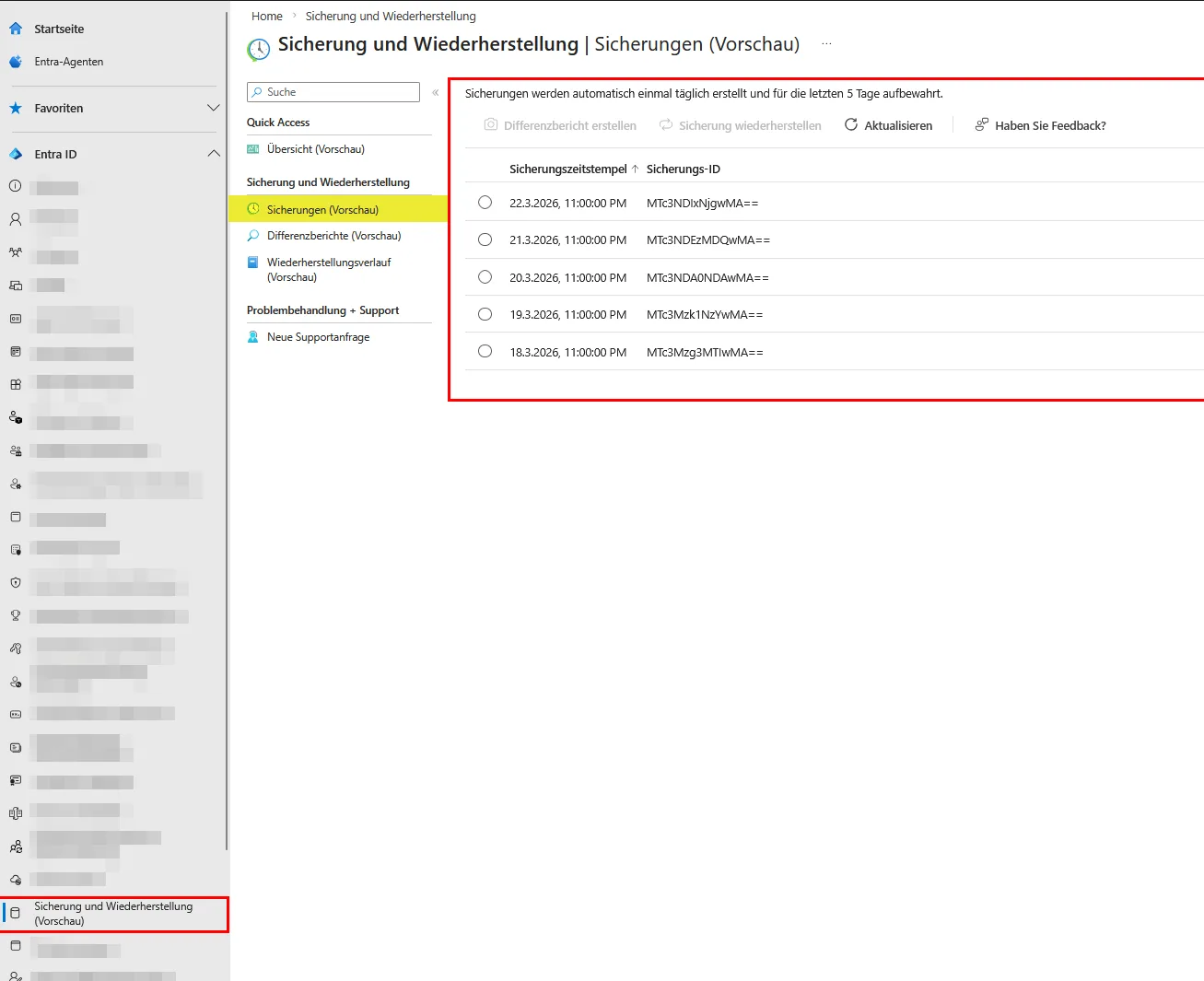
The service creates fully automated daily snapshots of your identity infrastructure, including applications, authentication methods, and Conditional Access Policies. Microsoft chooses a strictly closed system architecturally: you can neither deactivate the backups nor adjust the schedule. Through this forced implementation, Microsoft ensures that even compromised administrator accounts or ransomware actors cannot manipulate the backup chain. The backup data remains geo-redundant in the exact same region as your Entra tenant, whereby data residency requirements are natively fulfilled. A decisive design factor is the rolling storage of exactly five days. This extremely short retention period serves primarily for immediate disaster recovery in the case of administrative misconfigurations. If an administrator accidentally removes the MFA exception for break-glass accounts, the complete exclusion of the IT team is imminent. With the native backup, you hold a fixed restore point ready, whereby the faulty policy is flawlessly overwritten by the functional state from the previous day.
Difference Reports as a Safety Net
To perform a clean rollback, you must evaluate which attributes have changed before the actual restore. A blind rollback would overwrite legitimate system changes from the last few hours, which is why the process is mandatorily controlled via so-called Difference Reports. You select the desired snapshot from the timeline and start the generation of the report. The system calculates the complete Graph state in this process. If a user is removed from a group, this also affects connected Enterprise Applications and app roles. Since Entra ID must fully iterate through these deep dependencies to avoid inconsistencies in the database structure, the calculation requires significant processing time. Consequently, even with smaller tenants, you must expect waiting times of up to 75 minutes before you can intervene.
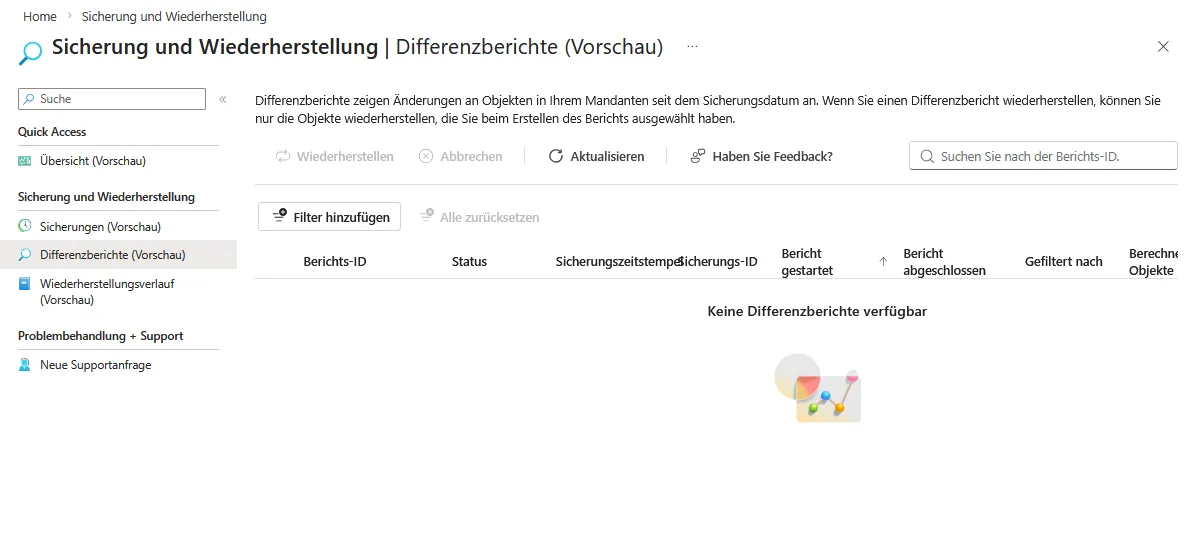
As soon as the report is available, you select the corrupted objects and trigger the restore process, which runs asynchronously. If, for example, you have executed a faulty script and need to undo 500,000 object changes, the restore process blocks the system for up to 30 hours. You must mandatorily factor this RTO (Recovery Time Objective) into your emergency plans.
Least Privilege for the Restore Process
To access the snapshots, you need an Entra ID P1 or P2 license. Permissions are controlled via dedicated roles:
- Entra Backup Reader / Entra-Sicherungsleser: Enables the viewing of snapshots and difference reports.
- Entra Backup Administrator / Entra-Sicherungsadmin: Enables the active restoration of objects.
Since a restore changes profound system states, you should never assign these administrative roles permanently. Instead, use Privileged Identity Management (PIM) to activate the Backup Admin role for only a few hours in the event of an acute failure, thereby minimizing the risk of an attacker restoring insecure legacy configurations as a backdoor.
Assessment of Limitations
Native Backup & Recovery for Entra ID closes a critical vector gap that system architects long had to bypass when securing their cloud identities. The implementation as a background service that cannot be disabled drastically increases resilience against insider threats. Even in the event of a total compromise of global admin accounts, the immutable snapshots of the last five days remain untouched, ensuring you always maintain a secured starting point for the reconstruction of your access policies. Nevertheless, you must view the current preview phase as a pure emergency fallback level for operational errors. Hard-deleted objects currently cannot be reconstructed via this native interface, which is why you still rely on the 30-day recycle bin for actual data loss. Furthermore, there is no API or export function for the difference reports, which makes automated processing in a SIEM system significantly more difficult. The hard limitation to only five days of retention time fundamentally conflicts with common audit frameworks that require a retention period of several months. Large enterprise environments will have to continue relying on specialized ISV solutions for the time being, as only these cover extended RPO/RTO requirements and unlimited archiving periods. You should nevertheless evaluate the feature in a sandbox immediately, measure the runtimes of the difference reports, and update your disaster recovery runbooks according to the new native possibilities.
Sei der Erste und starte die Diskussion mit einem hilfreichen Beitrag.
Kommentar hinterlassen
Dein Beitrag wird vor der Veröffentlichung kurz geprüft — fachlich, respektvoll und auf den Punkt ist hier genau richtig.