
Since the HCW uses the WinHTTP stack for PowerShell remoting sessions, system-wide proxy settings often conflict with the requirements of cloud endpoints. WinRM expects a clean, end-to-end connection. A proxy that attempts to inspect this encrypted data stream or requires authentication will terminate the session prematurely.
Cause Analysis: The WinHTTP Dilemma
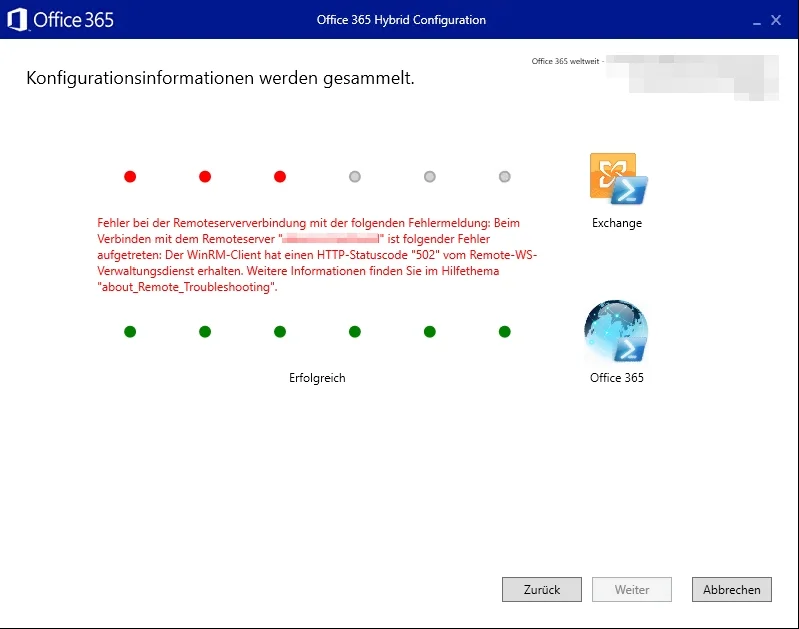
WinRM (Windows Remote Management) is the technical foundation used by the HCW to execute commands in Exchange Online. While standard browser requests are often routed through proxies without issue, WinRM is highly sensitive to latency and protocol manipulation by intermediaries. If a proxy is configured in the system settings of your Exchange server, WinRM will attempt to tunnel packets for outlook.office365.com through it. This results in the 502 error because the proxy cannot handle the PSSession protocol (WS-Management).
Step-by-Step: Resolving WinRM Connectivity
To resolve the error, you must eliminate proxy interference at the system level. The following steps ensure that the WinHTTP stack takes the direct route to the cloud.
1. Identify the System Proxy
First, check if a proxy server is configured for the WinHTTP service. This is independent of the settings in Edge or Internet Explorer. Open an administrative command prompt and run:
netsh winhttp show proxy
2. Clear the WinHTTP Stack
If a proxy is displayed, you must remove it, forcing the WinRM client to establish the connection directly. Use the following command:
netsh winhttp reset proxy

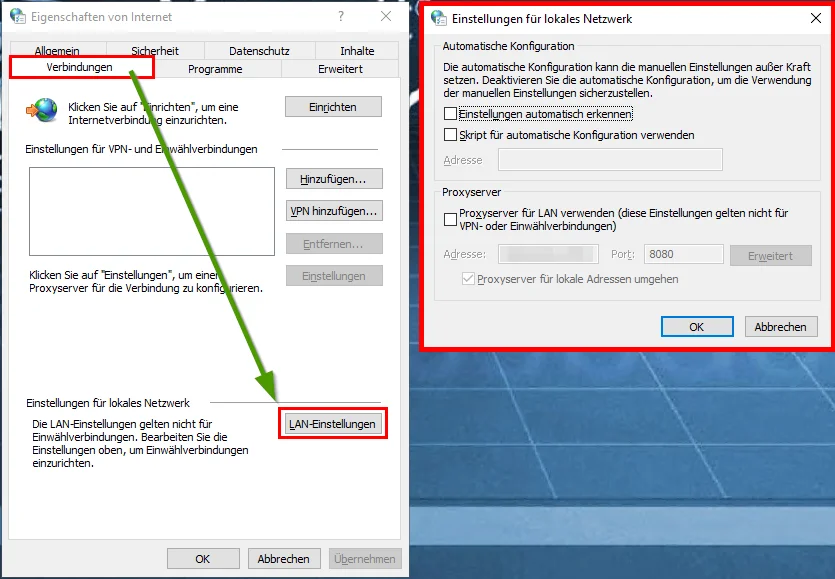
3. Adjust Local Internet Options
Although WinHTTP is the critical component, parts of the HCW framework rely on the settings of the logged-in user.
- Open the Control Panel and navigate to Internet Options.
- Select the Connections tab and click on LAN settings.
- Uncheck the box Use a proxy server for your LAN.
Authentication and TLS Hardening
If the 502 error persists after a proxy reset, the issue often lies deeper within the authentication configuration or outdated encryption protocols.
Check WinRM Client Configuration
The HCW often requires Basic Authentication on the client side to establish the connection (even if this contradicts modern hardening practices). You can validate this as follows:
winrm get winrm/config/client
If the value for Basic is set to false, enable it temporarily for the duration of the hybrid configuration:
winrm set winrm/config/client/auth @{Basic="true"}
Enforce TLS 1.2
Exchange Online strictly requires TLS 1.2. If your Windows Server attempts to negotiate an older version via WinHTTP, this can also lead to gateway errors. Ensure that TLS 1.2 is enabled for WinHTTP in the registry:
New-ItemProperty -Path 'HKLM:\SOFTWARE\Microsoft\Windows\CurrentVersion\Internet Settings\WinHttp' -Name 'DefaultSecureProtocols' -Value 2048 -PropertyType 'DWord' -Force
Conclusion and Administrative Assessment
The 502 error in the HCW is not a software bug, but rather a clear indication of infrastructure incompatibility. In modern architectures, using authenticated proxies for server-to-server communication with Microsoft 365 is problematic. The clear recommendation is: Exchange servers should have direct access to Microsoft IP address ranges via dedicated firewall rules (Port 443).
Fixing the issue with netsh winhttp reset proxy is the pragmatic solution to successfully complete the wizard. In the long term, however, you should review the proxy settings via Group Policy (GPO) for your Exchange servers to prevent automated updates or configuration runs from failing at this hurdle again. A clean separation between user web traffic and administrative cloud communication is key to a stable hybrid environment.
Sei der Erste und starte die Diskussion mit einem hilfreichen Beitrag.
Kommentar hinterlassen
Dein Beitrag wird vor der Veröffentlichung kurz geprüft — fachlich, respektvoll und auf den Punkt ist hier genau richtig.