Store M365 customer data in-country.
On December 14, 2026, Microsoft will change the rules governing where your Microsoft 365 tenant data may reside. The trigger is a new setting called 'Store Microsoft 365 customer data in-country,' which has been visible in the Admin Center since September 14, 2026.
For eligible tenants, it is set to 'Off' by default. If you leave it that way, Microsoft will be allowed to move and store affected customer data regionally within the EU data boundary from the specified date, including from Germany to other EU countries. Those who want to maintain country-specific storage must take action.
Who the switch affects and what's at stake
This affects tenants whose default geography is Germany, France, Norway, Sweden, or Switzerland. For other regions, the switch will not appear. It concerns the classic storage locations for your workloads: Exchange Online, SharePoint, OneDrive, Teams, and Copilot data. December 14, 2026, is not a migration date in the sense of 'everything moves immediately.'
Microsoft puts it cautiously: For tenants with the setting "Off," the migration can begin. Whether and when individual mailboxes or sites will actually move remains unclear.
The difference in question is subtle but crucial for compliance. The EU data boundary ensures that data does not leave the EU. However, it does not guarantee that the data remains in Germany. This specific country commitment was the very reason many customers opted for a tenant with German standard geography in the first place. If this commitment is removed, a mailbox could in future be located in another EU data center without any changes to the customer's contract.
Why this matters to you: For many German customers, data storage within their own country is a fixed component of data processing agreements and internal compliance requirements. A silent shift to 'EU-wide' can undermine commitments made in contracts and data protection impact assessments without any active consent. This turns the setup into an opt-out trap: the default is the more lenient option, not the stricter one.
How to Find the Switch in the Admin Center
You can find the switch in the Microsoft 365 Admin Center under Settings, then Org settings, Organization profile, and Data location. On the Data Location card, the 'Commitments' section contains the option 'Store Microsoft 365 customer data in-country'.
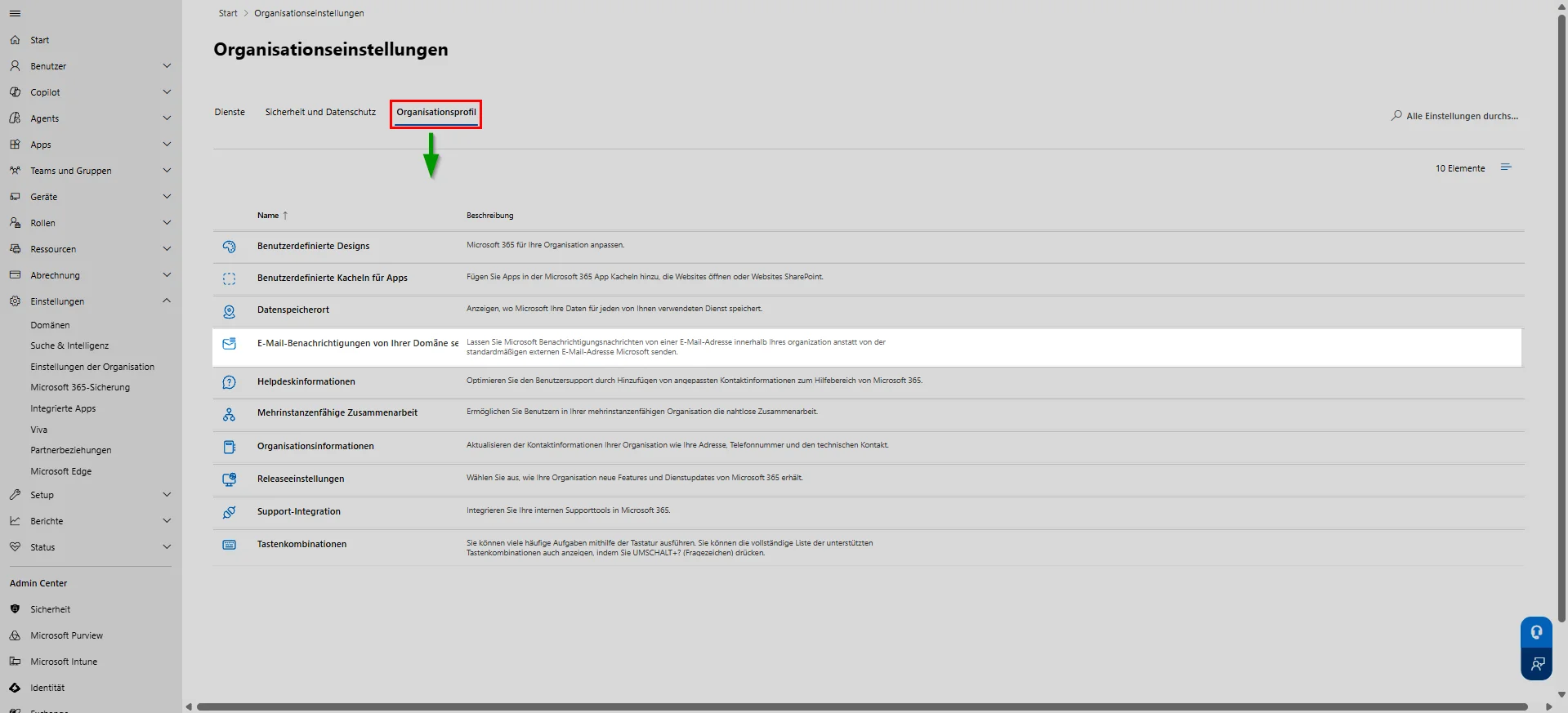
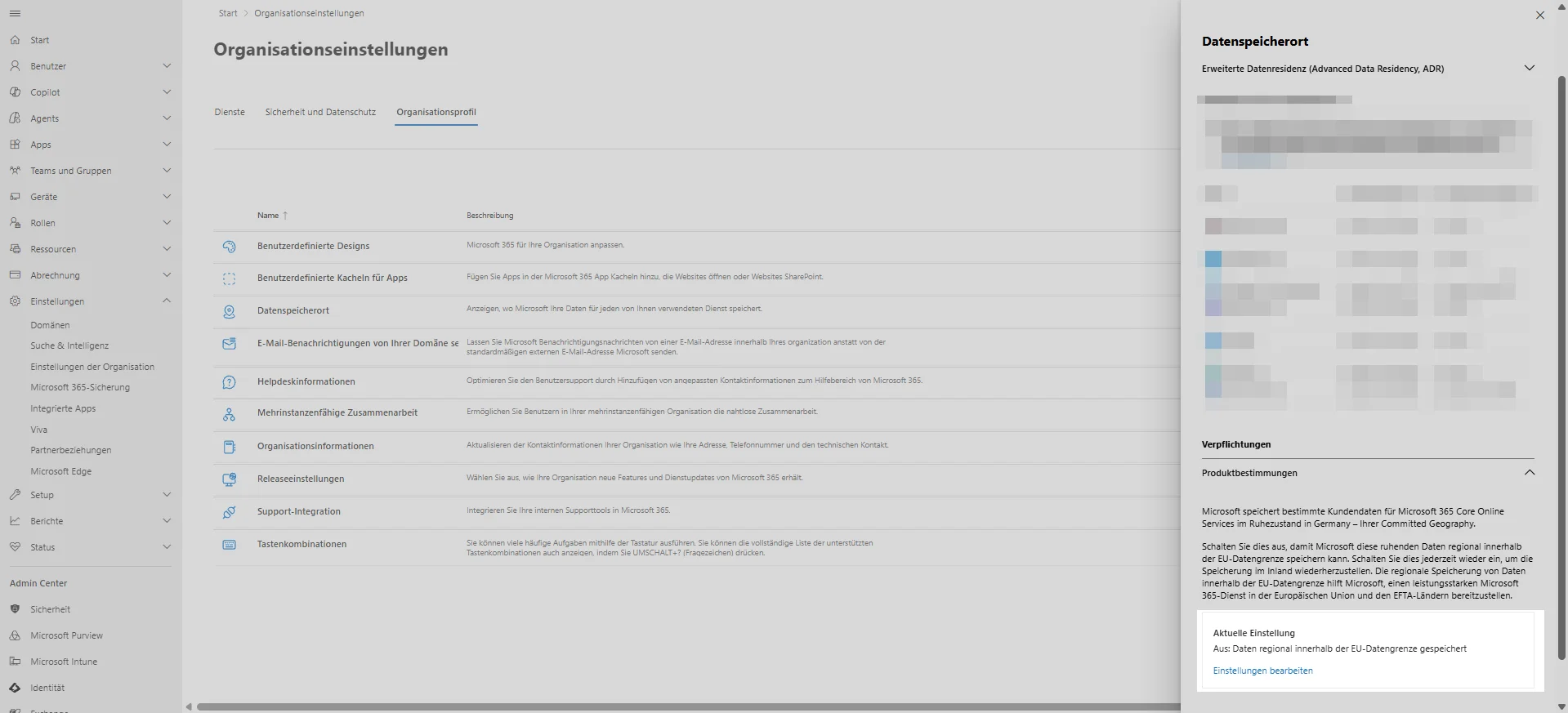
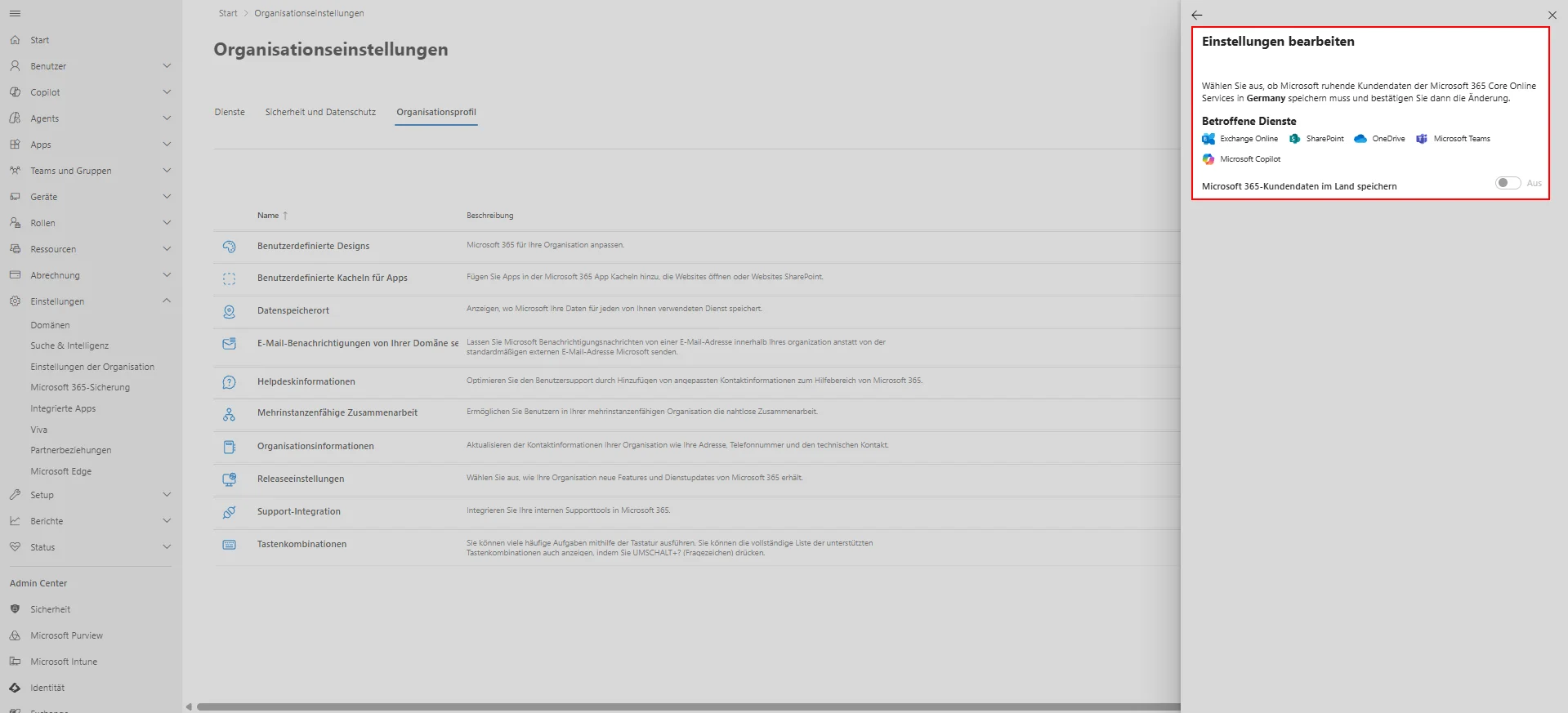
For tenants created after September 14, 2026, the setting is documented as 'Off' by default. For older tenants, Microsoft refers to the tenant-specific notification in the Message Center, which indicates the default configuration for your specific tenant and whether any action is required. This notification is your authoritative reference, not a generic blog post.
Grayed-Out Switch and the Way Back
Microsoft explains in its documentation who won’t see the option—and this isn’t a rollout error, but intentional. Tenants with a paid data residency offering won’t see the switch because their data residency is already governed by that. This applies to Advanced Data Residency (ADR), Advanced Data Residency for Education, and Multi-Geo Capabilities.
There is also a second case: Tenants that would qualify for Data Residency based on the Product Terms but did not opt into the Legacy Move Program may not be eligible. If your organization is not eligible, no action is required—your existing commitment remains unchanged.
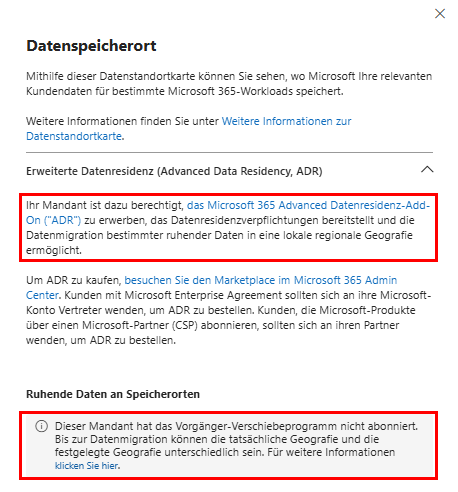
This covers the reader reports. The grayed-out switch with the note on Advanced Data Residency represents the ADR case. The completely missing switch in the Austrian tenant is due to the default geography, as the option only appears for France, Germany, Norway, Sweden, and Switzerland. Where Business Standard runs without an add-on package, however, the switch is configurable. As of September 25, 2026, there was also an update to the display, after which the option became available for more eligible tenants. If the switch remains grayed out for an eligible tenant, it’s worth taking a second look in the coming days.

For your tenant, the mandatory notification can be found in the Message Center under ID MC1470878. It specifies whether your organization is eligible and how the value was preconfigured. This entry is not yet publicly accessible—you can only view it when logged into the Message Center of your own tenant.
The road back takes time
The decision isn't set in stone. You can switch back to country-based storage later. The price for that is time: According to Microsoft, moving the data back takes about six months. While the data is migrating, the Data Location Card may temporarily show a discrepancy between the current geography and the committed geography until the move is complete. That’s an argument for getting this sorted out now rather than reacting under pressure in December.
Conclusion
For every tenant you manage with the default geography set to Germany, France, Norway, Sweden, or Switzerland, check two things before December 14, 2026. First, the Data Location Card in the Admin Center and the status of the toggle. Second, the individual notification in the Message Center, as it specifies the actual default setting for your tenant.
[EN MOCK] Dokumentiere die Entscheidung with Datum and Verantwortlichem, dawith sie zur Auftragsverarbeitung and zur Datenschutz-Folgenabschätzung passt. Bleibt der Schalter ausgegraut, hältst du fest, dass du reagieren wolltest, and behältst die Option im Blick. So bleibt der Datenstandort deine Entscheidung and nicht die stille Voreinstellung von Microsoft.
[EN MOCK] weitere Links
| [EN MOCK] Quelle | [EN MOCK] URL |
| [EN MOCK] Borns IT-Blog | [EN MOCK] https://borncity.com/blog/2026/09/24/microsoft-365-verschiebt-tenant-daten-ins-eu-ausland-opt-out-erforderlich/ |
| [EN MOCK] dasTECHNO | [EN MOCK] https://dastechno.com/de/news/microsoft-365-datenstandort-Germanland-14-dezember/ |
| [EN MOCK] Schönfelder EDV | [EN MOCK] https://s-edv.com/news/microsoft-365-datenstandort-in-country-einstellung-14-dezember |

Sei der Erste und starte die Diskussion mit einem hilfreichen Beitrag.
Leave a comment
Dein Beitrag wird vor der Veröffentlichung kurz geprüft — fachlich, respektvoll und auf den Punkt ist hier genau richtig.