
What your SLA reimburses you for!
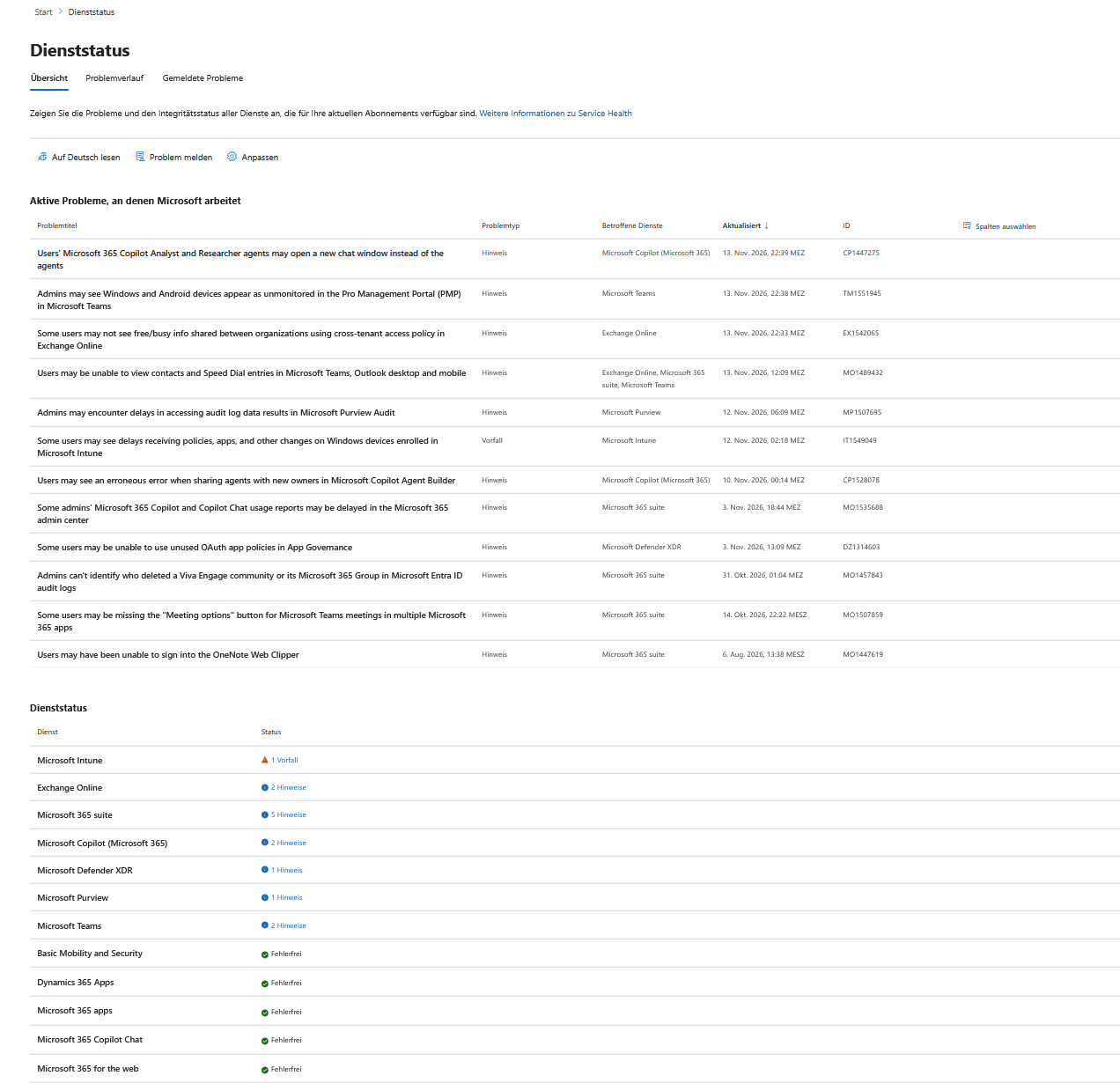
Since Thursday evening, November 12, 2026, Microsoft 365 has been down in large parts of the world. Microsoft is tracking the outage under MO1550821, with the Exchange portion listed as EX1550543. Affected services included Exchange Online, Teams, Defender, and Intune. According to Microsoft, the rollout of fixes will extend into Saturday, and the delivery window for emails has been extended to 48 hours. Many companies were left without reliable email for more than a full workday.
The question from management is sure to come: What do we get back from Microsoft for this? Little, and only upon request.
Private customers: no SLA, no credit
Microsoft 365 Personal and Family are governed by Microsoft’s Consumer Services Agreement. This agreement does not include any uptime guarantees—it only states that online services may occasionally be unavailable and that Microsoft is not liable for any resulting losses. Whether German law on digital products (Sections 327 et seq. of the German Civil Code, BGB) could entitle users to a price reduction in individual cases is a matter for legal assessment.
Business customers: 99.9 percent and three levels
For business customer rates, the Service Level Agreement for Microsoft Online Services applies, currently in the version from October 2026. Exchange Online, SharePoint Online, OneDrive, and Teams are listed there with 99.9% availability per calendar month. If this value is not met, a tiered system applies:
| Monthly Availability | November Outage (30 days) | Service Credit |
| Below 99.9% | More than 43.2 minutes | 25% |
| Below 99% | More than 7 hours 12 minutes | 50% |
| Below 95% | More than 36 hours | 100% |
However, the per-minute values only apply if all users were continuously affected. Microsoft calculates in user-minutes: the total minutes in the month (excluding planned maintenance) are multiplied by the number of users, while the downtime minutes are multiplied by the number of affected users. If Exchange Online is down for 10 hours affecting 20 percent of your workforce, the monthly availability only drops to around 99.72 percent. This still qualifies for the 25 percent tier.
The second catch lies in the definition. Each SLA specifies what counts as downtime for the respective service. In previous versions for Exchange Online, this was the period during which users could not send or receive emails via Outlook on the web. If OWA is running while the desktop client is down, technically there is no outage. Check the current version’s definition before doing the math.
Credit only for the affected service
The percentages apply exclusively to the service that failed to meet its target. If you have licensed Business Standard or E3 as a suite and only Exchange Online was affected, the credit applies to the Exchange portion of the suite price. If multiple services were impacted, each is evaluated separately.
Example calculation with assumed values: 50 users at €12 per license per month equals €600. Even the 50 percent tier would amount to a maximum of €300, and only the portion attributable to Exchange. A lost workday for 50 employees costs many times that.
No cash changes hands either. Service credits are offset against future invoices and, according to the SLA, are the only remedy for availability issues. If you cancel after an outage, you forfeit the credit.
Submit application: deadline, documents, process
Credits are not automatic; the burden of proof is on you. Microsoft requires a description of the incident, its timing and duration, the number and locations of affected users, and your troubleshooting attempts during the outage. For Microsoft 365, the request must be submitted by the end of the following month—so by December 31, 2026, for this outage.
The process depends on the sales model. If you purchase directly from Microsoft, you open a service request in the Admin Center.
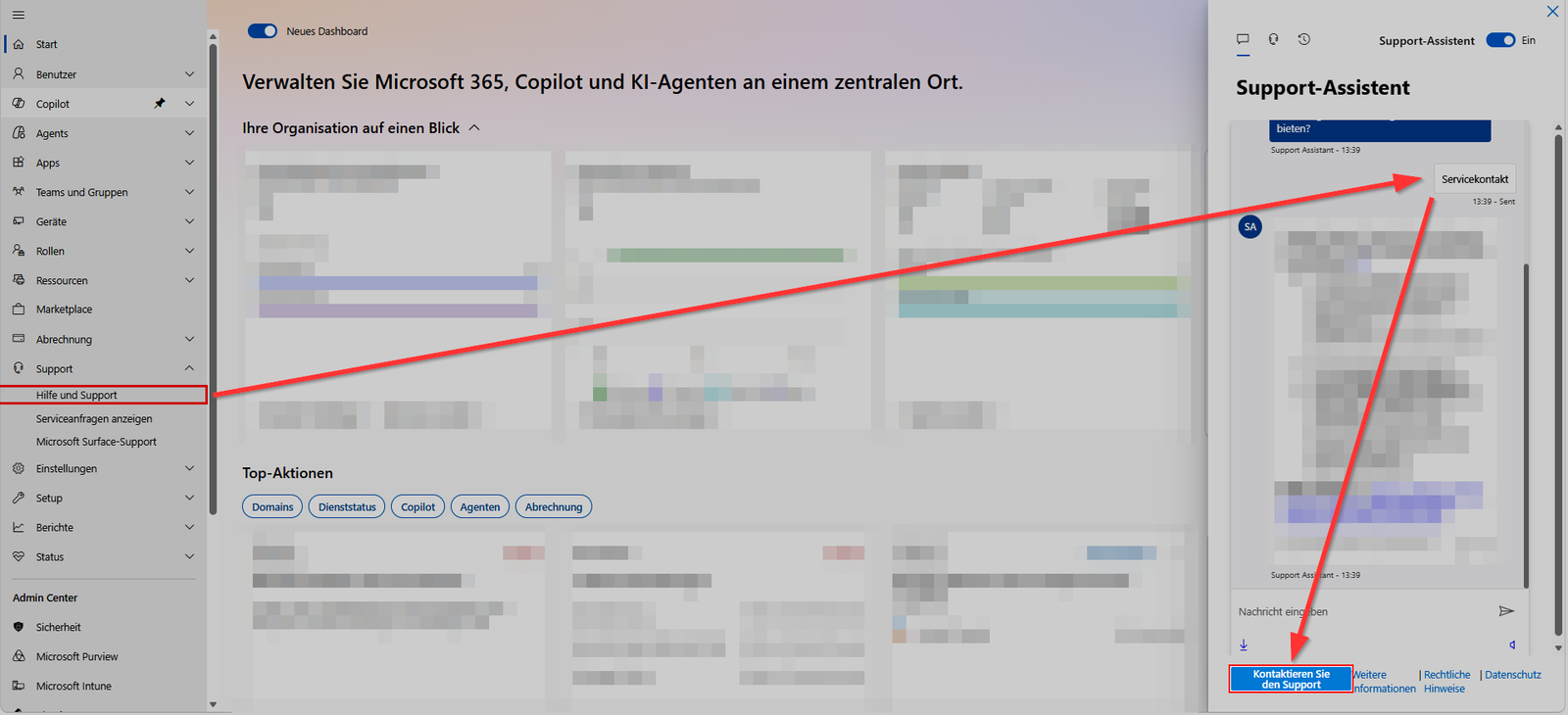
If your contract is through a CSP partner, they submit the request in Partner Center. Microsoft requires the tenant ID, the incident ID from Service Health, an email from the customer from the affected tenant’s domain, and the support ticket number. The credit goes to the partner, who must pass it on. Some distributors have their own, shorter deadlines, so ask now.
Secure the incident data immediately via Microsoft Graph:
Connect-MgGraph -Scopes "ServiceHealth.Read.All"
Get-MgServiceAnnouncementIssue -ServiceHealthIssueId "EX1550543" |
  ConvertTo-Json -Depth 5 | Out-File ".\EX1550543.json"
In past major outages, Microsoft has occasionally issued credits on its own initiative. However, you shouldn’t rely on this.
Conclusion
The SLA is a discount with paperwork. The tiered structure sounds generous, but user minutes and the narrow downtime definition significantly reduce the amount. For an office with 20 seats, the effort for documentation and tickets can exceed the benefit. It only pays off from a few hundred licenses, and enterprises with an Enterprise Agreement have a dedicated account manager for this.
Still submit the application if the threshold is definitely exceeded. You’ll need the documentation anyway: For supplier evaluation under ISO 27001 (Control 5.22) and for your incident management, a documented outage of more than one day is a hard data point.
Microsoft 365 was already down for hours to days in January and late August 2026. If your company can’t communicate without Exchange Online, no SLA will solve that problem. Calculate what an hour of downtime costs you, and define how employees and customers can reach you if the tenant is unresponsive. An emergency phone list outside of Microsoft 365 costs nothing and will help more on the first day of an outage than any service credit in January.

💬 Comments
0 commentsBe the first to start the discussion with a helpful comment.
Leave a comment
Comments are reviewed briefly before they are published — factual, respectful and to the point is just right here.