
M365 Admin Center | Organizational settings architecture
Every new Microsoft 365 tenant starts with predefined default settings. Microsoft optimizes these parameters for maximum usability and immediate compatibility. The result is an open architecture that drastically reduces the system's security level.
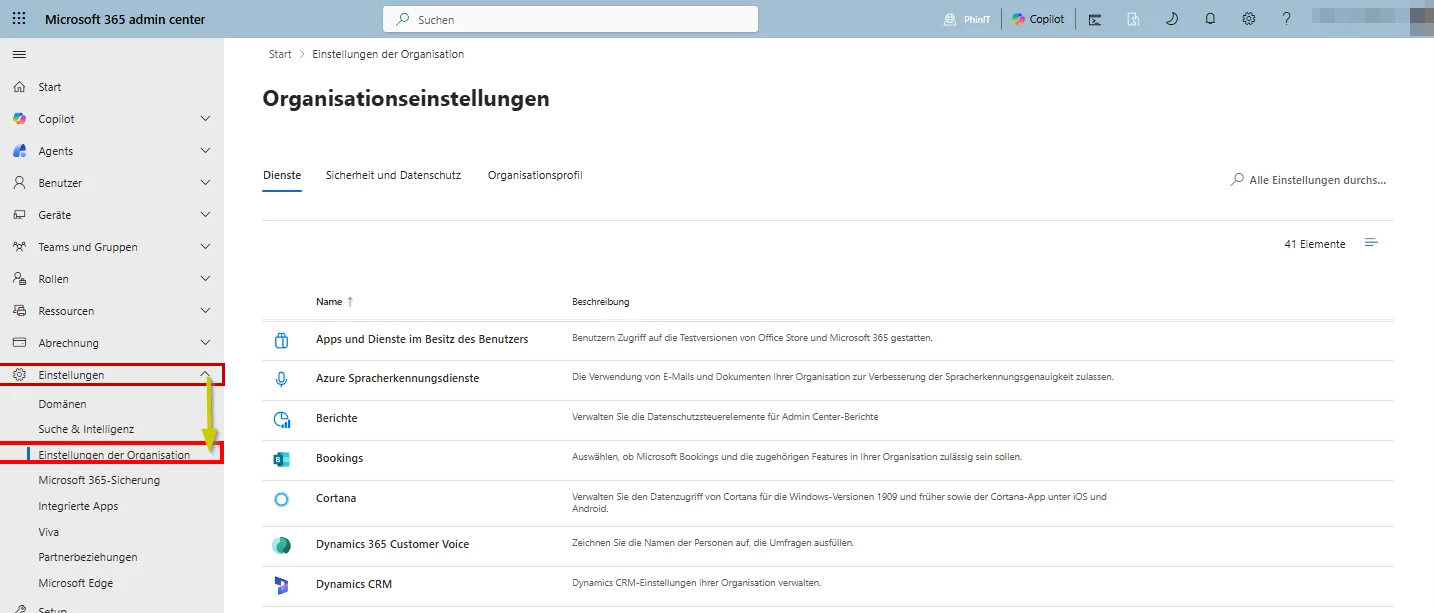
The **Settings > Org settings** section in the Microsoft 365 admin center provides the technical foundation. Here, you adjust the global configuration to precisely match your company’s actual protection requirements.
Unlike dedicated consoles for Exchange or Teams, here you define parameters with global scope. Any change at this level overrides local policies and immediately affects all identities in the system. If you don’t understand an option, inaction is the better choice than reckless configuration.

Misconfigurations here cause tenant-wide outages or expose internal data structures to unauthorized external access. The interface divides the configuration into three areas.
- Services: This tab uses feature flags to control which functions end users are allowed to access. Global deactivation revokes access for all users. Permissive local policies in the Teams Admin Center or SharePoint Admin Center will have no effect.
- Security & Privacy: Here you define the hard limits for external guest access and password policies. While granular policies reside in Entra ID, you configure the overarching baseline in this menu. If you leave the open default values, Microsoft retains control over possible external sharing.
- Organization Profile: In this section, you set the physical storage locations for tenant data and define the release channels for updates. Without a controlled and staged rollout, Microsoft activates new features tenant-wide immediately. This can start new data processing operations uncontrollably and without prior data protection review.
🔧 Services
This tab serves as the technical base configuration for workloads such as Planner, Forms, or Exchange Online. Here, you control top-level sharing settings and determine whether identities are allowed to connect third-party cloud storage or share calendars externally.
A global "Enabled" setting here grants access directly to the entire tenant. Only in the second step do specialized consoles like the Teams Admin Center evaluate local policies to filter access for specific user groups. Synchronize these global switches precisely with the local policies. Asynchronous configuration leads to conflicts and significantly extends troubleshooting for blocked access.
👉 Read the article: Services
Microsoft’s default settings prioritize immediate usability. They allow uncontrolled guest access and loose data sharing. If you adopt these defaults without scrutiny, you undermine your own security mechanisms.
An open self-service allows users, for example, to independently start test licenses for external cloud apps. Strictly harden this section. A closed foundation blocks shadow IT at the tenant level and ensures that downstream access controls in Entra ID take full effect.
👉 Read the article: Security & Data Privacy
Here you define the physical storage locations of the data as well as the release cadence of software updates. By deliberately controlling these rollout rings, you prevent untested features from reaching users directly. New features often automatically trigger new data processing workflows.
A methodical adjustment of this area ensures that the tenant operates precisely according to your data protection guidelines and does not circumvent any compliance policies.
👉 Read the article: Organisationsprofil
PowerShell for the settings
Manual configuration via the Admin Center UI is error-prone, difficult to reproduce, and not scalable. Organization settings can be queried, managed, and documented more efficiently using PowerShell. Since the MSOnline module is deprecated, the **modern Microsoft Graph PowerShell SDK** is recommended for these tasks.
Reading tenant information helps quickly verify the basic configuration. As an administrator, you should not only check marketing contact addresses but, above all, the **technical and security-relevant contacts**. Only this ensures that critical system warnings from Microsoft reach the right team.
These examples cover the basic configuration. For the full path including all hardening measures, app consent against OAuth phishing, guest user and cross-tenant control, self-service purchases via MSCommerce, and exporting as Configuration-as-Code, see the detailed article → M365 Organization Settings via PowerShell
Basic Tenant Information
# Abfrage der Tenant-Einstellungen (Fokus auf technische Kontakte)
Get-MgOrganization | Select-Object DisplayName, TechnicalNotificationMails, SecurityComplianceNotificationMails

# Direkte Änderungen vornehmen (erfordert die Tenant-ID für das Update)
$TenantId = (Get-MgOrganization).Id
Update-MgOrganization -OrganizationId $TenantId -TechnicalNotificationMails @("security-team@deine-domain.de")Services: Querying global sharing settings for calendars
# Prüfen der globalen Kalenderfreigabe-Richtlinien (benötigt ExchangeOnlineManagement)
Connect-ExchangeOnline
Get-SharingPolicy | Select-Object Name, Domains
Security & Privacy: Querying Self-Service Settings
# Prüfen, ob Standardbenutzer Enterprise Apps selbst registrieren dürfen
Get-MgPolicyAuthorizationPolicy | Select-Object -ExpandProperty DefaultUserRolePermissions | Select-Object AllowedToCreateApps
Organization Profile: Check Data Locations and Base Values
# Abfragen des Tenant-Standorts und der Basis-IDs
Get-MgOrganization | Select-Object DisplayName, Country, CountryLetterCode, PreferredLanguageConclusion ... to be taken with caution!
Organizational settings are the cornerstone of your M365 security architecture and do not tolerate careless changes. Since every adjustment here takes effect immediately and across all workloads, misconfigurations can quickly lead to tenant-wide outages or security vulnerabilities.
Instead of just tackling isolated symptoms in specialized admin centers, you lay the foundation for your entire environment here. Neglecting this not only risks technical issues but also compliance violations or data leaks. A methodical review of all requirements is therefore essential.
👉 more articles about Microsoft 365: MS365 | Sites

💬 Comments
0 commentsBe the first to start the discussion with a helpful comment.
Leave a comment
Comments are reviewed briefly before they are published — factual, respectful and to the point is just right here.