
... what admins can do now
Since yesterday, Thursday afternoon, many users worldwide have been unable to reliably access their mailboxes in Exchange Online. Microsoft is tracking the incident under EX1550543 (Exchange Online) and MO1550821 (services dependent on Exchange).
As of Friday, November 13, 11:45 AM: Microsoft reports initial stabilization, but capacity remains below normal levels. The all-clear has not been given.
What happened
According to the service health timeline, EX1550543 started on November 12 at 16:17 UTC (17:17 local time). Initially, Microsoft reported mailbox issues in North and South America, followed by MO1550821 at 18:26 UTC. At its peak, Downdetector recorded around 130,000 Outlook reports from the US, with incidents reported across 74 countries.
Initially, Microsoft cited increased load, then corrected itself: traffic had not risen; instead, many servers unexpectedly failed, and the remaining ones absorbed their load. Affected servers failed automatic health checks and were removed from service. A process responsible for establishing secure connections on these servers timed out, causing the machines to stop accepting requests. Recovered servers crashed again as soon as traffic returned.
Microsoft halted deployments, rerouted and throttled traffic. Overnight, the team rolled back a network change that aligned with the start time, even though no matching change had been identified by the evening. The confirmed root cause will only be provided in the Post-Incident Report (PIR). Microsoft has found no evidence of an attack.
What may be affected in your case
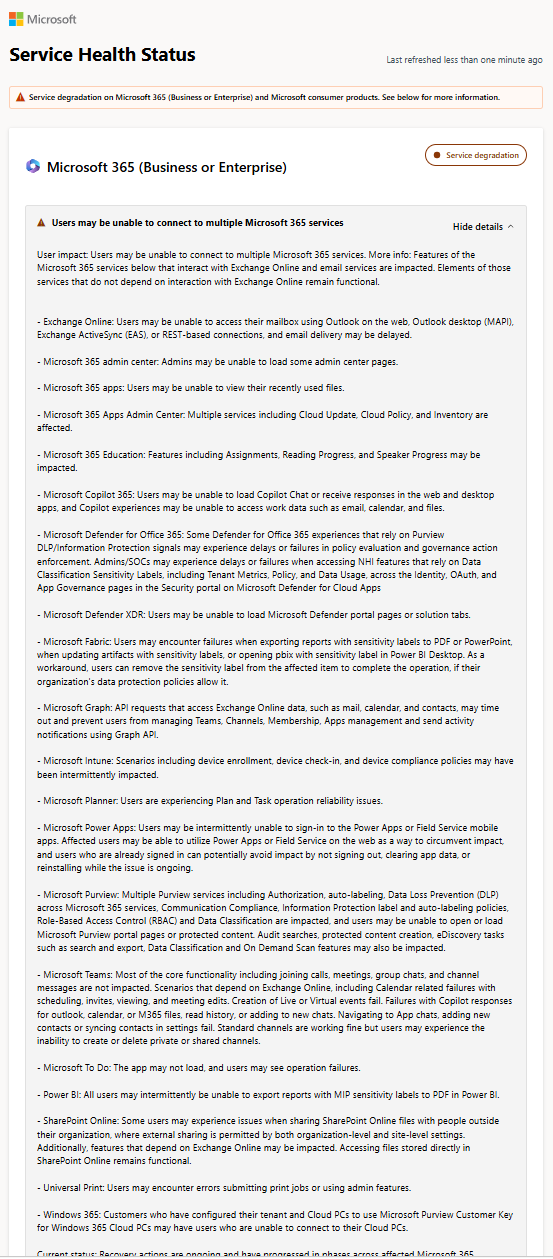
In Exchange Online, access via Outlook on the web, Outlook Desktop, ActiveSync, and REST may fail. Since many services use Exchange in the background, this also affects:
- Teams: Calendar, meeting scheduling, and events. Chat, calls, and meetings are largely operational.
- Defender for Office 365: Safe Links, Safe Attachments, quarantine, and Threat Explorer may experience outages.
- Purview: DLP and automatic classification.
- Microsoft Graph: Queries for mail, calendar, and contacts are timing out, causing scripts and integrations to fail.
- Copilot, Planner, To Do, Intune, Power Apps, and parts of the Admin Center.
Critical are the Defender failures. If Safe Links cannot check a URL, the click in Outlook or Teams fails.
What you should do now
According to current information, emails are not being lost; they are queued. Sending servers will retry delivery, and TechRadar reports that Microsoft has extended the retry window to 48 hours. Instruct your users not to resend messages and warn them about phishing emails circulating that prompt them to reset their Outlook password. If you don’t have access to the Admin Center, you can find updates at status.cloud.microsoft.
Document the start, end, and number of affected users, as you will need this data twice. If you fall under NIS2, you must assess whether the outage constitutes a significant security incident for your operation. The cause being with the provider does not exempt you from this. For SLA credits: Microsoft guarantees 99.9% monthly availability; below that, you get 25% credit, and below 99%, 50% credit on the Exchange portion. You request the credit via a service request by December 31, 2026, or through your partner for CSP contracts.
 QUELLE
Conclusion
A strained process for secure connections has been crippling Exchange Online for over 18 hours, and with Exchange down, Defender protections and Graph integrations are failing.
Microsoft’s repeated reinterpretation of the root cause shows just how little the operator knows so far. Track EX1550543 and MO1550821, secure your timestamps, and await the PIR before deriving any architectural implications.

💬 Comments
0 commentsBe the first to start the discussion with a helpful comment.
Leave a comment
Comments are reviewed briefly before they are published — factual, respectful and to the point is just right here.